What Top Facebook Ad Agencies Automate in Onboarding
12/19/2025

If you ask the best-performing Facebook ad agencies how they launch accounts so quickly, you will hear the same answer: they automate the unglamorous parts of onboarding. Not campaign strategy, not creative direction, but everything around identity checks, access, permissions, measurement validation, and workflow handoffs. The result is shorter time to first impression, fewer back-and-forth messages, and less risk.
This playbook breaks down what top Facebook ad agencies actually automate in onboarding, how those automations work in practice, and the KPIs that prove impact. You will also see where a one‑link, branded onboarding flow fits into the stack so clients feel looked after from the moment they say yes.
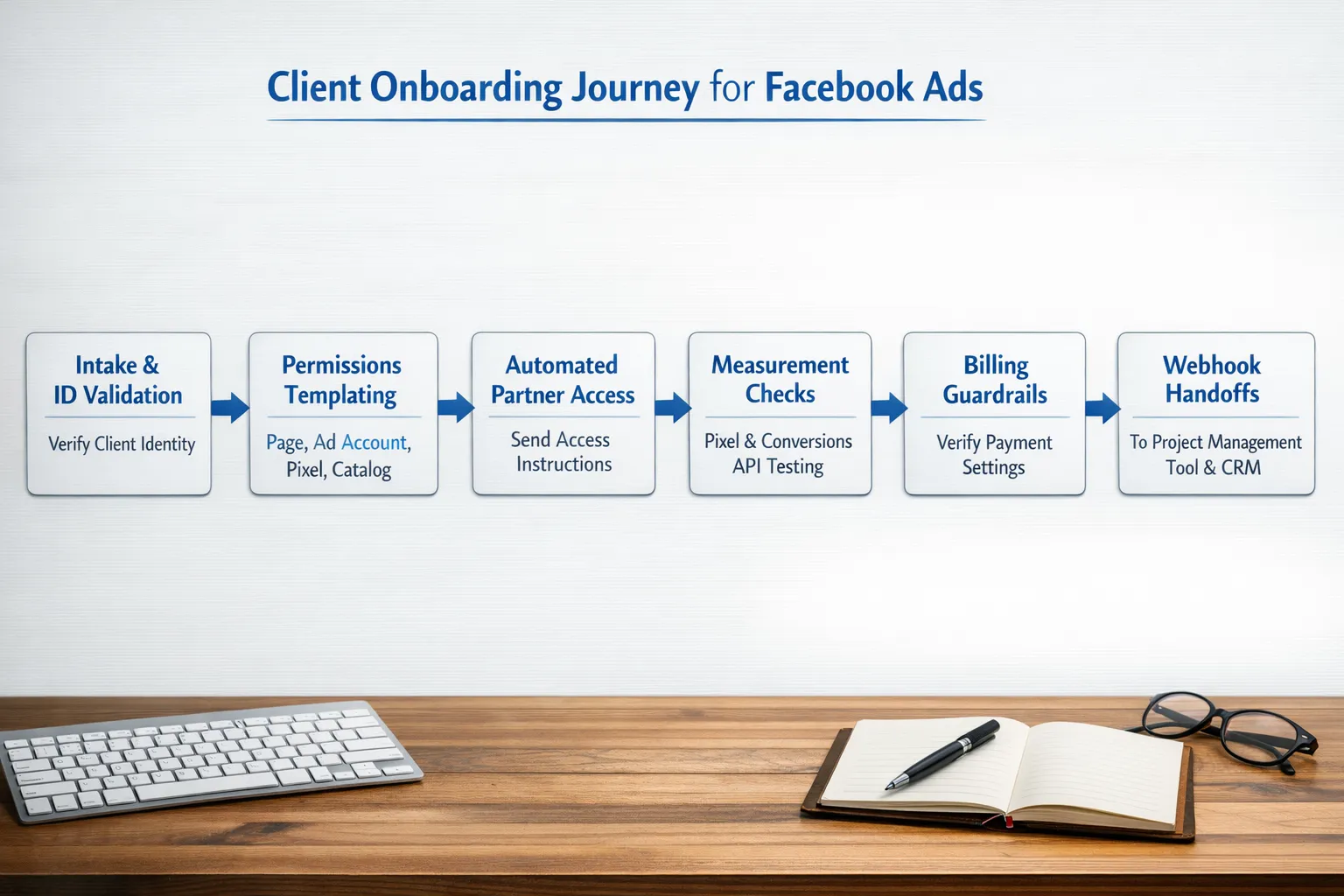
First, define the Facebook onboarding surface area
Before you automate, agree on what onboarding covers for Meta assets and policies. In most engagements, the surface area includes:
- Client identity, business verification status, and 2FA readiness
- Meta Business Manager access via partner assignment, plus assets such as Page, Ad Account, Pixel, Catalog, Domain, and Dataset
- Measurement readiness, including Pixel events and Conversions API (CAPI)
- Billing and spend guardrails (payment method on file, optional ad spend limit)
- Creative, brand-safety and approvals (disclaimers when needed), and data handling commitments
- Workflow handoffs to PM/CRM, kickoff scheduling, and audit logging
If you need a step-by-step manual checklist first, bookmark the agency-focused guide, Facebook Business Manager Access: Client Onboarding Checklist. Once you have that foundation, layer automation on top.
What the best agencies automate, and why it works
Top shops remove human bottlenecks by packaging repeatable micro-tasks into automated steps triggered by a single, branded link. Here is what they automate and how.
1) Single‑link intake and ID validation
What to automate: Collect the client’s Business Manager ID, Page IDs, Ad Account IDs, Pixel ID, website URL, and key contacts, then validate the format in real time.
How it works: A branded onboarding link pre-fills or validates fields, checks ID patterns, and confirms the website resolves. If something is missing, the client sees a clear prompt and cannot submit partial data.
Why it matters: Clean IDs are the number one blocker. Eliminating “what’s your BMID?” threads saves a day or more.
Helpful resource: Meta Business Help Center
2) Permission templates mapped to scope
What to automate: Template the least-privilege permission sets you request for common scopes such as “Run ads on existing assets,” “Build new pixel + CAPI,” or “Manage catalog.”
How it works: Clients select their service package. Your onboarding flow maps that choice to a permission template that spells out exactly which roles you need on each asset.
Why it matters: Clarity reduces friction and reassures clients. It also supports internal compliance.
Deep dive: Facebook Business Advertising: Onboarding Clients the Simple Way
3) Partner access instructions, personalized
What to automate: Generate step-by-step partner access instructions that are specific to the client’s setup, including your Agency Business ID and the asset list they already provided.
How it works: After intake, the flow renders client-ready instructions to add your agency as a partner to specified assets inside Business Settings. When possible, it sends the instructions to the right owner automatically.
Why it matters: Meta access is granted inside Business Manager. Clear, asset-specific instructions reduce mistakes and support non-technical stakeholders.
Helpful resource: Meta Business Help Center
4) Access confirmation and gaps detection
What to automate: Once the client completes partner access, run a validation step to confirm you can see each asset and highlight any gaps.
How it works: Your onboarding dashboard updates the status of each asset. If a Page is shared but the Ad Account is not, it flags the missing asset and triggers a single follow-up email.
Why it matters: You want one clean checklist with green checks, not five separate threads.
Related reading: Meta Business Setup: Secure Access Steps for Agencies
5) Measurement readiness linting (Pixel and CAPI)
What to automate: Confirm that a Pixel exists, the Pixel is connected to the correct assets, and test events are received. If CAPI is in scope, verify that server events arrive and parameters match.
How it works: The flow asks for the website and Pixel ID. It guides clients to send a test event and captures a screenshot or log of the Test Events tool outcome. If CAPI is planned, it generates next steps and owner assignments.
Why it matters: Launching campaigns without reliable measurement burns time and budget.
Helpful resource: Meta Conversions API documentation
6) Billing and spend guardrails
What to automate: Verify that the Ad Account has an active payment method and, if your policy requires, a spend limit or alert.
How it works: The flow prompts the client to confirm and optionally upload a confirmation screenshot. If something is missing, it routes a one-click instruction to the billing owner.
Why it matters: Nothing stalls momentum like a first-charge failure.
7) Creative and brand-safety intake
What to automate: Intake of brand assets, ad approvals process, and any policy-sensitive needs such as special ad categories or disclaimers.
How it works: The onboarding link includes a lightweight brand questionnaire and secure file collection. It then generates a summary for your creative team and an internal policy checklist.
Why it matters: You shorten the gap between access granted and first ad draft ready for review.
8) Stakeholder communication and kickoff scheduling
What to automate: Welcome emails, next-step summaries, and kickoff scheduling once access is confirmed.
How it works: When all required assets turn green, the system sends a branded “Access Complete” summary with the kickoff agenda and a scheduling link. It also posts to your team channel and creates the kickoff event.
Why it matters: Clients feel momentum, not radio silence.
9) PM/CRM handoffs via webhooks
What to automate: Creation of the project in your PM tool, tasks for each onboarding step, and a deal stage update in your CRM.
How it works: Webhooks fire on status changes. “Ad Account confirmed” creates a QA checklist task, while “Measurement verified” starts the creative timeline.
Why it matters: No manual re-entry of data, fewer mistakes, better forecasting.
Related reading: How Digital Marketing Agencies Streamline Client Onboarding
10) Audit log, compliance, and offboarding prep
What to automate: A tamper-evident log of who granted what, when, and under which permission template, plus a ready-made offboarding checklist.
How it works: Every step creates a record. If the engagement ends, you have a precise list of assets to revoke and evidence of least-privilege access.
Why it matters: Reduces risk, accelerates support escalations, and signals professionalism.
Related reading: Navigating Facebook Ad Support: Agency Playbook
A practical automation map you can copy
Use this table to scope or audit your onboarding automations. Adapt the triggers and outputs to your stack.
| Area | What gets automated | Trigger | Output | Primary KPI |
|---|---|---|---|---|
| Intake | Collect and validate Business Manager, Page, Ad Account, Pixel IDs | Client opens branded link | Clean, validated asset list | Intake completion rate |
| Permissions | Map scope to least-privilege templates | Package selected | Asset-specific permission list | Permissions accuracy rate |
| Partner access | Personalized instructions with your Business ID | Intake submitted | Instruction email to asset owner | Access granted time |
| Access confirmation | Verify you can see each asset | Client marks complete or webhook ping | Green checklist, gap flags | First-try pass rate |
| Measurement | Pixel and CAPI test event checks | Access confirmed | Screenshot/log and owner assignment | Measurement ready time |
| Billing | Payment method and optional spend limit confirmation | Ad Account visible | Confirmation record or follow-up task | Billing readiness time |
| Brand safety | Creative intake and policy checklist | Intake final step | Creative brief and internal checklist | Time to first draft |
| PM/CRM handoff | Projects, tasks, and stages | All required assets green | PM tasks, CRM stage change | Time to kickoff scheduled |
| Comms | Welcome and access-complete emails | Status changes | Branded summaries to stakeholders | Client CSAT in week 1 |
| Audit | Evidence log and offboarding plan | Each step | Exportable log | Audit completeness |
The 24-hour “time-to-first-impression” playbook
If your goal is to serve first impressions within one business day of signature, this is the arc to aim for.
- Immediately after agreement, send a single, branded onboarding link that includes intake and permission templates.
- As soon as intake is submitted, auto-generate partner access instructions and route them to the correct owner.
- When assets turn green, fire PM/CRM webhooks, open measurement tasks, and prompt for Pixel test events.
- Auto-send a branded “Access Complete” summary with a kickoff scheduler. Lock a call within 24 hours.
- On the kickoff call, verify measurement and billing, confirm creative intake, and preview the first ad concepts.
- Launch the first test campaign if guardrails and measurement checks are green.
Agencies that consistently hit this timeline treat onboarding like a product, not a favor. For help productizing, see Packaging Digital Marketing Services With Frictionless Onboarding and Pricing Facebook Marketing Services With Seamless Onboarding.
Automation pitfalls to avoid
- Over-requesting access. Ask for the minimum required by scope, then escalate with a paper trail when justified.
- Mixing personal logins and passwords. Use partner access inside Business Settings, not shared credentials.
- Ignoring measurement until after launch. Validate Pixel and, if applicable, CAPI before you touch budget.
- One-size-fits-all instructions. Tailor access steps to the assets your client actually uses.
- Silent handoffs. Every status change should trigger a clear, branded update and internal tasking.
For a deeper look at clean account access, review Facebook Manager Ads: Clean Account Access for Clients.
Metrics that prove your onboarding automation is working
Leaders track onboarding like a funnel. These targets are realistic for high-performing teams and can be tuned to your model.
| Metric | Target to aim for | Why it matters |
|---|---|---|
| Intake completion rate (first 24h) | 85 percent or higher | Measures client momentum right after the sale |
| Access granted time (median) | Under 1 business day | A direct proxy for automation clarity |
| First-try access pass rate | 80 percent or higher | Indicates instruction quality and permission templates |
| Measurement ready time | Under 48 hours | Prevents wasted spend and rework |
| Time to kickoff scheduled | Under 24 hours | Maintains perceived speed and trust |
| Time to first impression | Under 48 hours | Turns onboarding into visible progress |
| Onboarding touches per client | 5 or fewer | Reduces friction for both sides |
| Week-1 CSAT (post-onboarding) | 9 out of 10 | Early trust predictor for retention |
Build vs. buy: how top agencies decide
Some agencies assemble a DIY stack of forms, docs, screenshots, schedulers, and custom scripts. Others standardize on a dedicated onboarding platform to package everything into one branded link with APIs and webhooks. Use these criteria:
- Client experience: Single, branded link versus a patchwork of forms and emails.
- Speed to maintain: How quickly can non-engineers update permission templates or copy?
- Security posture: Centralized audit log, least-privilege templates, and clear offboarding.
- Integrations: Can you push status changes into your PM/CRM and data warehouse?
- Time-to-value: Weeks of building and maintaining flows versus minutes to publish.
Connexify was built precisely for this moment. Agencies use it to send a one‑link, white‑label onboarding experience that collects IDs, standardizes permissions, supports multiple platforms, and triggers API or webhook handoffs, all without installation. It includes a user-friendly dashboard, customizable permissions, and secure data handling, with a 14‑day free trial so you can test it with a real client before you commit.
If you want a deeper operational blueprint first, explore:
- Meta Business Setup: Secure Access Steps for Agencies
- Evaluating Social Media Marketing Services for Faster Onboarding
Make onboarding your advantage
Great Facebook ad agencies execute creative and optimization at a high level. Elite agencies also remove every ounce of friction from the path to launch. Automate the parts that slow you down and stress clients, measure the results, and refine your templates until your onboarding is as productized as your media playbook.
Ready to turn this into your new baseline? Book a short demo or start a 14‑day free trial to see how a single, branded link with API and webhook integrations can compress onboarding from days to minutes.
- Book a demo: connexify.io
- Start your 14‑day free trial: connexify.io