Client Onboarding for PPC: From Contract to First Click
02/18/2026

Most PPC campaigns do not stall because of strategy. They stall because access, tracking, billing, and approvals get handled in five different threads by five different people, and nobody can confidently say, “We are measurement-ready.”
This guide gives you a practical, PPC-specific onboarding flow from contract signed to first click, with clear owners, minimum access, and verification steps that prevent the most expensive failure mode in paid search: paying for traffic you cannot attribute.
What “first click” means in PPC (and what it should mean)
In PPC, “first click” is not a launch milestone by itself. The real milestone is first attributable click: a click that lands on the right page, under the right tracking, with budgets and policies configured so you can scale without emergency fixes.
A clean first-click definition typically includes:
- Correct account access for the delivery team (no shared passwords)
- Billing ready (no surprise “payments profile” issues on launch day)
- Conversion tracking validated (test conversion recorded end to end)
- Landing pages QA’d (mobile, speed, forms, thank-you page, call tracking)
- Basic governance in place (who can approve creative, who can change budgets)
If you treat those as “later,” you are effectively buying data debt.
The PPC onboarding “bill of materials” (what you must collect up front)
PPC onboarding is cross-platform by default. Even a “simple Google Ads engagement” touches analytics, tagging, landing pages, and usually a CRM.
Use the table below as your minimum bill of materials for most lead gen PPC engagements.
| Category | What you need | Typical owner | Why it matters |
|---|---|---|---|
| Ads platforms | Google Ads account access (or MCC link), Microsoft Advertising access if applicable | Client admin | Without correct roles, you cannot build, launch, or troubleshoot policies/billing |
| Measurement | GA4 property access, conversion definitions (what counts as a lead or sale) | Client marketing + agency analyst | Prevents “we launched but nothing tracks” scenarios |
| Tagging | Google Tag Manager (GTM) container access (or confirmation client will implement) | Client web/dev or agency | Fastest path to consistent tracking changes without redeploys |
| Landing pages | URLs, form logic, thank-you page behavior, phone number strategy | Agency + client | Determines Quality Score inputs and conversion integrity |
| Commerce (if relevant) | Merchant Center access, feed ownership, shipping/tax settings | Client ecom owner | Shopping and Performance Max readiness depends on this |
| CRM/offline (if relevant) | CRM fields, lead stages, offline conversion plan | Client RevOps/sales ops | Enables lead quality feedback loops, not just CPL |
| Approvals | Who approves ad copy, landing page changes, budgets, and offers | Client decision-maker | Reduces delays and post-launch rework |
| Security | 2FA expectations, least-privilege roles, no password sharing | Everyone | Reduces risk and avoids account recovery chaos |
For platform-specific access rules, it is safest to rely on the vendor’s current documentation (for example, Google Ads access levels and GA4 access management).
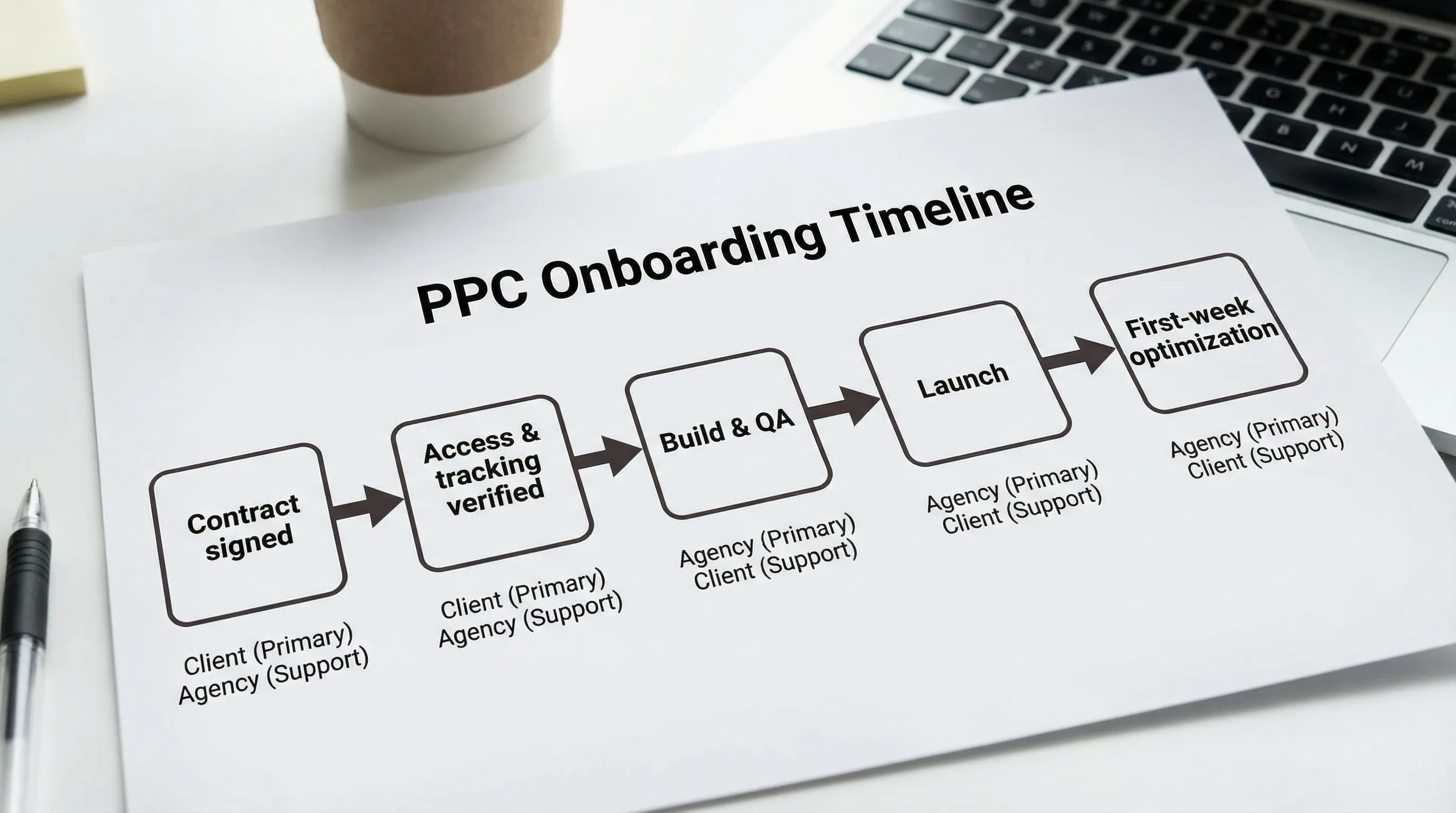
A repeatable PPC onboarding timeline: from contract to first click
The fastest teams do not “move fast.” They move in a tight sequence with verification gates. Here is a practical flow you can standardize.
Phase 1 (Day 0): Sales-to-delivery handoff that does not drop critical context
Before you ask the client for logins or IDs, align internally on four items:
- The offer and scope (what channels, what is explicitly out of scope)
- The win definition (what outcome in 30 days would feel like progress)
- The conversion definitions (primary vs secondary conversions)
- The onboarding SLA (example: “time to verified access within 24 hours”)
This prevents the most common PPC onboarding failure: collecting “everything,” then discovering you still missed the one thing you needed.
Phase 2 (Day 0 to Day 1): One request, one place, one owner
Clients do not struggle with onboarding because they are slow. They struggle because requests are fragmented.
A strong pattern is:
- Send a single branded onboarding link
- Collect platform IDs, asset links, and the exact permissions needed
- Assign an owner on the client side for access actions (not “whoever has time”)
This is where client onboarding software like Connexify fits naturally: it centralizes multi-platform access setup into one branded flow, with customizable permissions and secure handling, so you are not chasing screenshots and forwarding emails across threads.
Phase 3 (60 minutes): Access and measurement verification sprint
Do a live verification sprint (on a call or screenshare) as soon as the client submits access. Time-box it to keep momentum.
What you are verifying is simple: “Can we get in, can we see the right assets, and can we record a test conversion?”
A practical PPC verification sprint includes:
- Confirm you can access the correct Google Ads account (right account, right login identity)
- Confirm billing is active (or confirm who will activate it and when)
- Confirm GA4 data is flowing (real-time view, correct property)
- Confirm GTM publish rights (or a clear deployment process if client-owned)
- Validate at least one test conversion end to end (form submit, call, purchase)
If you operate in regions impacted by stricter privacy and consent requirements, align early on measurement dependencies such as consent configuration. Google provides an overview of Consent Mode to help teams understand the moving parts, but your exact implementation should be owned by whoever is responsible for privacy and legal decisions.
Phase 4 (Day 1 to Day 3): Build and QA (before you spend)
Once access and measurement are verified, you can build with confidence.
Typical build tasks:
- Account audit (existing campaigns, negatives, conversion actions, audiences)
- Campaign plan (structure, match types, geo, budgets, ad schedule)
- Ads and assets (copy, sitelinks, callouts, images if applicable)
- Landing page QA (message match, speed, form fields, thank-you behavior)
- Policy and brand constraints (restricted categories, claims, disclaimers)
Your objective is not perfection. It is to launch without preventable rework.
Phase 5 (Launch day): Controlled release
A controlled PPC launch is boring, and that is the goal.
Launch-day checklist (high signal, low fluff):
- Confirm correct conversion is set as primary
- Confirm location targeting settings (presence vs interest behavior) match intent
- Confirm budgets match the agreed ramp plan
- Confirm final URLs and tracking parameters (and that they resolve correctly)
- Confirm call tracking behavior if phone leads matter (routing, recording notices, attribution plan)
Phase 6 (First week): Stabilize, then scale
Your first week should prioritize diagnostics over opinions.
Focus areas:
- Search terms and negatives (protect relevance)
- Disapprovals and policy notices (fix fast, document root cause)
- Budget pacing (ensure you are not starving learning or overspending)
- Lead quality signal (even a simple “good lead/bad lead” tag beats silence)
If the client needs heavier support to cover creative, tracking, and multi-channel coordination, it can help to reference what a managed delivery model looks like in practice. For example, this managed campaign service outlines how an experienced PPC manager coordinates advanced conversion tracking, audience research, and supporting specialists.
The most common PPC onboarding blockers (and how to prevent them)
Blocker 1: “We gave you access” (but it is the wrong access)
Common scenario: the client adds a personal email, not the agency’s correct identity, or grants limited roles that cannot link assets.
Prevention: request access by role and responsibility (media buyer, analyst, finance), and verify immediately in a live sprint.
Blocker 2: Tracking is “installed” but not validated
Teams confuse “tag present” with “conversion recorded.” The gap usually shows up in thank-you page logic, SPA behavior, cross-domain flows, or form submissions that do not fire reliably.
Prevention: require a test conversion and screenshot evidence (time, event name, platform). Do not launch spend without it.
Blocker 3: No clear definition of a qualified lead
If sales rejects leads but marketing cannot see why, PPC optimization becomes a volume game.
Prevention: define one lightweight feedback loop in onboarding (even weekly), and identify a field or tag that indicates lead quality.
Blocker 4: Billing, policy, or ownership surprises
Billing profiles, advertiser verification, or Merchant Center ownership are launch killers when discovered late.
Prevention: make “billing and compliance readiness” a formal onboarding gate, not an afterthought.
The PPC onboarding metrics that improve speed and margins
You do not need dozens of metrics. Track a few that expose bottlenecks.
| Metric | What it measures | Why it matters |
|---|---|---|
| Time to verified access | Contract signed to confirmed platform access | Predicts launch speed more than any ops update |
| Time to measurement-ready | Contract signed to first validated test conversion | Prevents wasted spend and attribution gaps |
| Intake completion rate | % of clients who finish onboarding without manual chasing | Reveals friction in your onboarding UX |
| Rework rate (first 14 days) | # of rebuilds caused by missing info or wrong permissions | Directly impacts profitability |
Where Connexify helps PPC teams move faster (without cutting corners)
PPC onboarding is mostly coordination work. Connexify is designed to reduce that coordination load by streamlining how clients grant access across platforms.
With Connexify, agencies can:
- Use one-link client onboarding to centralize access setup instead of emailing checklists
- Deliver a branded onboarding experience that feels like part of your agency, not a duct-taped form
- Support multiple platforms in one flow (useful when PPC touches analytics, tagging, CRM, and creative)
- Request customizable permissions aligned to least privilege
- Use white-label options for agencies that want a fully consistent client experience
- Trigger downstream workflows via API and webhook integrations (for example, notifying your PM tool when access is granted)
If you want to evaluate fit, the lowest-risk step is to test it on your next client because Connexify offers a 14-day free trial and requires no installation.
Frequently Asked Questions
What is the fastest way to do client onboarding for PPC? The fastest method is a single, centralized onboarding flow that collects required assets and permissions up front, followed by a time-boxed live verification sprint to confirm access, billing, and a test conversion.
What access do I need to run PPC campaigns for a client? At minimum you need the appropriate role-based access to the ad platform (for builds and launch) plus access to measurement tooling (GA4 and often GTM) so conversions can be validated and maintained.
Should agencies ever ask for client passwords? Generally, no. Use platform-native user access and least-privilege permissions wherever possible, and document ownership so accounts remain client-controlled.
What should happen before the first click goes live? You should verify correct account access, confirm billing readiness, validate conversion tracking with a test conversion, QA landing pages, and clarify approvals and change control.
Turn your PPC onboarding into a one-link, verified-access system
If your PPC launches keep slipping because of access and tracking delays, productize the handoff. Connexify helps agencies move from contract to first click with a single branded onboarding link, secure permission requests, and faster multi-platform setup.
Get started with a 14-day free trial or book a demo at Connexify.