UTM Governance: A Simple Standard Clients Will Follow
02/14/2026

Attribution breaks in boring ways.
Not because your agency cannot run campaigns, but because campaign tracking turns into a free-for-all. One person tags LinkedIn as utm_source=linkedin, another uses LinkedIn Ads, a third writes paid-social. Reports drift, dashboards disagree, and the client loses trust in the numbers.
UTM governance fixes this with a small, teachable standard that clients can actually follow. The goal is not perfection, it is consistency.
What “UTM governance” actually means
UTM governance is the lightweight system that makes campaign tags:
- Consistent (same channel always maps to the same source and medium)
- Usable (anyone can build a correct URL in under a minute)
- Auditable (you can quickly spot mistakes and fix them)
- Safe (no personal data in URLs, no internal links polluted)
If your client has multiple stakeholders (marketing, sales, partners, franchisees), governance is the difference between clean performance reporting and endless “why is this bucket so big?” meetings.
The simple UTM standard clients will follow
Here is the standard that works for most agencies and is easy to enforce.
1) Decide where UTMs are required (and where they are not)
Keep the rule simple:
- Use UTMs for external links that you control and that should be attributed (paid ads when needed, email, influencer links, partnerships, QR codes).
- Do not use UTMs for internal links on the website (it can overwrite attribution and inflate sessions).
If you are using Google Analytics 4, Google’s overview of campaign parameters is a good baseline for what UTMs do and how GA reads them.
2) Lock the required parameters
Most teams overcomplicate UTMs. Start with five fields, but do not force all five every time.
| Parameter | Required? | What it answers | Allowed format (simple) | Example |
|---|---|---|---|---|
utm_source | Yes | Who sent the traffic? | lowercase, hyphenated | linkedin |
utm_medium | Yes | What type of traffic is it? | lowercase, hyphenated | paid-social |
utm_campaign | Yes | Which initiative? | lowercase, hyphenated | 2026q1-demand-gen |
utm_content | Optional | Which creative/variation? | lowercase, hyphenated | video-15s-hook1 |
utm_term | Optional | Which keyword/targeting cluster? | lowercase, hyphenated | crm-automation |
Client-friendly rule: If you do nothing else, always fill source, medium, and campaign.
3) Use one naming style, no debates
Your “style guide” should fit on one line:
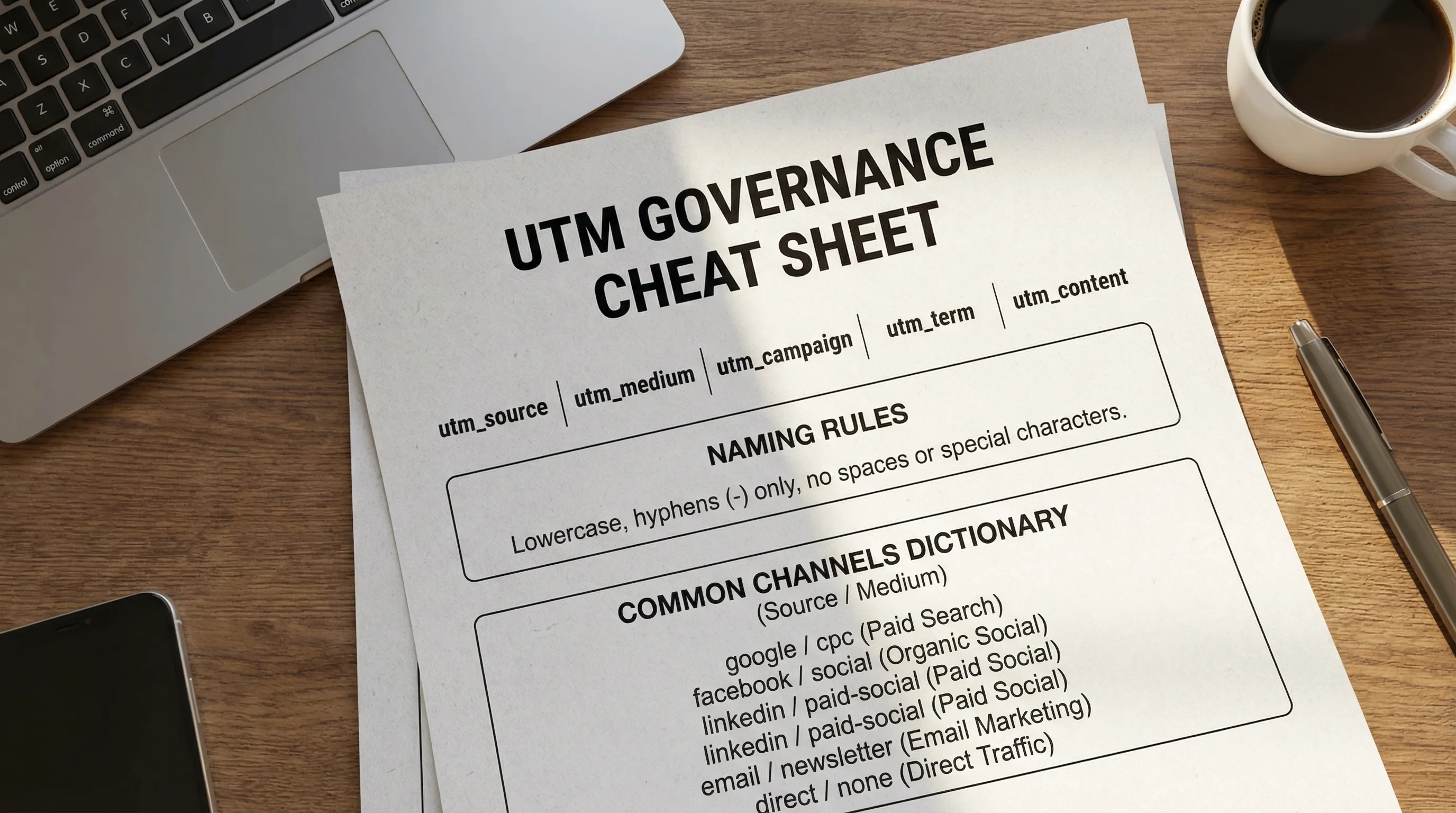
- All lowercase, hyphens only, no spaces, no emojis, no special characters.
This reduces errors when data flows into GA4, a CRM, spreadsheets, or BI tools.
4) Create a source and medium dictionary (this is the heart of governance)
Most reporting mess comes from inconsistent source and medium. Solve that with a tiny dictionary.
| Channel | utm_source | utm_medium | Notes |
|---|---|---|---|
| Google Ads (search) | google | paid-search | Prefer auto-tagging when possible, keep UTMs consistent when used |
| Meta ads | facebook | paid-social | Use instagram separately if you need platform split |
| LinkedIn ads | linkedin | paid-social | Avoid linkedin-ads as source, keep it as a platform |
| Email newsletter | newsletter | email | Keep source stable, vary campaign per send |
| Partner referral | partnername | partner | One partner, one source value |
| QR code (offline) | qr | offline | Use campaign to indicate location or event |
Two important notes:
- Source should be the platform or referrer name, not a description.
- Medium should be your taxonomy, a controlled list that maps cleanly to reporting.
5) Standardize utm_campaign with a short formula
Campaign names fail when they become mini novels.
Use a simple formula that answers reporting questions:
yyyyq#-initiative-offer
Examples:
2026q1-demand-gen-audit2026q1-retargeting-case-studies2026q2-product-launch-core
If you need more detail, add only one more segment:
2026q1-demand-gen-audit-uk
The more you encode, the less people comply.
6) Provide a “golden path” to build UTMs in under 60 seconds
Governance fails when building UTMs feels like homework.
Make the process feel automatic:
- Use a shared builder (many teams use a simple internal form, or Google’s Campaign URL Builder).
- Pre-fill dropdowns for
sourceandmediumfrom your dictionary. - Free text only for
campaign, and optionalcontentorterm.
Your standard should not require anyone to remember values. It should require them to choose.
The governance workflow (owners, approvals, and QA)
A standard alone is not governance. Governance is a standard plus a workflow.
Assign one owner
Pick one owner who can say “yes” and “no”:
- For agencies, this is usually the paid media lead or analytics lead.
- For clients, assign a marketing ops point person if they have one.
The owner maintains the dictionary and resolves edge cases (new partners, new platforms).
Add one approval gate for high-risk links
Not everything needs review, but some things do.
A practical rule:
- No approval needed for day-to-day ads if you use the standard builder.
- Approval required for:
- New channels (first time using Reddit, affiliates, etc.)
- Offline campaigns (QR codes, mailers, conference signage)
- Anything that will be reused widely (template links, evergreen partnerships)
QA: the three checks that catch 95 percent of issues
-
Format check: lowercase and hyphens, no spaces.
-
Dictionary check:
sourceandmediummatch allowed values. -
Landing page check: the URL resolves correctly, with no double question marks or broken redirects.
In GA4, you can quickly sanity-check in Acquisition reports by filtering on campaign dimensions once traffic starts coming in.
Common UTM governance mistakes (and what to do instead)
Mistake: Mixing paid vs organic in utm_medium
If you sometimes use social and sometimes paid-social, your channel grouping becomes messy.
Fix: Keep a controlled medium list, for example paid-social, organic-social, paid-search, email, partner.
Mistake: Using UTMs on internal links
This can overwrite source attribution and distort conversions.
Fix: Ban UTMs for internal navigation and lifecycle emails that occur after the session starts (use event tracking where appropriate).
Mistake: Putting personal data in UTMs
UTMs end up in analytics tools, server logs, and sometimes get shared.
Fix: Explicitly ban PII. No names, emails, phone numbers, or customer IDs.
Mistake: Reinventing the standard for every client
If each account uses different mediums, your team cannot scale reporting.
Fix: Maintain an agency default. Only customize when there is a strong reporting reason.
A copy-paste UTM governance policy (client-ready)
Use this in your kickoff deck or onboarding doc.
UTM GOVERNANCE (Client + Agency)

Naming rules
- Use lowercase only
- Use hyphens instead of spaces
- Do not include names, emails, phone numbers, or any personal data

Required fields
- utm_source (required)
- utm_medium (required)
- utm_campaign (required)
- utm_content (optional)
- utm_term (optional)

Allowed utm_medium values
- paid-search
- paid-social
- organic-social
- email
- partner
- offline

Source/medium dictionary
- linkedin / paid-social
- facebook / paid-social
- instagram / paid-social
- google / paid-search
- newsletter / email

If you are unsure, ask the UTM owner before publishing the link.
How to make this stick during client onboarding
The best time to introduce UTM governance is before anyone starts building links.
Put UTM governance into your Day 0 onboarding deliverables
Treat it like access setup and measurement verification, it is foundational.
A clean Day 0 package includes:
- Your one-page UTM policy (the section above)
- The source/medium dictionary
- A link to the UTM builder your team will use
- Who owns changes and how requests happen
If you already run an onboarding SLA like “time-to-verified-access,” add a companion metric: time-to-tracking-ready. (Connexify’s blog has several operations-first onboarding guides that pair well with this approach, for example Internet Marketing: The Modern Client Onboarding Guide and Digital Agency Marketing: A Fast Client Onboarding Plan.)
Use onboarding software to remove “where do I find this?” friction
Most client non-compliance is not defiance, it is confusion across too many tools.
Connexify is built to streamline onboarding for agencies and service providers with a single branded link, secure access setup, customizable permissions, and integrations. In practice, that means you can:
- Include your UTM governance doc and builder link inside the same onboarding flow where clients provide access and assets
- Ask clients to confirm the one naming convention they agree to (so stakeholders align)
- Keep the “current standard” in one place, instead of buried in email threads
The outcome is simple: fewer tagging variants, fewer attribution disputes, faster reporting confidence.
Frequently Asked Questions
What is UTM governance? UTM governance is a lightweight standard plus workflow that controls how you name and use UTM parameters so reporting stays consistent across channels and stakeholders.
Which UTM parameters should be required? For most teams, require utm_source, utm_medium, and utm_campaign. Keep utm_content and utm_term optional so the standard stays easy to follow.
Should we use UTMs for Google Ads? Many teams rely on auto-tagging for Google Ads, but UTMs can still be used when you need consistent cross-channel campaign naming. The key is consistency and avoiding conflicting tagging rules.
What is the easiest UTM naming convention for clients? All lowercase with hyphens, plus a short campaign format like 2026q1-initiative-offer. Avoid long strings, special characters, and personal data.
How do we enforce UTMs across partners and internal teams? Use a single source/medium dictionary, provide a quick builder with dropdowns, assign one owner, and add QA checks for high-risk links (offline, partnerships, reusable templates).
Make governance effortless with a single onboarding link
If you want clients to follow standards, remove the friction.
Connexify helps agencies streamline onboarding with one branded link, secure multi-platform access setup, and automation-friendly integrations. Use it to ship your UTM governance pack alongside access and measurement requirements, so tracking is consistent from Day 0.
Get started on Connexify with a 14-day free trial, or book a demo to see the branded onboarding flow in action.