Meta Ads Login: Fix Access Issues in 10 Minutes
02/12/2026

Meta Ads access issues rarely come from “the password.” In most cases, a Meta Ads login problem is really one of three things: you are in the wrong identity context, you are missing permissions to the right assets, or Meta is blocking a security step (2FA, checkpoint, restriction).
This guide is a fast, time-boxed triage you can run in about 10 minutes. It is written for marketers, agencies, and operators who need to get into Ads Manager now, without turning it into a two-day Slack thread.
First, identify what kind of “login” issue you actually have
Before you start clicking randomly, separate these buckets:
- Authentication problem: you cannot sign in at all (wrong credentials, 2FA loop, checkpoint).
- Authorization problem: you can sign in, but Ads Manager opens with missing ad accounts, missing Business Portfolios, or “no permission” errors.
- Restriction problem: you can sign in, but actions are blocked (account restricted, ad account disabled, payment/billing holds).
This post focuses on the fastest fixes for authentication and authorization, because those are what most people mean when they say “Meta Ads login isn’t working.”
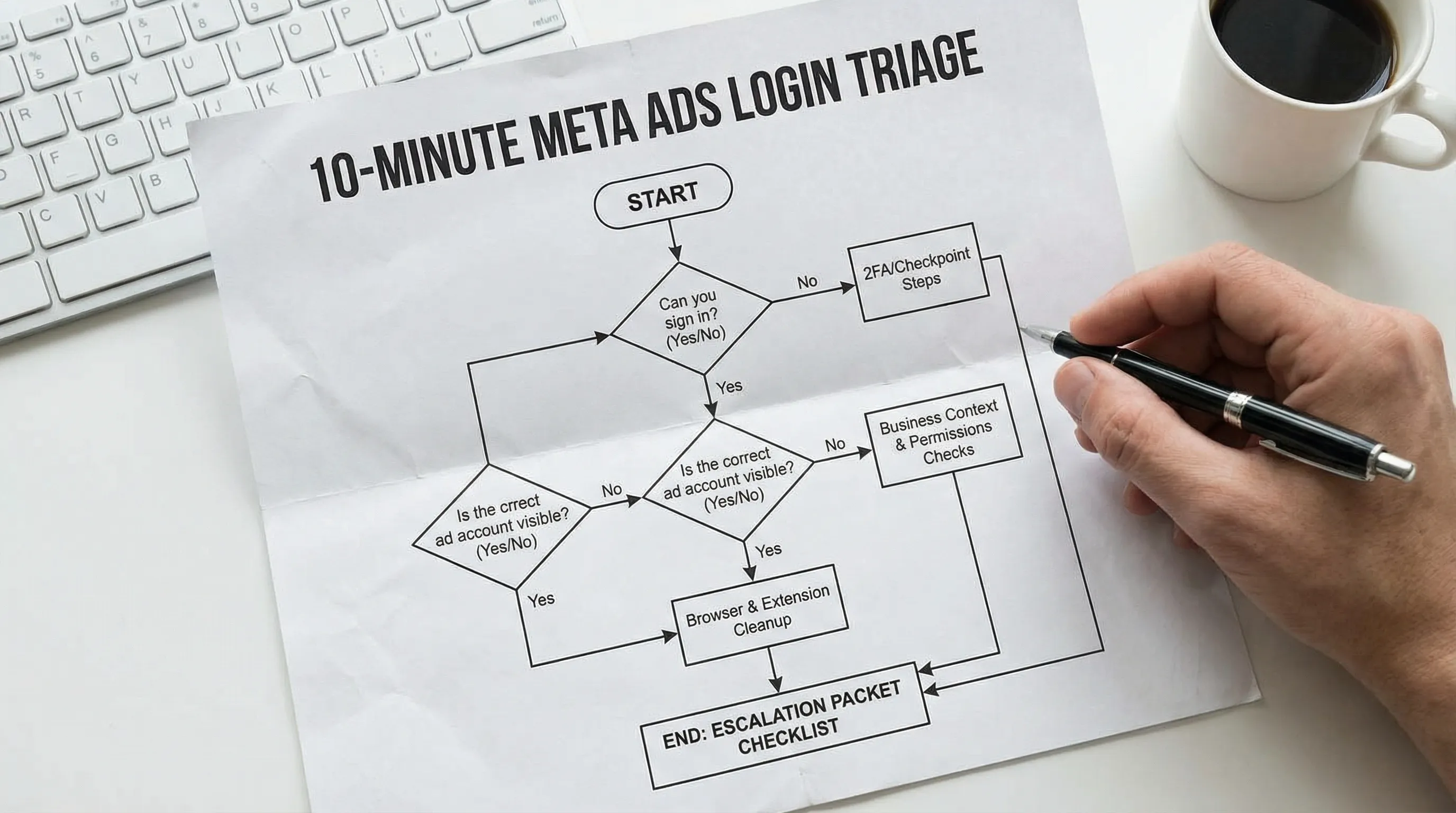
The 10-minute Meta Ads login fix (minute-by-minute)
Minute 0 to 1: Use the right entry point and a clean session
Start with two quick sanity checks:
- Open Ads Manager from the canonical business entry point, like Meta Business Suite (then navigate to Ads Manager), or go directly to adsmanager from a fresh session.
- Use a private browsing window (Incognito) to eliminate stale cookies and “stuck” sessions.
Why this matters: Meta’s business tools heavily depend on cookies and session state. A clean session often resolves loops where you keep landing in the wrong business context.
Minute 1 to 3: Confirm you are in the right identity and business context
The most common “Meta Ads login” failure for agencies is that you are logged in as the right human, but viewing the wrong container.
Check these two things:
Identity context (the human)
- Are you logged into the correct Facebook profile that was granted access?
- If your company uses separate work profiles, make sure you are not on a personal-only profile.
Business context (the container)
- In business tools, verify you are inside the correct Business Portfolio (Meta’s business container, formerly Business Manager).
- If you have access to multiple businesses, switching to the wrong one can make the ad account “disappear,” even though your access is fine.
If your team regularly hits this, build a simple internal rule: every access check starts with “Which profile am I in?” and “Which Business Portfolio am I in?”
For a deeper, agency-focused explanation of how roles and containers work, see Meta for Business: Permissions, Roles, and Safe Access.
Minute 3 to 5: If the ad account is missing, treat it as a permissions issue
If you can log in, but the right ad account is not visible, assume authorization is the blocker.
At this point, stop troubleshooting the browser and start verifying access inputs:
- Do you have access to the correct Business Portfolio?
- Do you have access to the correct Ad Account inside that business?
- Were you added as a partner (typical for agencies) or as an individual user?
A fast way to resolve this is to have the client (or internal admin) re-check access in Meta and re-add you with the minimum role needed.
If you need a secure, repeatable method for collecting the right IDs and permissions, Connexify’s approach is to standardize the request and handoff through a single, branded link, instead of ad hoc messages and screenshots. You can see the full secure workflow in Meta Business Setup: Secure Access Steps for Agencies.
Minute 5 to 7: Fix 2FA loops and security checkpoints
If you cannot complete sign-in because of 2FA or a checkpoint, you need to stabilize the security path.
Common fast fixes:
- Confirm you can access the configured 2FA method (authenticator app, SMS number, security key).
- If you are being prompted repeatedly, remove the variable: switch devices (try desktop if mobile fails, or vice versa).
- Make sure your time and timezone are correct on your phone if you use an authenticator app (time drift can break codes).
Meta strongly recommends 2FA, and in many business setups it is effectively required. If you need the official reference, start at the Facebook Help Center guide for two-factor authentication.
If you have access but are stuck in a security loop, also check Accounts Center for security alerts and connected account issues.
Minute 7 to 9: Remove browser friction (cookies, extensions, blocked scripts)
Once identity and permissions are verified, browser issues become the next likely culprit.
Do the minimum effective cleanup:
- Disable ad blockers and privacy extensions for Meta domains (many break Business Suite and Ads Manager UI).
- Clear cookies and site data for facebook.com and business.facebook.com, then sign in again.
- Try a second browser profile (Chrome profile, Firefox profile) rather than reinstalling anything.
If you are in a corporate environment, also consider that strict security policies can block required scripts. Testing quickly on a personal hotspot can isolate “network policy” from “Meta problem.”
Minute 9 to 10: Build an escalation packet (so support can actually help)
If you are still blocked after the steps above, don’t escalate with “it doesn’t work.” Escalate with a tight packet.
Capture:
- The exact error message (copy text, do not paraphrase)
- Screenshot of the error and the URL you are on
- Timestamp and timezone
- Your profile email and name (the identity that should have access)
- Business Portfolio ID and Ad Account ID (if known)
- What changed most recently (new user added, 2FA enforced, business verification, ownership change)
This dramatically increases the odds that a client admin, internal ops, or Meta support can resolve it in one pass.
If you want a more exhaustive troubleshooting map for stubborn cases, this companion piece goes deeper: Facebook Ad Manager Login Issues: Fixes That Work.
Fast symptom-to-fix map (the stuff people actually see)
Use this table when someone Slacks you a screenshot with no context.
| Symptom in Meta Ads tools | Most likely cause | Fastest fix you can try first |
|---|---|---|
| You can log in, but the ad account is missing | Wrong Business Portfolio selected, or missing ad account permission | Switch business context, then have an admin confirm your ad account access and role |
| “You don’t have permission” when opening Ads Manager | You are logged into the wrong profile, or you were removed from the business | Confirm the profile email, then re-add user/partner access |
| Infinite redirect between Business Suite and Ads Manager | Corrupted cookies, extension interference | Private window test, then clear site cookies and disable extensions |
| 2FA codes accepted, then you get prompted again | Session conflict across devices, or checkpoint | Log out of other sessions, switch device, complete checkpoint in a clean browser profile |
| Everything loads, but buttons fail or pages are blank | Blocked scripts (ad blockers, strict browser settings) | Disable extensions for Meta domains and retry |
Note: Meta UI and wording changes frequently. Focus on the pattern (sign-in vs permission vs restriction), not the exact phrasing.
What to ask a client (or internal admin) to confirm in under 2 minutes
When the ad account is missing, you will save the most time by sending a precise request to the person who controls access.
Here is what you need them to verify.
| What to confirm | Why it matters | What you can send as plain-language request |
|---|---|---|
| Which Business Portfolio owns the ad account | Being in the wrong business container makes accounts “disappear” | “Please confirm which Business Portfolio owns the ad account and that I’m added to that same business.” |
| Whether you are added as a Partner or as a Person | Partner access is common for agencies, person access is common for employees | “Can you confirm whether we should be added as a partner (agency) or as an individual user?” |
| Your role on the ad account | Wrong role looks like a login issue | “Please confirm my role on the ad account and upgrade if needed for our scope.” |
| 2FA enforcement | 2FA blocks access even when permissions are correct | “Is 2FA required for the business? If yes, please confirm I meet the requirement.” |
If you are running Meta ads as a service, these checks should be part of your standard onboarding gate, not a late-night fix.
For an agency-ready, step-by-step access workflow, see Meta Ads Manager Access: Agency Setup Guide.
Preventing Meta Ads login emergencies (agency and ops playbook)
Once you have fixed today’s issue, the real win is ensuring it does not happen again next week. Most recurring Meta login incidents are process debt.
Standardize “time-to-verified-access” as an onboarding SLA
Agencies that scale treat access like a deliverable with an owner, a definition of done, and a clock. A practical internal SLA is:
- Verified access to the correct Business Portfolio and ad account
- Ability to view billing and create/edit campaigns (only if in scope)
- Confirmation that pixel or events visibility is present (if required)
This also gives you an objective way to separate client-side delays from agency-side delays.
Stop collecting access in DMs and spreadsheets
The risk is not just speed, it is also security and accuracy:
- IDs get mistyped
- People share passwords (which creates compliance and ownership risk)
- Access gets granted to the wrong profile
- No one knows what was approved, when, and by whom
A dedicated onboarding layer is designed to remove those failure modes. Connexify’s model is a single branded onboarding link where clients can provide the right access and details in one place, across platforms, with customizable permissions and integrations (API and webhooks), so your team is not rebuilding the same handoff every time.
If you want to see what that looks like in practice, start at Connexify and use the 14-day free trial to map one onboarding flow end-to-end before rolling it out.
Run a quarterly access audit (and actually offboard)
Meta access tends to accumulate. Old contractors linger, agencies change, roles drift.
A lightweight audit cadence reduces both login incidents and security exposure:
- Review who has access to the Business Portfolio
- Review who has access to the ad account, pixel, and connected assets
- Remove users who no longer need access
- Confirm 2FA requirements are met
If you already have your “asset registry” and permissions standardized, this audit becomes routine instead of painful.
When “login” is not the problem (account restrictions and disabled assets)
If you can sign in and see the right business, but you are blocked by restrictions (ad account disabled, spending limit issues, payment holds), you are no longer in the 10-minute fix category. Those cases require:
- Clear documentation (IDs, screenshots, recent changes)
- A disciplined escalation path
- Tight client communication about timelines and risk
If you are handling these regularly, build a small internal runbook and keep a reusable escalation template. This agency-focused playbook can help: Navigating Facebook Ad Support: Agency Playbook.
A practical way to make this go away for good
Most teams do not need more Meta expertise, they need fewer manual handoffs.
If your team keeps losing hours to access fire drills, consider productizing onboarding so every client gets the same secure flow, the same permission requests, and the same verification steps.
Connexify is built for that, a single branded onboarding link that helps agencies and service providers collect access across platforms quickly, reduce manual back-and-forth, and get to verified access faster. Explore the platform at connexify.io when you are ready to turn “Meta Ads login issues” into a solved process.