Client Onboarding Email Sequence for Agencies (Copy-Paste)
02/19/2026

Client onboarding tends to break for one simple reason: the client does not know what “done” looks like, and your team ends up chasing access, logins, approvals, and asset links across five different threads.
A tight email sequence fixes that. It sets expectations, keeps momentum after “closed-won,” and gives clients one clear next step at a time.
Below is a copy-paste client onboarding email sequence for agencies, designed for modern service delivery (paid media, SEO, creative, analytics, lifecycle). It assumes you want onboarding to be fast, secure, and auditable (no password sharing, least-privilege access, clear owners).
What this email sequence is built to accomplish
Most agencies are really trying to achieve three outcomes in the first 7 to 10 days:
- Time-to-verified-access: your team can log in, see the right assets, and confirm permissions.
- Measurement readiness: you can trust conversion tracking enough to make decisions.
- Operational clarity: there is a single owner on the client side for approvals, billing, and access.
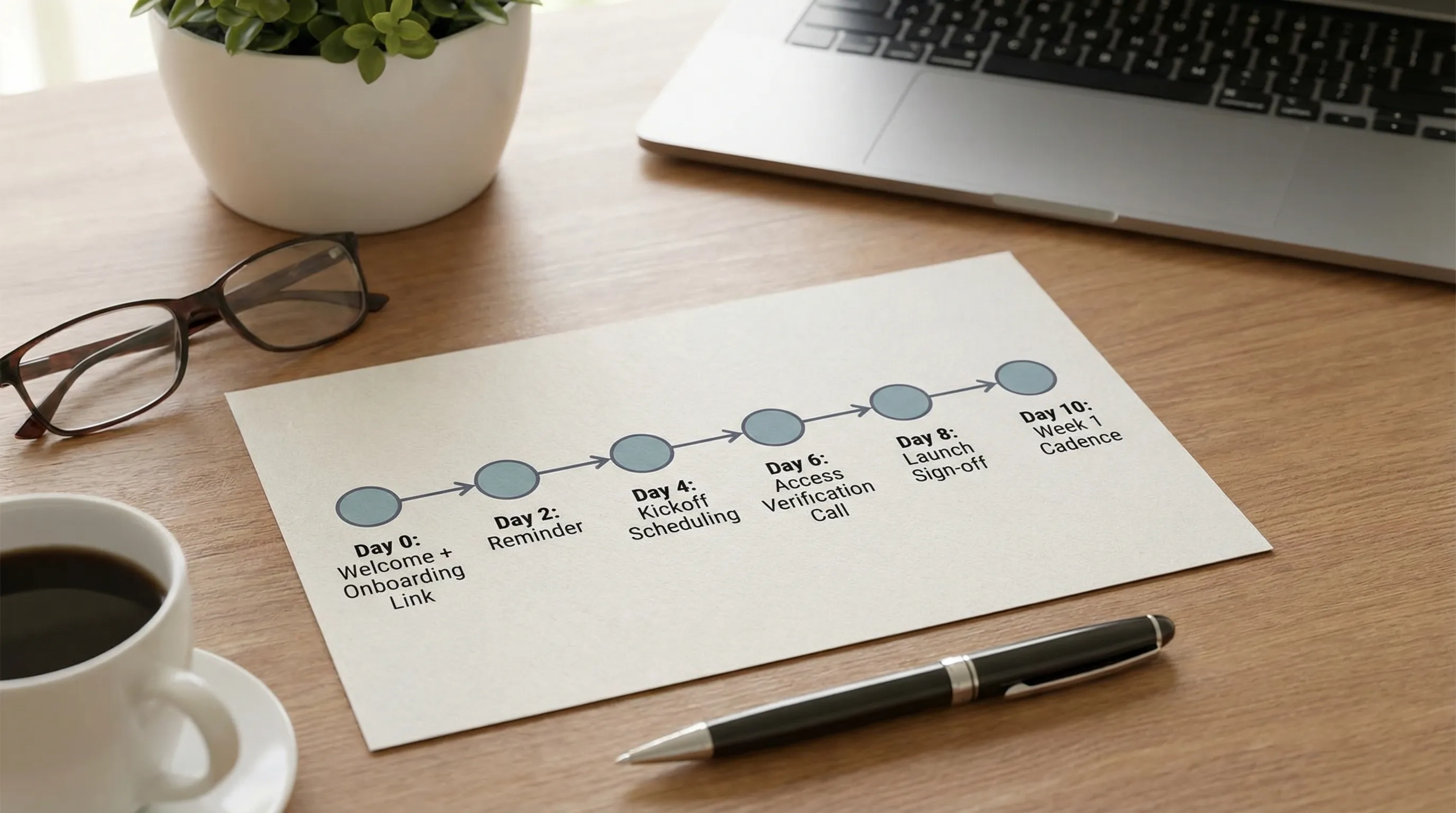
If you want to compress onboarding from “days of back-and-forth” to a predictable workflow, the emails below are structured as a small funnel:
- Email 1 gets completion (intake + access) with a single CTA.
- Emails 2 and 5 keep the process moving without sounding needy.
- Emails 3 and 4 lock the kickoff and verification sprint.
- Emails 6 to 8 prevent late-stage surprises right before launch.
Quick setup (so these templates actually work)
Before you paste anything, fill these placeholders once and reuse them:
- {ClientName}
- {PrimaryContactName}
- {ExecSponsorName} (optional)
- {AgencyName}
- {OnboardingLink} (one link that collects intake, assets, and access requests)
- {KickoffLink} (calendar link)
- {SharedFolderLink} (optional)
- {SlackOrTeamsInviteLink} (optional)
- {GoLiveTargetDate}
- {YourName} / {Role} / {Phone}
If you use a client onboarding platform like Connexify, {OnboardingLink} can be a single branded link that handles multi-platform access requests (with customizable permissions) and gives your team a dashboard view of what is complete versus blocked. Learn more at Connexify.
The sequence (timing, subject lines, and goals)
Use this table as your operating plan. “Day” means days after contract or invoice paid.
| When to send | Subject line (suggested) | Goal | Primary CTA | |
|---|---|---|---|---|
| 1 | Day 0 | Welcome to {AgencyName}, next step (5 minutes) | Start intake and access correctly | Complete onboarding link |
| 2 | Day 1 | Quick reminder: onboarding link for {ClientName} | Nudge completion | Complete onboarding link |
| 3 | Day 1 to 2 | Schedule kickoff + what we need beforehand | Lock kickoff and reduce kickoff churn | Book kickoff |
| 4 | Day 2 to 4 | 15-minute access verification (to avoid launch delays) | Verify access live, prevent surprises | Join verification call |
| 5 | After access is verified | Access confirmed, next steps to hit {GoLiveTargetDate} | Confirm progress and align on plan | Approve plan / confirm owners |
| 6 | If stalled 3 business days | We’re blocked on access (need your help today) | Escalate politely to unblock | Assign owner / complete access |
| 7 | 24 to 48h pre-launch | Launch readiness sign-off for {GoLiveTargetDate} | Get final approvals and governance | Approve / confirm |
| 8 | End of Week 1 post-launch | Week 1 recap + next optimizations | Set cadence and expectations | Confirm recurring meeting |
Email 1 (Day 0): Welcome + single next step
Send this immediately after signature or payment. Keep it short and action-oriented.
Subject: Welcome to {AgencyName}, next step (5 minutes)

Hi {PrimaryContactName},

Excited to kick things off with {ClientName}.

To start work quickly and safely, please complete this onboarding link:
{OnboardingLink}

It walks you through:
- The accounts and assets we need access to (no password sharing)
- Who the right owner is on your side for approvals and billing
- A few key intake questions so we don’t waste your time in kickoff

If you can complete it today, we can stay on track for {GoLiveTargetDate}.

If anything is unclear, reply here and I’ll help.

Thanks,
{YourName}
{Role}, {AgencyName}
{Phone}
Why it works: one CTA, sets security expectations, and connects completion to a timeline.
Email 2 (Day 1): Reminder nudge (no guilt, no pressure)
Send if the onboarding link is not complete within 24 hours.
Subject: Quick reminder: onboarding link for {ClientName}

Hi {PrimaryContactName},

Quick reminder to complete the onboarding link when you have a moment:
{OnboardingLink}

Once it’s done, we can verify access and begin setup.

If someone else on your team owns account access, feel free to forward this email or tell me who to send it to.

Thanks,
{YourName}
Email 3 (Day 1 to 2): Kickoff scheduling + agenda
This email prevents the “kickoff call that turns into a scavenger hunt.”
Subject: Schedule kickoff + what we need beforehand

Hi {PrimaryContactName},

Let’s get the kickoff on the calendar.

Book a time here: {KickoffLink}

To keep kickoff productive (and not an access-chasing call), please complete the onboarding link beforehand:
{OnboardingLink}

Kickoff agenda (30–45 mins):
1) Confirm goals and definition of “done”
2) Confirm channels and scope for the first 30 days
3) Confirm measurement plan (what we track and where)
4) Confirm approvals, owners, and weekly cadence

If you already know who should join on your side (marketing owner, web owner, finance/billing), reply with names and emails and we’ll include them.

Thanks,
{YourName}
Email 4 (Day 2 to 4): 15-minute access verification call
This is your highest leverage meeting. It prevents launch delays caused by “we thought we had access.”
Subject: 15-minute access verification (to avoid launch delays)

Hi {PrimaryContactName},

To avoid last-minute surprises, we do a short access verification once onboarding is submitted.

Goal: confirm we can log in and see the right assets (ads, analytics, tags, domains, or social accounts), with the right permissions.

Please pick a 15-minute slot here: {KickoffLink}

What to have ready on the call:
- The person who can approve or grant access
- Any 2FA device needed for approvals
- Admin access to the relevant business accounts (or the ability to invite partners)

If you’d rather do this async, tell me which systems are in scope and who owns each one, and we’ll send a clean, step-by-step request.

Thanks,
{YourName}
Email 5 (after verification): Access confirmed + next steps
Send this once your team confirms access and has no blockers, or when only minor items remain. This email reduces anxiety and keeps the client engaged.
Subject: Access confirmed, next steps to hit {GoLiveTargetDate}

Hi {PrimaryContactName},

Thanks, we verified access for {ClientName}.

Confirmed:
- {ConfirmedItems}

Still pending (if any):
- {PendingItems}

Next steps from our side:
- {AgencyNextSteps}

What we need from you:
- {ClientNextSteps}

If we complete the pending items by {Date}, we stay on track for {GoLiveTargetDate}.

Reply “approved” to confirm the plan, or send edits if anything looks off.

Thanks,
{YourName}
Tip: keep {ConfirmedItems} and {PendingItems} very concrete (account IDs, properties, ad accounts, pixels, catalogs, DNS records, etc.), not vague statements.
Email 6 (only if stalled): Escalation without drama
Use this if you are blocked 3 business days, or if the go-live date is at risk. It should be direct, respectful, and easy to act on.
Subject: We’re blocked on access (need your help today)

Hi {PrimaryContactName},

We’re currently blocked from moving forward due to missing access/approvals:
- {Blocker1}
- {Blocker2}

The fastest fix is to assign one owner who can complete these today.

Can you confirm who will own this on your side?

If it’s helpful, I can jump on a 10-minute call to walk through it live.

Thanks,
{YourName}
If you need to copy in an exec sponsor, you can add this line above the close: “Looping in {ExecSponsorName} for visibility since {GoLiveTargetDate} is at risk.”
Email 7 (24 to 48 hours pre-launch): Launch readiness sign-off
This is where agencies lose time (and trust) if they skip governance checks. The goal is a clean “yes” to launch, not a debate.
Subject: Launch readiness sign-off for {GoLiveTargetDate}

Hi {PrimaryContactName},

We are queued to go live on {GoLiveTargetDate}. Please confirm the items below so we can launch confidently.

Sign-off checklist:
- Budget and billing are confirmed (correct ad account / payment method)
- Tracking is confirmed (test conversions or events verified)
- Creative and copy are approved (final versions)
- Landing pages are final and accessible
- Approvals owner is available on launch day (name: {ApproverName})

Reply with:
1) “Approved to launch”
2) Any constraints (dates, hours, compliance notes)

Thanks,
{YourName}
If your service includes regulated review (health, finance, legal), adjust the checklist language to match the client’s policy. Keep it plain English.
Email 8 (end of Week 1 post-launch): Week 1 recap + cadence
This email reduces churn risk by showing control and setting the rhythm.
Subject: Week 1 recap + next optimizations

Hi {PrimaryContactName},

Quick Week 1 recap for {ClientName}.

What we shipped:
- {ShippedItems}

Early signals (directional):
- {Signal1}
- {Signal2}

What we’re doing next (Week 2 priorities):
- {NextPriority1}
- {NextPriority2}

Cadence:
- Weekly check-in: {ProposedDayTime}
- Monthly performance review: {ProposedMonthlySlot}

Confirm the recurring weekly slot works for you, and who else should be included.

Thanks,
{YourName}
Two optional templates that improve completion rates
Use these when you have multi-stakeholder onboarding (common in mid-market and enterprise).
Optional A: “Forward to your access owner” email
Subject: Can you loop in the person who owns account access?

Hi {PrimaryContactName},

To complete onboarding, we need help from whoever owns account access / admin permissions.

Can you forward them this link?
{OnboardingLink}

If you tell me their name + email, I can send it directly.

Thanks,
{YourName}
Optional B: “We do not accept passwords” security note
Use this if clients try to share logins (it happens).
Subject: Quick security note on access

Hi {PrimaryContactName},

Quick note: for security, we can’t accept passwords via email, spreadsheet, or chat.

Please use the official invite/partner access flow for each platform (or our onboarding link), so access is tied to named users and can be revoked cleanly.

If you want, tell me which platform you’re working on and I’ll send the exact steps.

Thanks,
{YourName}
For general guidance on avoiding password reuse and improving account security, you can reference the NIST Digital Identity Guidelines internally when defining your agency’s security policy.
How to adapt this sequence to your agency’s offers
Instead of rewriting emails every time, change only two things:
- The “bill of materials” (what access and assets you need)
- The verification definition of done (what must be true before you build or launch)
Here is a simple mapping you can copy into your internal SOP.
| Offer | Assets you typically request | Verification “done” looks like |
|---|---|---|
| Paid social (Meta, TikTok, LinkedIn) | Business IDs, ad accounts, pixels/events, catalogs (if relevant), billing owner | You can view assets, create drafts, and confirm events fire in test tools |
| Google Ads + analytics | Google Ads account, GA4 property, GTM container, conversion actions | Conversions are imported or firing, and access is correct for your operators |
| SEO | GSC, GA4, CMS or read-only content access, sitemap/robots context | You can validate indexation, track baseline, and ship priority fixes |
| Creative + content | Brand guidelines, asset library, approvals owner, publishing access (if included) | You can produce, route approval, and publish without permission gaps |
If you want a deeper process blueprint, Connexify has a broader guide on speeding client onboarding across platforms: Client Onboarding Software: How to Cut Setup Time to Minutes.
Where Connexify fits (if you want this sequence to run with less manual chasing)
These templates work with plain email, but they get dramatically easier when your CTA is truly one step.
Connexify is built for agencies and service providers that want to streamline onboarding with:
- One-link client onboarding (one branded link instead of multiple threads)
- Multi-platform support (so your process is consistent across ad, analytics, and other systems)
- Customizable permissions (request the right access for the right role)
- API and webhook integrations (trigger tasks or update your CRM/PM tool when onboarding is complete)
- A user-friendly dashboard (so your team can see what is blocked)
If you want to turn the sequence above into a trackable, branded onboarding flow, you can book a demo or start from the 14-day free trial.

Implementation notes (so you do not create more work)
Keep these rules to preserve speed and avoid onboarding chaos:
- One email owner: one person at your agency is accountable for onboarding completion.
- One client owner: ask the client to name a single access and approvals owner.
- One CTA per email: if you add multiple actions, completion drops.
- Always timebox verification: “15-minute access verification” is more effective than “let’s make sure access is set.”
- Write down “done” per stage: access verified, measurement verified, creative approved, billing confirmed.
If you want an agency-focused reference for what to automate in onboarding (especially for paid media), this Connexify post is a solid companion: What Top Facebook Ad Agencies Automate in Onboarding.