Client Onboarding Software: How to Cut Setup Time to Minutes
02/09/2026

The fastest agencies and service providers treat onboarding like a product, not an admin chore. When onboarding is “send a few emails and hope for the best,” setup time expands to days because access requests, IDs, and approvals bounce between stakeholders.
Client onboarding software flips that dynamic. Done right, it turns onboarding into a single, trackable flow that gets you to verified access in minutes so your team can deliver value immediately.
Why client setup takes days (and what “minutes” really requires)
Most onboarding delays are not caused by one big problem. They come from five small frictions that compound:
- Platform sprawl: Ads, analytics, CRM, CMS, billing, creative tools, and data connectors all have different invite paths.
- Identity mismatch: The client invites the wrong email, the wrong Business entity, or an inactive user.
- Permission uncertainty: Clients hesitate because they do not know what roles are safe, or what each permission actually enables.
- Approval latency: Legal, finance, IT, and the day-to-day marketing owner are not aligned on who can grant access.
- No verification loop: Teams “assume it worked” and only discover missing permissions at launch time.
If you want setup in minutes, you need one measurable definition of done:
Time-to-verified-access: the elapsed time from “welcome link sent” to “your team can log in and confirm the required assets and permissions are correct.”
That metric forces a practical operating change: you are no longer “requesting access,” you are completing and verifying access.
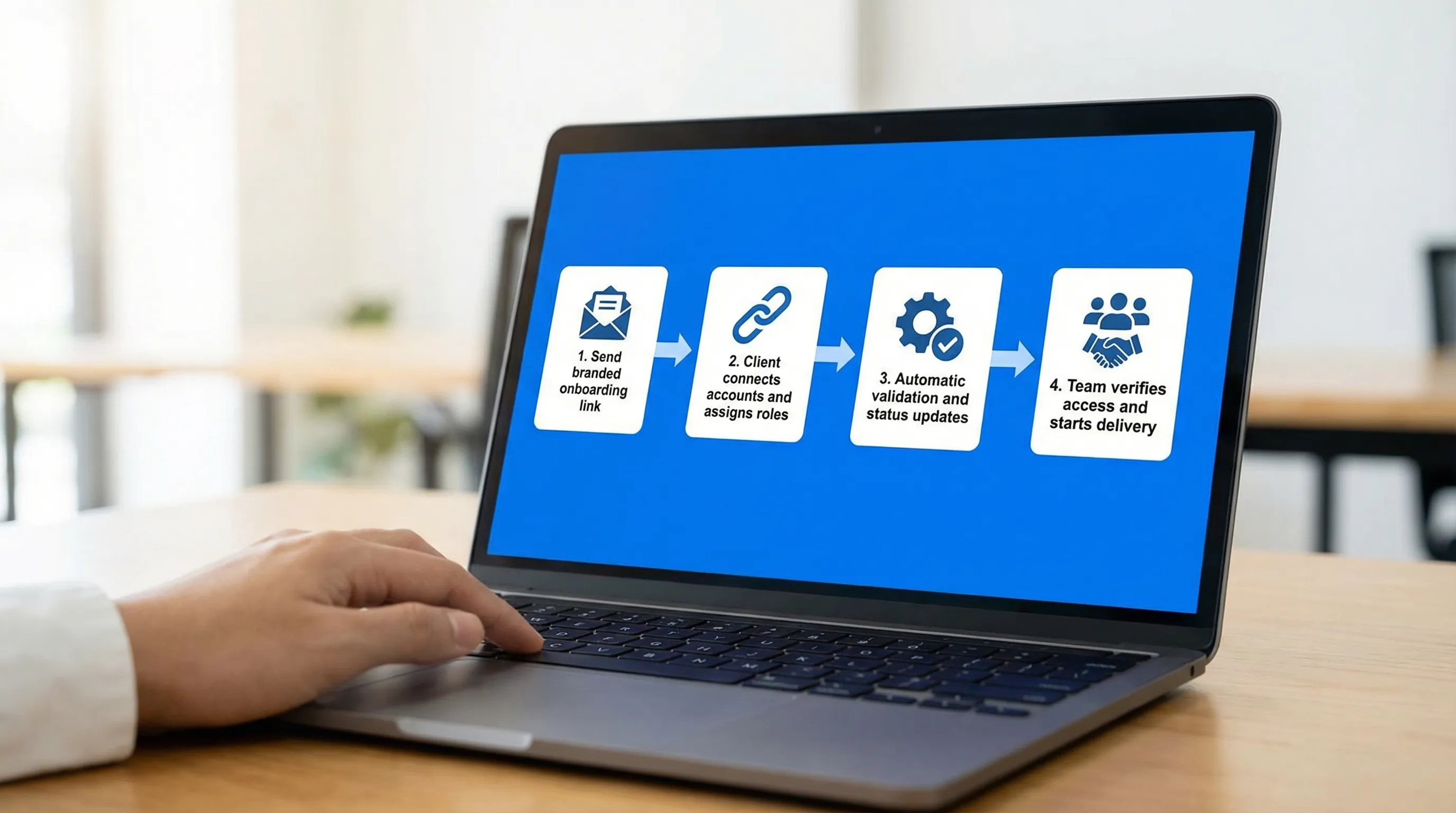
The “minutes, not days” onboarding workflow (software-first)
The most reliable way to compress setup time is to run onboarding as a short, structured flow with clear pass criteria.
Step 1: Predefine your onboarding bill of materials
Before you send anything to a client, your team should know exactly what you need for the scope you sold.
A good bill of materials is not a long checklist. It is a short list of required assets, IDs, and owners.
Examples (adjust for your service):
- Ads: ad account ID, business entity ID, pixel/CAPI ownership, billing owner
- Analytics: GA4 property access, GTM container access, domain verification status
- CRM: admin or integration user access, pipeline/attribution fields, form routing owner
- Creative/approvals: brand assets location, approver(s), SLA for feedback
When this is standardized, client onboarding software can present the right requests automatically instead of you rewriting instructions for every deal.
Step 2: Use a single, branded onboarding link
The fastest workflows reduce “where do I go?” decisions to one.
A one-link experience matters because clients do not want to:
- search old emails for instructions,
- switch between tools with different login states,
- guess which items are urgent versus optional.
Connexify’s approach is built around one-link client onboarding with a branded onboarding experience, designed to replace scattered email threads with a single entry point.
Step 3: Request permissions with templates (least privilege by default)
Most delays happen when clients fear over-sharing. Permission templates remove ambiguity.
Two principles speed onboarding while reducing risk:
- Least privilege: request only what you need to perform the contracted scope.
- Role clarity: label permissions in plain English, for example “Run ads (no billing)” or “View analytics (read-only).”
For a security baseline, it is worth aligning your approach with the least privilege concept used in standards like NIST’s Zero Trust guidance.
Step 4: Verify access immediately (do not “assume”)
Software can collect access, but you still need a fast verification loop.
A tight verification loop means:
- someone on your team tests login and confirms the exact assets,
- missing permissions are flagged right away,
- the client gets an immediate, specific fix request (not a generic “it did not work”).
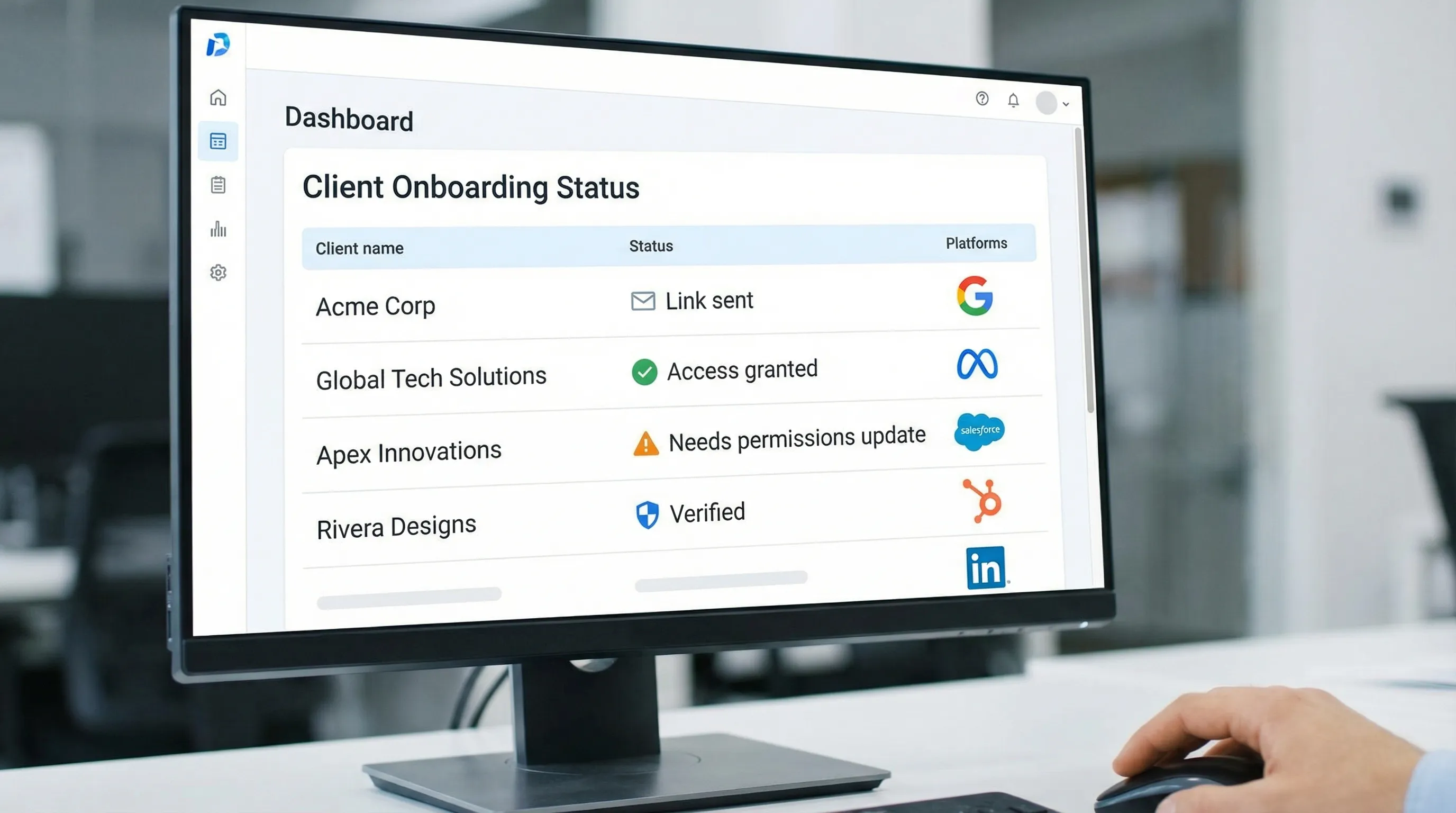
This is where a user-friendly dashboard and status visibility prevents relaunching the same conversation across Slack, email, and tickets.
Step 5: Automate the handoff to delivery (PM, CRM, or data stack)
Onboarding is not finished when access is granted. It is finished when your delivery system is ready.
Look for onboarding software that supports API and webhook integrations, so you can:
- create or update the client record in your CRM,
- open a project with the right template,
- notify the channel owner that access is verified,
- log an audit trail of when access was granted.
What to look for in client onboarding software (features that actually cut time)
Many tools claim to “improve onboarding.” Fewer are designed to reduce setup time for multi-platform access and permissioning.
Use this table as a practical evaluation checklist.
| Capability | Why it cuts setup time | What “good” looks like in practice |
|---|---|---|
| One-link onboarding | Eliminates back-and-forth about where to start | A single URL the client can open on any device, with progress visibility |
| Branded client experience | Increases trust and completion rates | Your logo, language, and clear explanations of why each request is needed |
| Multi-platform support | Prevents separate flows per tool | One workflow that spans ads, analytics, CRM, and other systems |
| Customizable permissions | Reduces over-sharing and client hesitation | Role templates aligned to scope, with least-privilege defaults |
| White-label options | Improves perceived professionalism | Client sees your brand, not a third-party patchwork |
| Secure data handling | Avoids risky workarounds (passwords, screenshots) | Clear security posture, access without credential sharing |
| Dashboard and status tracking | Stops “did you do it yet?” loops | Real-time status per client, with clear blockers |
| API/webhooks | Removes manual internal busywork | Automatic project creation, notifications, and CRM updates |
| No installation required | Avoids IT delays | Browser-based completion, easy for non-technical stakeholders |
Connexify aligns strongly with this set: one-link onboarding, branded and white-label options, permission controls, integrations (API/webhooks), and a dashboard.
A realistic rollout plan that gets results fast
If your current onboarding is email-driven, you do not need a months-long change program. You need a controlled rollout.
Sprint A (process design): standardize what you request
In this sprint, your goal is clarity, not perfection.
Define:
- Your top 3 service packages (the ones you sell most)
- The bill of materials for each package (required vs optional)
- Your permission templates (minimum roles per package)
- Your definition of done (what counts as “verified access”)
Sprint B (production test): run onboarding on 3 to 5 new clients
Time-box the test and capture failure modes.
During the pilot, measure:
- time-to-verified-access
- completion rate on first send
- number of clarification messages required
Then tighten the flow by removing ambiguity. Most wins come from improving wording and role defaults, not adding more steps.
Sprint C (scale): integrate and operationalize
Once the flow is stable, connect onboarding to your delivery stack using integrations.
This is also the right moment to lock in governance:
- who can request access,
- who verifies,
- when you audit access,
- how offboarding works.
Security and compliance: faster does not mean riskier
Many teams slow onboarding because they are trying to be careful. The irony is that slow onboarding often pushes people into insecure behaviors, like password sharing or sending screenshots of sensitive settings.
Client onboarding software should help you stay fast and safe by making secure behavior the default.
Key practices to keep:
- No passwords over email: use platform-native invites and role assignment.
- Named users: avoid shared logins so access is accountable.
- Least privilege: request only what you need now, expand later if scope expands.
- Auditability: keep a record of who granted what, and when.
If you work with regulated or risk-sensitive clients (healthcare, finance, legal), clarity and documentation matter even more. Law firms, for example, often publish formal privacy and data-handling notices that clients expect vendors to respect, you can see an example with Henlin Gibson Henlin and the compliance-forward structure of its public-facing information.
Connexify positions itself around fast, secure access setup and secure data handling, which is exactly what you need to prevent “speed” from becoming “shadow IT.”
The KPIs that prove onboarding is getting faster (and staying healthy)
If you do not measure onboarding, it will quietly expand again.
Here are the most useful operational metrics to implement:
| KPI | Definition | Why it matters |
|---|---|---|
| Time-to-verified-access | Time from link sent to access confirmed by your team | The single best indicator of setup speed |
| First-pass completion rate | % of onboardings completed without clarification | Signals how clear your requests and templates are |
| Permission rework rate | How often you must change roles after initial grant | Reduces launch risk and support load |
| Time-to-first-value | Time from verified access to first deliverable shipped | Connects onboarding to business outcomes |
| Stalled onboarding count | # of clients stuck beyond your SLA | Gives ops a daily queue to unblock |
Avoid copying someone else’s “benchmarks.” Your baseline depends on your client mix and platform complexity. The win is measurable improvement month over month.
Frequently Asked Questions
What is client onboarding software? Client onboarding software is a system that standardizes and automates the steps required to bring a new client live, commonly including intake, access setup, permissions, and handoffs to delivery.
How can client onboarding software cut setup time to minutes? It reduces setup time by centralizing requests into a single flow, using permission templates, tracking completion status, and enabling immediate verification and automated handoffs via integrations.
Is a one-link onboarding flow actually better than sending a checklist? Yes in most cases. Checklists still require clients to interpret instructions across tools. A one-link flow reduces cognitive load, keeps progress visible, and prevents steps from being skipped.
How do you stay secure while speeding up onboarding? Use named users, least-privilege roles, platform-native invites, and an auditable process. Avoid password sharing and ensure access is verified before launch.
What should I prioritize when choosing client onboarding software for an agency? Prioritize one-link onboarding, multi-platform support, customizable permissions, a branded experience, secure data handling, and integrations (API/webhooks) that connect onboarding to your CRM and project tools.
Cut setup time with Connexify
If your team is still onboarding through email threads, scattered docs, and last-minute permission emergencies, you are paying for it in delays, rework, and slower time-to-value.
Connexify is built to streamline onboarding for agencies and service providers with a single branded onboarding link, multi-platform support, customizable permissions, white-label options, and API/webhook integrations, so you can move from “signed” to “verified access” dramatically faster.
Explore Connexify at connexify.io to book a demo or start a 14-day free trial.