Client Onboarding Checklist for Retainers: Day 0 to Day 7
03/01/2026


Retainers don’t fail because the strategy was wrong. They fail because Week 1 is chaotic: access is incomplete, tracking is unverified, approvals are unclear, and both sides burn time in Slack threads that never resolve.
This client onboarding checklist for retainers is designed for agencies and service providers who want a repeatable Day 0 to Day 7 system that protects speed, security, and confidence. Use it as a launch plan, a handoff standard, and a shared “definition of done” that prevents scope creep and stalled starts.
How to use this Day 0 to Day 7 checklist (so it actually works)
Before you jump into the daily tasks, set two rules:
- One owner per lane: each task has a single accountable owner (agency-side or client-side). If “everyone” owns it, nobody does.
- Verification beats completion: an invite sent is not access granted. A tag installed is not measurement ready. Each day includes a clear “done” test.
A simple role model that works for most retainers:
| Role | Who it is | What they own in Week 1 |
|---|---|---|
| Agency Account Lead | Client-facing lead | Scope alignment, kickoff, escalation, Week 1 recap |
| Agency Ops / PM | Delivery coordinator | Checklist execution, deadlines, reminders, handoffs |
| Channel Specialist(s) | Paid/SEO/Email/Social | Platform setup, build, QA, early optimization |
| Analyst / Tracking Lead | Measurement owner | Conversion definitions, GTM/GA4, pixel/CAPI, QA |
| Client Owner | Economic buyer or marketing lead | Approvals, access sponsorship, priority decisions |
| Client Admin (IT/Finance) | Admin support | SSO/MFA, billing, domains, procurement/security |
If you want an operational metric to rally around, make it Time-to-Verified-Access (TVA). Connexify has a useful breakdown of how to define and run that SLA in practice: Time-to-Verified-Access: The SLA That Prevents Delays.
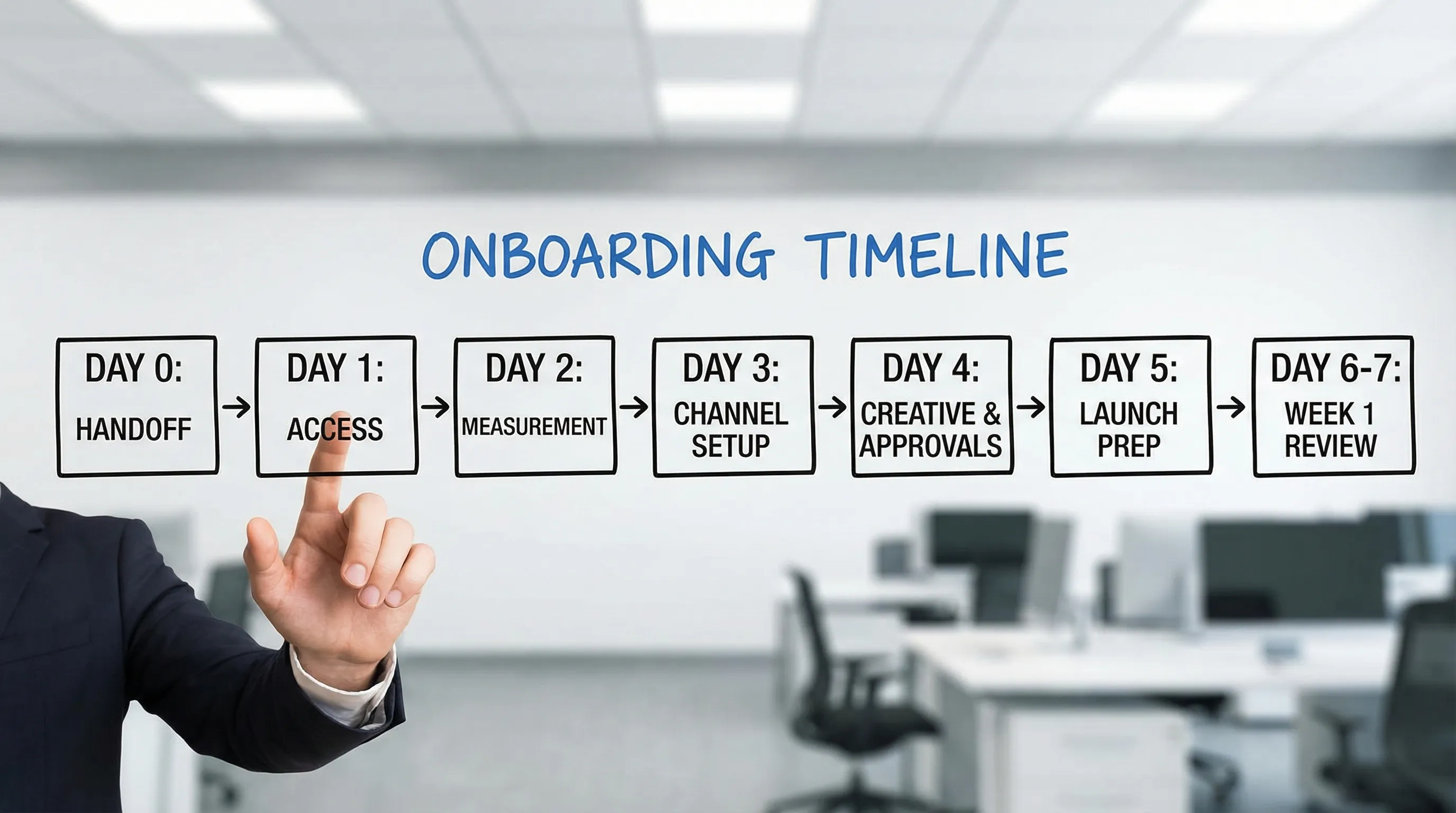
Day 0 (Contract signed): Handoff, expectations, and a single source of truth
Day 0 is where retainers either become “real” or become a vague promise. Your goal is to ship a clean handoff that creates momentum and reduces client effort.
Day 0 checklist
| Task | Owner | Definition of done (DoD) |
|---|---|---|
| Send a welcome note with one CTA | Account Lead | Client receives one message with one action: “Complete onboarding” |
| Confirm scope and “win definition” | Account Lead + Client Owner | 3 bullets: objective, primary KPI, what’s out of scope |
| Assign the working team + escalation path | PM | Names, emails, and response SLAs documented |
| Create the onboarding hub | PM | One link to the checklist, docs folder, and kickoff calendar |
| Send the access + intake request | PM | Client receives a consolidated request (not 10 separate asks) |
| Set security baseline expectations | PM + Client Admin | Named users only, MFA required, no password sharing policy |
Security note worth stating plainly: request least-privilege access by default. It is not only good practice, it is the standard approach in security frameworks. For example, NIST SP 800-53 includes least privilege controls (AC-6) as a core access principle (NIST SP 800-53).
If you want a stronger Day 0 package, build it from a pre-boarding bill of materials: Pre-Boarding Checklist: What to Collect Before Kickoff.
Day 1: Access and identity (get to verified, usable access)
Day 1 is about turning “we invited you” into “we can operate.” Most retainer delays come from identity mismatch (wrong email, wrong business portfolio, wrong role) and multi-admin bottlenecks.
Day 1 checklist
| Task | Owner | Definition of done (DoD) |
|---|---|---|
| Confirm identities and emails for all stakeholders | PM + Client Owner | Every person has a named account (no shared logins) |
| Enforce MFA/2FA where possible | Client Admin | MFA enabled for admins and key users |
| Collect platform IDs and admin contacts | PM | IDs captured for each platform and “who can approve” listed |
| Request role-based access (partner where supported) | Specialist + Client Admin | Access granted at the correct scope (business, ad account, property) |
| Run a 15-minute verification sprint | Specialist | Login confirmed, permissions validated, screenshots or notes saved |
Common Day 1 pitfall: teams treat access as binary. In reality, access is granular. “I can see the account” is not the same as “I can edit conversion events” or “I can manage billing.” Define the minimum permissions per service and verify against that minimum.
If your agency manages many platforms, compressing this into a single, trackable flow can eliminate back-and-forth. Connexify is built specifically for that: a single branded link to collect access across platforms with customizable permissions and a dashboard to track completion (Connexify).
Day 2: Measurement readiness (define conversions, validate tracking, prevent wasted spend)
A retainer that launches activity without measurement creates conflict later. Day 2 is where you agree on what “working” means and ensure data can be trusted.
Day 2 checklist
| Task | Owner | Definition of done (DoD) |
|---|---|---|
| Confirm primary conversion(s) and attribution boundaries | Account Lead + Client Owner | One primary conversion selected, documented, and agreed |
| Validate analytics access (GA4, dashboards, BI if used) | Analyst | Correct property access confirmed and data is visible |
| Validate tag manager access (if applicable) | Analyst + Client Admin | Publish rights confirmed or a publish workflow agreed |
| Install or audit key tags (pixel, events, offline signals) | Analyst | Events fire correctly in test mode and are documented |
| Lock a UTM standard for Week 1 | PM | One naming standard distributed and applied to first campaigns |
For a lightweight standard clients actually follow, use a simple UTM policy and bake it into onboarding: UTM Governance: A Simple Standard Clients Will Follow.
Day 3: Channel setup (make the environment buildable)
Day 3 is about making sure the systems are ready to build campaigns or deliverables without hidden blockers.
Day 3 checklist
| Task | Owner | Definition of done (DoD) |
|---|---|---|
| Confirm billing readiness per channel | Client Finance + Specialist | Payment method verified, spending limits clarified |
| Map what will be built in Week 1 | Specialist + Account Lead | A short build plan exists (campaigns, landing pages, emails, posts) |
| Standardize naming conventions | Specialist | Campaign/account naming doc created and used |
| Confirm asset ownership model | Account Lead + Client Owner | Client owns core assets, agency gets scoped access |
| Create the “launch backlog” | PM | Tasks sequenced with owners and deadlines |
If your retainer includes paid social and Meta assets, partner-based access and correct permissions are a frequent bottleneck. A platform-specific guide can help teams avoid common mistakes: Meta Ads Manager Access: Agency Setup Guide.
Day 4: Creative, assets, and approvals (reduce waiting and rework)
Day 4 is where many retainers quietly lose a week. Not because the team can’t produce, but because no one defined who approves what, how feedback is given, and when something is “final.”
Day 4 checklist
| Task | Owner | Definition of done (DoD) |
|---|---|---|
| Collect core brand assets | Client Owner | Logos, fonts, brand guidelines, and examples delivered |
| Confirm messaging guardrails | Account Lead | “Must say / can’t say” documented, compliance notes captured |
| Set an approvals workflow and SLA | PM + Client Owner | One review surface, one decider, review deadlines agreed |
| Build the first set of creatives/deliverables | Creative/Channel team | Drafts produced in correct formats and routed for review |
| Run a preflight QA before sending | Specialist | Links work, tracking parameters present, specs met |
For a proven structure that prevents approval queues from becoming the bottleneck, reference: Creative Approvals Workflow That Doesn’t Slow Production.
Day 5: Launch prep (QA gates and go-live criteria)
Day 5 is about reducing launch risk. You are not trying to be perfect, you are trying to be controlled, measurable, and reversible.
Day 5 checklist
| Task | Owner | Definition of done (DoD) |
|---|---|---|
| Confirm “go-live” checklist per channel | Specialist | QA checklist completed and stored |
| Validate tracking end-to-end | Analyst | Test conversion or key event observed and logged |
| Confirm budgets, caps, and risk limits | Client Owner + Specialist | Written confirmation of spend boundaries |
| Confirm comms cadence for the first 72 hours | Account Lead | Who gets updates, where, and how often |
| Create a rollback plan | Specialist | Clear steps to pause, revert, or switch lanes documented |
Day 6: Soft launch (controlled start, fast learning)
A smart retainer launch often uses a soft start: limited scope, tighter monitoring, and rapid fixes.
Day 6 checklist
| Task | Owner | Definition of done (DoD) |
|---|---|---|
| Launch in a controlled lane | Specialist | Campaigns or deliverables shipped with limits applied |
| Monitor early signals | Specialist + Analyst | Key metrics watched and anomalies flagged |
| Fix the first round of blockers | PM | Issues captured, assigned, and resolved or escalated |
| Document what changed | PM | Change log maintained (what, why, when) |
Day 7: Week 1 recap and operating cadence (turn onboarding into a system)
Day 7 is not just a status update. It is the moment you convert onboarding into an ongoing operating model: what happens weekly, who decides, and what “good” looks like.
Day 7 checklist
| Task | Owner | Definition of done (DoD) |
|---|---|---|
| Deliver a Week 1 recap | Account Lead | Wins, risks, next priorities, and decisions needed |
| Confirm the weekly cadence | Account Lead + Client Owner | Meeting schedule, agenda, and owners agreed |
| Lock the KPI scoreboard | Analyst | 5 to 10 metrics defined with sources and definitions |
| Schedule governance routines | PM + Client Admin | Access review cadence set (monthly or quarterly) |
| Define next “time-to-value” milestone | Account Lead | Next concrete milestone chosen (first lead, first SQL, first report) |
If you want ideas for onboarding instrumentation beyond Week 1, this KPI framework is helpful: Client Onboarding KPIs: What to Track in 2026.
The most common Week 1 blockers (and how to neutralize them)
These issues show up across retainers, regardless of niche. The fix is almost always clearer ownership and verification.
| Blocker | Early warning signal | Practical fix |
|---|---|---|
| Access granted, but wrong role | “I can see it, but can’t edit” | Define minimum permissions per service, then re-request with screenshots |
| Multi-admin bottleneck | “Our admin is out until next week” | Identify admin on Day 0, add a backup admin, schedule a 15-minute access call |
| Measurement uncertainty | “We’ll figure tracking out later” | Make Day 2 a gate, no scale until test events or test conversions pass |
| Approval paralysis | Feedback arrives in 5 places | One review surface, one decider, SLAs, and a preflight checklist |
| Billing surprises | Ads can’t spend or invoices bounce | Confirm billing readiness on Day 3, document caps and rules |
| Security/procurement delays | Vendor questionnaires appear mid-week | Preempt with a security evidence pack and clear answers |
If procurement security questions routinely slow your starts, it helps to anticipate what clients ask (SOC 2 scope, encryption, credential handling, retention). Connexify has a concise overview of common questions to prepare for: SOC 2 Questions Clients Ask About Onboarding Tools. For background on SOC reporting, see the AICPA SOC overview.
What to track during Day 0 to Day 7 (so you can improve every retainer)
A checklist is good, but a measured checklist becomes a competitive advantage.
| Metric | What it means | Why it matters in retainers |
|---|---|---|
| Time-to-Verified-Access (TVA) | Time from request sent to access confirmed usable | Predicts whether Week 1 will ship or stall |
| Access completion rate | % of requested systems granted correctly | Finds platform-specific friction and training gaps |
| Measurement-ready time | Time until conversions/events are validated | Prevents wasted spend and “bad data” disputes |
| Rework rate | % of tasks redone due to wrong inputs/permissions | Direct driver of margin and client frustration |
| Client effort score (simple) | “How hard was onboarding?” 1 to 5 | Reveals whether your process scales across clients |
Making this checklist easier: consolidate intake and access into one branded flow
If you are running retainers across multiple platforms, the biggest operational win is eliminating scattered requests. Instead of:
- separate emails for each tool
- manual permission explanations repeated per client
- unclear status and constant follow-ups
Use an onboarding layer that centralizes requests, tracks completion, and standardizes permissions.
Connexify is designed for agencies and service providers that want to reduce onboarding time dramatically with:
- One-link client onboarding through a single branded link
- Multi-platform support for common agency stacks
- Customizable permissions to request least-privilege access by default
- White-label options for a consistent client experience
- API and webhook integrations to automate handoffs into your CRM/PM systems
- No installation required and a 14-day free trial
If you want a deeper overview of what onboarding software changes operationally (and what to look for), this guide is a useful companion: Client Onboarding Software: How to Cut Setup Time to Minutes.
The takeaway
A strong retainer start is not about doing more in Week 1. It is about doing the right things in the right order, with verification gates and clear ownership.
If you implement this Day 0 to Day 7 checklist as written, you get three outcomes your clients will feel immediately:
- faster time to first meaningful deliverable
- fewer access and tracking emergencies
- a more confident, professional working relationship
When you are ready to turn this into a single branded onboarding flow your team can run on every retainer, explore Connexify or start with a demo request from the site. (And if you prefer to test first, Connexify offers a 14-day free trial.)