Meta Pixel vs CAPI: What to Verify on Day 1
02/27/2026


Day 1 with a new Meta account is not the moment to debate “Pixel vs CAPI.” It’s the moment to verify that you can trust the signal before you spend budget, launch creatives, or report numbers to a client.
This guide focuses on what to verify on Day 1 so your team can answer a simple question with evidence:
“Are we measurement-ready, and can we prove it?”
Meta Pixel vs CAPI (Conversions API): the practical difference
Both systems send event data to Meta, but they do it through different routes, and that changes what can break.
- Meta Pixel: browser-based events (fires from the user’s device).
- Conversions API (CAPI): server-to-server events (sent from your server, backend, or a partner integration).
Meta generally expects many advertisers to use both so you get redundancy and better event matching.
| Topic | Meta Pixel (Browser) | CAPI (Server) | Why it matters on Day 1 |
|---|---|---|---|
| Where events fire | User browser | Server, backend, CRM, gateway | Tells you what can be blocked and what logs you can inspect |
| Common failure mode | Tag not installed, wrong container, blocked by browser settings, duplicate tags | Missing parameters, mis-mapped events, no dedupe, auth/endpoint failures | Helps you choose the fastest troubleshooting path |
| Best at | Fast setup, on-site behavior | More durable signal, better resilience, offline or backend events | Sets expectations for what “good” looks like |
| Key Day 1 check | Events fire on the right pages with the right params | Events arrive, are mapped correctly, and dedupe works | Prevents double-counting and reporting surprises |
What “Day 1 verified” should mean (definition of done)
A lot of teams stop at “I see PageView in Events Manager.” That is not Day 1 verified.
A stronger Day 1 definition is:
- Browser events are firing for the correct domain and the correct dataset (Pixel).
- Server events are arriving (CAPI), and you can identify their source.
- Deduplication works (you are not double-counting the same conversion).
- Key parameters are present for your primary conversion (Lead, Purchase, CompleteRegistration, etc.).
- Governance is clean (right people have access, and the client owns the assets).
If you can’t prove those five things, you are not ready to scale.
The Day 1 verification checklist (in the right order)
1) Confirm you are looking at the right business, dataset, and domain
Before you test anything, validate the basics:
- You have access to the client’s Meta Business Portfolio and the correct dataset in Events Manager.
- The dataset is connected to the correct ad account (or accounts) you’ll run from.
- The dataset is receiving traffic from the right domain (not staging, not a legacy domain, not a dev subdomain).
If your agency runs multiple clients, this “right container” step prevents the most embarrassing Day 1 mistake: validating the wrong Pixel.
2) Verify Pixel install integrity (one dataset, no accidental duplicates)
Pixel problems on Day 1 are often “installation integrity” problems, not “event strategy” problems.
In Events Manager (and optionally with the Meta Pixel Helper extension), sanity-check:
- Base pixel loads once per page load.
- The dataset ID matches what you expect.
- You’re not firing multiple pixels unless intentionally designed.
- You are not firing the same event multiple times due to duplicate tags, multiple containers, or SPA routing issues.
What to capture as proof: a screenshot of the event stream showing PageView activity on the correct domain.
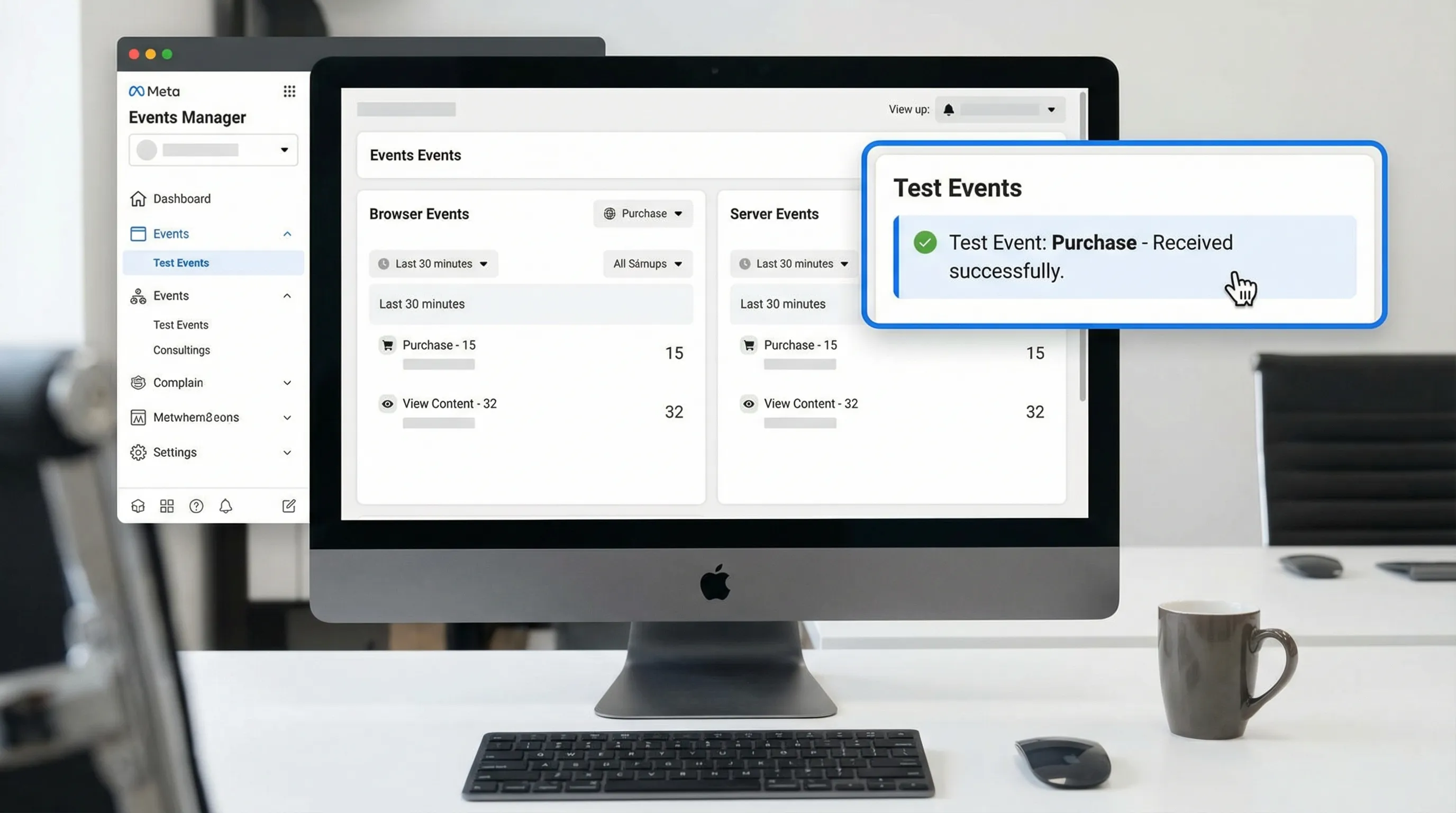
3) Verify your primary conversion event in Test Events
Day 1 is about a small set of events, not a long taxonomy. Pick the event that maps to revenue.
Common primary events:
- Lead gen: Lead or CompleteRegistration
- Ecommerce: Purchase (plus AddToCart and InitiateCheckout if you want a minimal funnel)
In Events Manager, use Test Events to trigger the conversion end-to-end (submit a form, place a test order, hit the thank-you page), then validate:
- The event fires once.
- The event contains expected parameters (for example, value and currency for Purchase).
- The event timestamp is current (no caching or delayed queue surprises).
4) Verify CAPI is actually receiving events (not just “configured”)
Many accounts have a CAPI integration that is “set up” but not reliably sending. Day 1 is where you detect this early.
Look for:
- A clear Server event stream in Events Manager.
- Consistent arrival when you repeat the same test conversion.
- A stable event name mapping (for example, your backend “order_completed” is actually mapped to Purchase, not a custom event you never optimize for).
What to capture as proof: a screenshot showing the same test conversion arriving as a Server event.
5) Verify deduplication when running Pixel + CAPI together
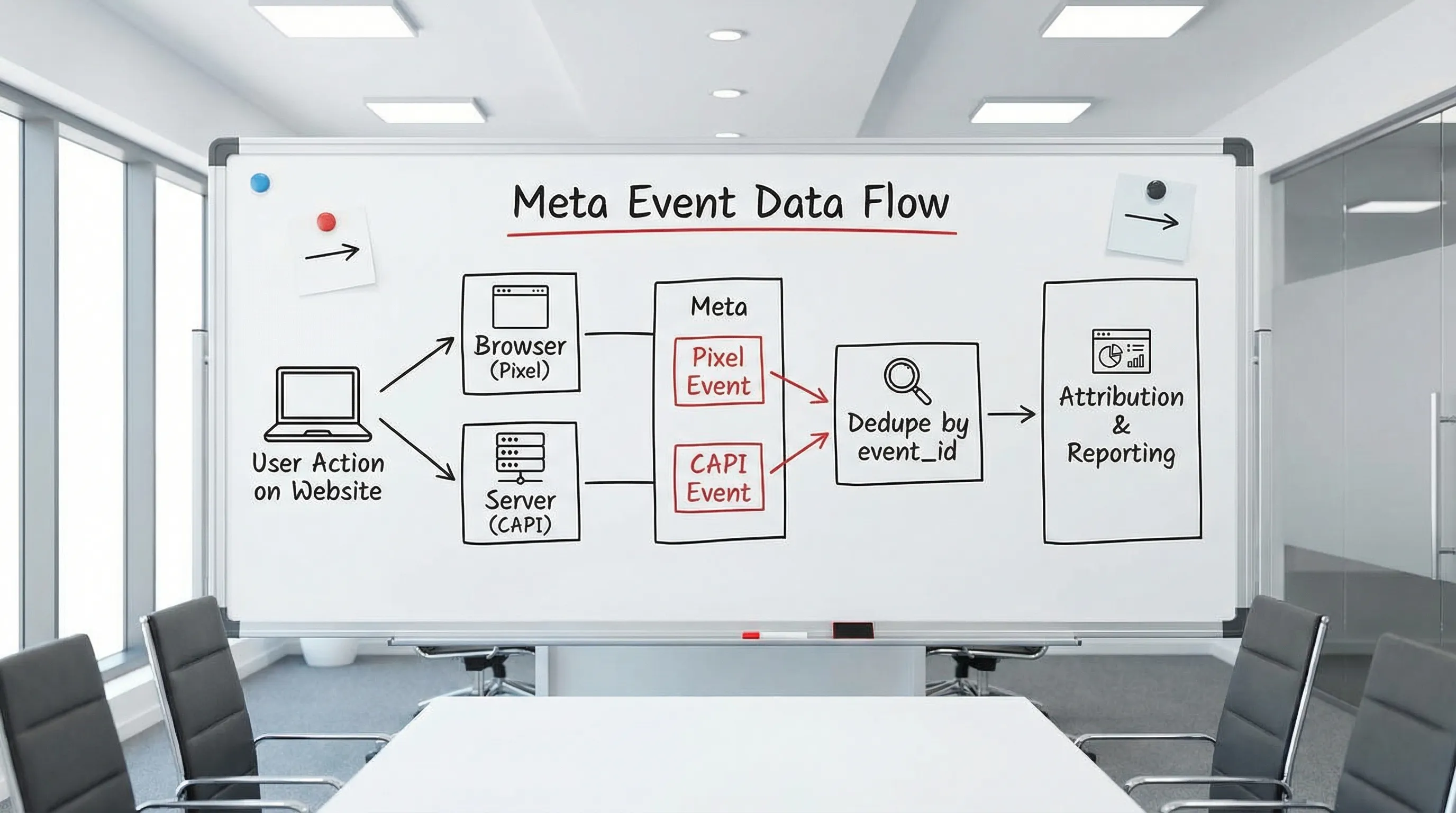
If you send the same conversion via Pixel and CAPI, you need deduplication, otherwise you inflate conversion counts.
Your Day 1 dedupe check:
- Trigger one conversion.
- Confirm you see it as both a browser event and a server event.
- Confirm Meta is deduplicating (Meta uses event_name + event_id as a common dedupe approach).
If you cannot validate dedupe, you should treat conversion reporting as unsafe.
6) Check event quality signals you will regret ignoring later
This is the part teams skip on Day 1, then spend weeks trying to fix after performance is already being judged.
In Events Manager, look for:
- Diagnostics warnings (parameter issues, mismatched domains, missing required fields).
- Event Match Quality (if shown for your setup). You are looking for improvement opportunities, not perfection on Day 1.
- For web: Aggregated Event Measurement (AEM) configuration is aligned to your primary conversion (especially important if you optimize for Purchase or Lead).
The goal is to avoid “we optimized for a conversion that isn’t reliably attributable.”
Day 1 troubleshooting map (symptom to likely cause)
When something breaks, speed comes from having a default diagnosis path.
| Symptom | Likely cause | Day 1 fix |
|---|---|---|
| PageView shows, but Lead/Purchase never appears | Event not implemented, fires on wrong page, or blocked by consent logic | Use Test Events, confirm trigger conditions, verify thank-you page routing |
| Events appear twice | Duplicate tags, multiple containers, SPA double-fire | Remove duplicate pixel, dedupe tag triggers, verify one firing per action |
| CAPI shows “connected” but no server events arrive | Misconfigured integration, endpoint/auth issue, wrong dataset | Re-test with a known action, check integration logs, confirm dataset ID mapping |
| Server events arrive but reporting is inflated | Missing dedupe setup (event_id mismatch) | Implement consistent event_id across browser and server for the same action |
| Events arrive from the wrong domain | Staging/dev environment sending production events | Filter or separate environments, correct dataset configuration, fix deployment |
| Purchase fires but has no value or wrong currency | Parameter mapping issue | Fix value/currency mapping in your ecommerce platform or server payload |
Make Day 1 repeatable: the “measurement-ready” onboarding packet
Day 1 verification fails most often because the agency does not have the right access, IDs, and owners in place. Treat this as an onboarding artifact, not an ad ops task.
Your minimum packet should include:
- Business Portfolio ID and confirmation that the client owns assets
- Dataset (Pixel) ID
- Domain(s), including checkout domain if different
- Who can approve partner access and who can run a live test (someone who can submit a real lead or test order)
- CAPI method (partner integration, direct, gateway, server-side GTM) and where logs live
If you want extra perspective on how other marketers structure practical verification and measurement routines, Saaga Solve’s no-fluff breakdowns are worth browsing on the Saaga Solve marketing and SEO blog.
Where Connexify fits
If your team is onboarding multiple clients, the hardest part is not knowing what to verify. It is getting the right people to complete the right access steps fast, without messy password sharing.
Connexify is built for that operations layer: a single branded onboarding link that requests the correct access and permissions across platforms, with a trackable flow your team can standardize. It can help you shorten “waiting for access” so Day 1 can actually be Day 1.
Frequently Asked Questions
Should I use Meta Pixel or CAPI? In most agency setups, you use both. Pixel gives quick browser coverage, and CAPI adds more durable server-side signal. Day 1 is about verifying both and confirming deduplication.
What is the most important thing to verify on Day 1? That your primary conversion event (Lead or Purchase) is firing correctly and is not being double-counted when sent via both Pixel and CAPI.
How do I know if deduplication is working? Trigger one real test conversion and confirm Meta is treating the browser and server versions as the same event (commonly via matching event_name and event_id).
Why does CAPI look “connected” but no conversions show up? “Connected” only means the integration exists. Day 1 verification requires proving server events arrive for a test action and are mapped to the correct standard event.
Do I need perfect Event Match Quality on Day 1? No. You need a baseline that is stable and improving, plus a clear list of diagnostics warnings you plan to fix before scaling spend.
What should I send the client as Day 1 proof? A short measurement-ready proof pack: screenshots from Events Manager Test Events showing the primary conversion arriving, plus confirmation of dedupe and any diagnostics issues logged.
Turn Day 1 verification into a standard onboarding step
If you want Day 1 to be predictable across every new client, you need two things: a repeatable verification checklist, and a repeatable way to collect access and approvals.
Connexify helps agencies operationalize that handoff with a single, branded onboarding link that streamlines secure access setup across platforms.
- Explore Connexify at connexify.io
- Or book a demo and see how to standardize measurement-ready onboarding for your team