Client Onboarding for Analytics: GA4, GTM, and Events
02/26/2026


Analytics onboarding is where “we got access” turns into “we can prove impact.” And it is also where many agency engagements quietly leak weeks of time: wrong GA4 property, no admin to publish GTM, events firing twice, consent mode breaking attribution, or a single missing step that only shows up after money is already spent.
This guide is a practical client onboarding for analytics playbook focused on GA4, Google Tag Manager (GTM), and event tracking. It is written for agencies and service teams that want a repeatable, secure, low-drama way to get measurement-ready fast.
What “measurement-ready” actually means (and why access alone is not enough)
A client can “give you access” and you still cannot ship reliable measurement.
Measurement-ready means:
- You have the right accounts and the right level of access to configure and publish.
- You have an agreed event plan that maps to business outcomes (not just button clicks).
- Events are implemented once, named consistently, and validated end-to-end.
- The data can be trusted enough to make budget and product decisions.
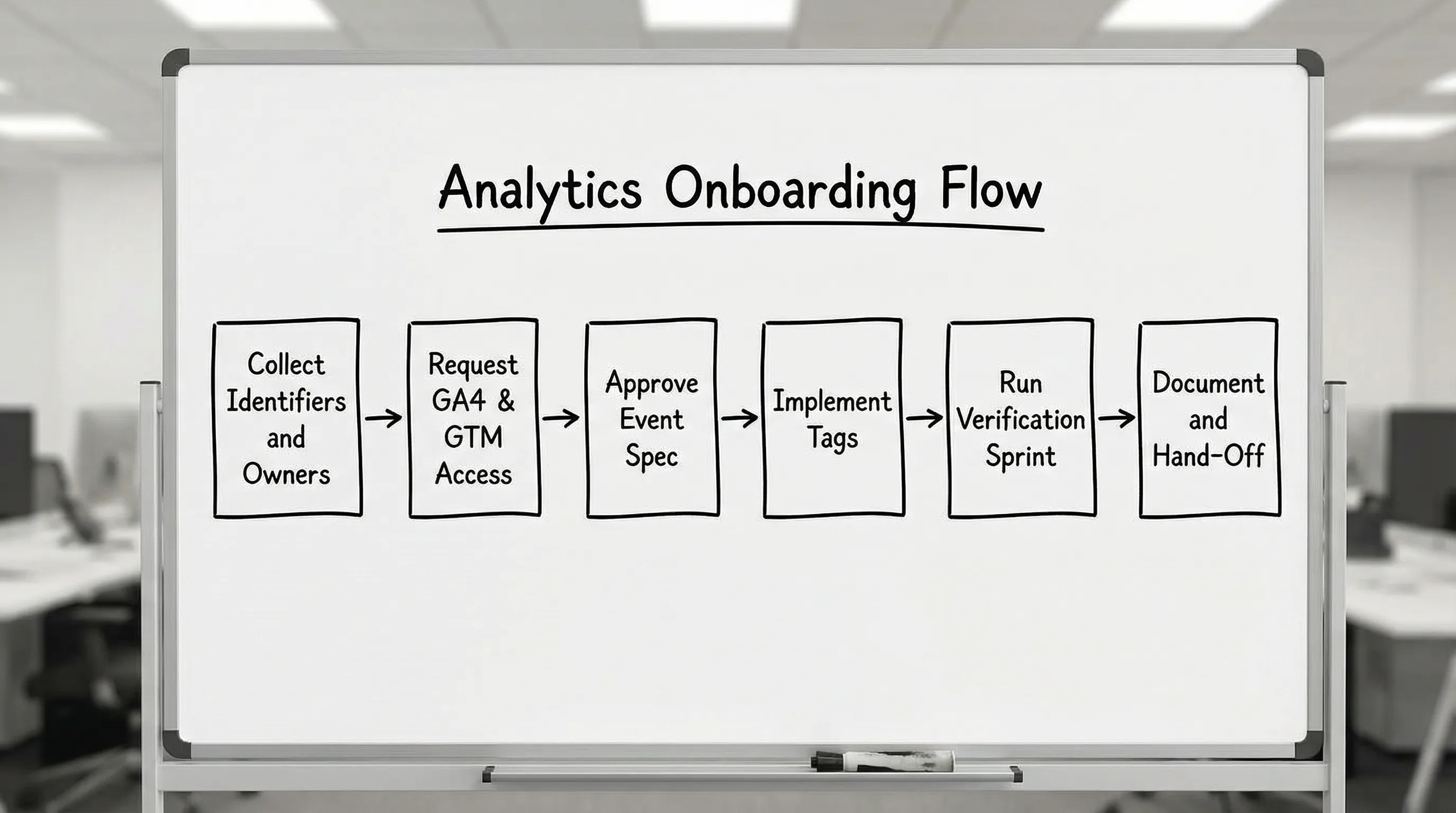
If you want one mental model, treat analytics onboarding as a production release: define requirements, obtain controlled access, implement, verify, and document.
The minimum analytics bill of materials to collect on Day 0
Before you touch GA4 or GTM, collect the minimum set of identifiers and decisions that prevent the most common rework.
Required identifiers
- Website URL(s) and primary domain
- GA4 Account name and Property ID (or confirmation that a new property should be created)
- GA4 Data Stream details (Web stream measurement ID, and any existing stream settings)
- GTM Container ID and where it is installed (CMS, hard-coded, server-side)
- Key platforms that will send conversions (Google Ads, Microsoft Ads, Meta, CRM, call tracking)
Required decisions
- Primary conversion(s) and what counts as a “qualified” conversion
- The source of truth for revenue or pipeline (CRM vs ecommerce platform vs billing system)
- Consent requirements (cookie banner, consent mode expectations, regions)
- Who can approve publishing changes (one named owner)
A surprisingly effective rule: no kickoff call until the above is confirmed, even if you do the deeper event spec later.
Access and permissions: what to request (and what not to)
The fastest analytics onboarding is usually the one with the fewest privileges, clearly scoped.
GA4: roles you actually need
In GA4, your team typically needs enough access to:
- Configure events and conversions
- Create and manage audiences if you support remarketing
- Link to ad platforms
- Adjust data retention and reporting settings when in scope
Google’s GA4 permissions can be confusing because “Editor” sounds powerful but still has limits compared to full admin capabilities.
A practical starting point for agencies:
| Tool | Recommended default | When to request higher access | Notes |
|---|---|---|---|
| GA4 Property | Editor | If you must manage links, user management, or certain settings depending on client governance | Avoid requesting user management unless it is explicitly in scope and approved. |
| GA4 Property | Viewer for stakeholders | Never | Keep stakeholder access simple to reduce noise and misclicks. |
If the client’s governance is strict, prefer: “client keeps admin, agency gets editor, and we do changes in a recorded change log.”
GTM: the “publish” bottleneck
For GTM, the big question is whether your team can publish.
| Tool | Recommended default | When to request higher access | Notes |
|---|---|---|---|
| GTM Container | Publish (or equivalent publish-level permission) for one responsible owner in your team | When you own tagging delivery SLA | If nobody can publish, everything becomes a ticket queue. |
| GTM Container | Edit for analysts/implementers | Rarely | Give least privilege by role. |
Also decide up front: do you publish directly, or do you submit versions for the client to publish?
What not to do
- Do not ask for shared logins or passwords.
- Do not request owner-level access “just in case.”
- Do not accept access from personal Gmail identities if the client has a business identity standard.
Event tracking onboarding: align on outcomes before taxonomy
Most analytics onboarding fails because the team starts with tags and ends up with inconsistent events.
Start with outcomes.
Step 1: define the conversion ladder
A simple conversion ladder for a B2B site could be:
- Lead (form submit)
- Qualified lead (meets criteria or reaches a key step)
- Sales accepted (from CRM)
- Closed won (from CRM)
For ecommerce:
- View item
- Add to cart
- Begin checkout
- Purchase
Your event plan should mirror the ladder. Everything else is diagnostic.
Step 2: create a one-page event spec your client can approve
Avoid 30-page tracking docs that nobody reads. Use a compact spec that includes just enough to implement correctly.
| Field | Example | Why it matters |
|---|---|---|
| Event name | generate_lead | Consistency across GA4 and GTM. |
| Trigger definition | “Thank-you page loads” or “Form submit callback” | Prevents double firing and mismatch. |
| Parameters | form_id, lead_type, page_category | Enables segmentation later without creating new events. |
| Conversion? | Yes/No | Keeps conversion list clean. |
| Owner | Agency or client dev | Clear responsibility. |
| Test method | GA4 DebugView + GTM Preview | Forces verification plan. |
If you support multiple properties or brands, add a naming rule (lowercase, underscores, no spaces) and enforce it.
The 60-minute analytics verification sprint (what to test live)
Once access is granted and initial implementation is in place, run a timeboxed verification sprint. The goal is to confirm you can trust the data before campaigns, reporting, or optimization decisions.
Here is a practical checklist.
| Check | Pass criteria | Common failure |
|---|---|---|
| Identity and correct property/container | You are in the intended GA4 property and GTM container | Working in a staging property or old container. |
| GTM publish ability | A test version can be published or submitted via the agreed workflow | You can edit but not publish. |
| Baseline page_view/session data | GA4 is receiving events | Tag not installed on all templates or blocked by consent. |
| Key conversion fires once | One action equals one event | Double firing from click trigger + thank-you trigger. |
| Parameter integrity | Parameters appear as expected | Parameters missing due to variable scope or timing. |
| Cross-domain (if relevant) | Sessions persist across domains | Self-referrals inflate traffic and kill attribution. |
In GA4, verification is often done with DebugView during testing, then confirmed in standard reports after processing.
Consent, privacy, and data handling: decide early to avoid rework
Consent requirements are no longer a “later” item. They determine whether tags can fire, whether modeling is used, and how attribution behaves.
Key onboarding questions:
- Is there a consent management platform (CMP) already in place?
- Which regions must be treated as consent-required?
- Do you need Google Consent Mode configuration?
- Are you collecting any sensitive data in event parameters?
If your client is regulated or audited, it also helps to operationalize reminders around reviews and renewals (for example, quarterly access audits or compliance deadlines). Tools like expiration reminder software can be useful to ensure governance tasks do not disappear into a calendar nobody checks.
Standardize the client experience: one intake, one link, one source of truth
Analytics onboarding touches multiple tools and multiple stakeholders (marketing, web, IT, sometimes legal). The operational failure mode is predictable: scattered email threads, partial access, and unclear definitions.
A dedicated client onboarding layer is designed to prevent exactly that.
With Connexify, agencies can consolidate analytics onboarding into a single, branded link that guides the client through:
- Connecting relevant platforms through one onboarding flow
- Requesting the right permissions with customizable access scopes
- Supporting multi-platform onboarding (useful when GA4, GTM, ads, and CRM access are all required)
- Keeping the experience white-labeled when needed
- Using integrations (API and webhooks) to sync status into your PM or CRM
Because Connexify is SaaS with no installation, it can fit into existing agency operations without a long implementation project. If you want to see what a one-link onboarding flow looks like in practice, you can explore Connexify at connexify.io.
GA4 setup decisions that should be part of onboarding (not “later”)
Even when GA4 already exists, agencies often need to confirm configuration choices early because they change reporting, attribution, and downstream activation.
Confirm the data stream and key settings
Onboarding checks to run:
- Is the web data stream attached to the correct domain(s)?
- Is enhanced measurement enabled, and does it align with your event plan?
- Is internal traffic filtered (or at least defined) so testing does not pollute data?
- Are referral exclusions needed (payments, third-party carts, scheduling tools)?
Align on conversion definitions
Be explicit:
- Which GA4 events will be marked as conversions?
- Which conversions matter for optimization vs just reporting?
- Do you need separate conversions for different lead types?
A clean conversion list is a competitive advantage. It makes reporting easier, and it prevents teams from optimizing to low-quality micro actions.
GTM onboarding: reduce risk with a container operating model
If you manage tagging across many clients, you need a consistent model for how GTM is maintained.
Decide how changes are made
Pick one approach and document it:
- Agency publishes: fast, but requires strong internal QA.
- Client publishes: more control for the client, but adds latency.
Establish versioning and QA rules
At minimum:
- Every publish includes a short changelog
- Every change is tested in GTM Preview
- Every conversion change is tested with a live end-to-end action
If a client has multiple environments, ask for that during onboarding (staging vs production), because it impacts how you test and how you name containers.
Common analytics onboarding blockers (and how to prevent them)
These are the issues that most often turn “we’ll launch next week” into “we’re still waiting.”
Blocker 1: wrong owner for access requests
Fix: name a single client owner for GA4 and GTM access, and capture it in the onboarding intake. If multiple people are involved, define who can actually approve and who is just informed.
Blocker 2: container installed inconsistently
Fix: confirm where GTM is installed (CMS theme, plugin, hard-coded) and whether there is more than one container present.
Blocker 3: events double fire
Fix: pick one trigger type per conversion (thank-you page OR submit callback OR click), then validate with a test plan.
Blocker 4: cross-domain breaks attribution
Fix: identify cross-domain flows during intake (checkout, scheduling, subdomains) and add them to the verification sprint.
Blocker 5: consent blocks measurement unexpectedly
Fix: ask about CMP and regions on Day 0, and include consent requirements in the event spec.
What to document before you call analytics onboarding “done”
The handoff document should be short, but complete enough that a future team can maintain the system.
Include:
- GA4 property and stream identifiers
- GTM container ID and who can publish
- Event spec (final) and which events are conversions
- Known limitations (consent, cross-domain, offline conversion gaps)
- Change process (how new events are requested and approved)
This is also where a dashboard view of onboarding completion is valuable. It keeps “access granted” and “measurement verified” from being confused.
A practical next step: turn analytics onboarding into a product
If you run analytics as a service, onboarding is not admin work. It is part of delivery quality.
A strong next step is to standardize:
- One analytics onboarding intake
- One permission matrix
- One event spec template
- One verification sprint
- One definition of done
If you want to operationalize this with a branded client experience, Connexify is built to streamline client onboarding across platforms with a single link, secure permissioning, and automation via API and webhooks. You can start with the 14-day free trial or book a demo from the site to see how it fits your agency workflow.