Salesforce Access for Agencies: A Safe Data Approach
02/24/2026


When an agency asks for Salesforce access, the client is not just granting “tool access”. They are granting proximity to revenue data, customer PII, deal strategy, and sometimes regulated information. That’s why the safest agencies treat Salesforce onboarding like a security and governance workflow, not a one-off admin request.
This guide outlines a practical, least-privilege approach to Salesforce access for agencies, including what to request, how to validate access quickly, and how to keep the client’s data protected over time.
Why Salesforce access is higher risk than “just another login”
Salesforce is often the system of record for:
- Leads, contacts, accounts, and opportunities (commercially sensitive)
- Notes, tasks, emails, call logs (high-context communication)
- Custom objects (often tied to internal operations)
- Integrations and automations (where a single token can move a lot of data)
A common agency failure mode is “fast access” that turns into “permanent over-access”. It usually looks like this:
- The client gives a shared admin login “temporarily”
- An agency team member exports more data than needed into spreadsheets
- API credentials get created ad hoc, then never rotated or retired
- Nobody can later answer, “Who had access to what, and when?”
A safe data approach aims for speed and verification, without trading away control.
The safest access model (in one sentence)
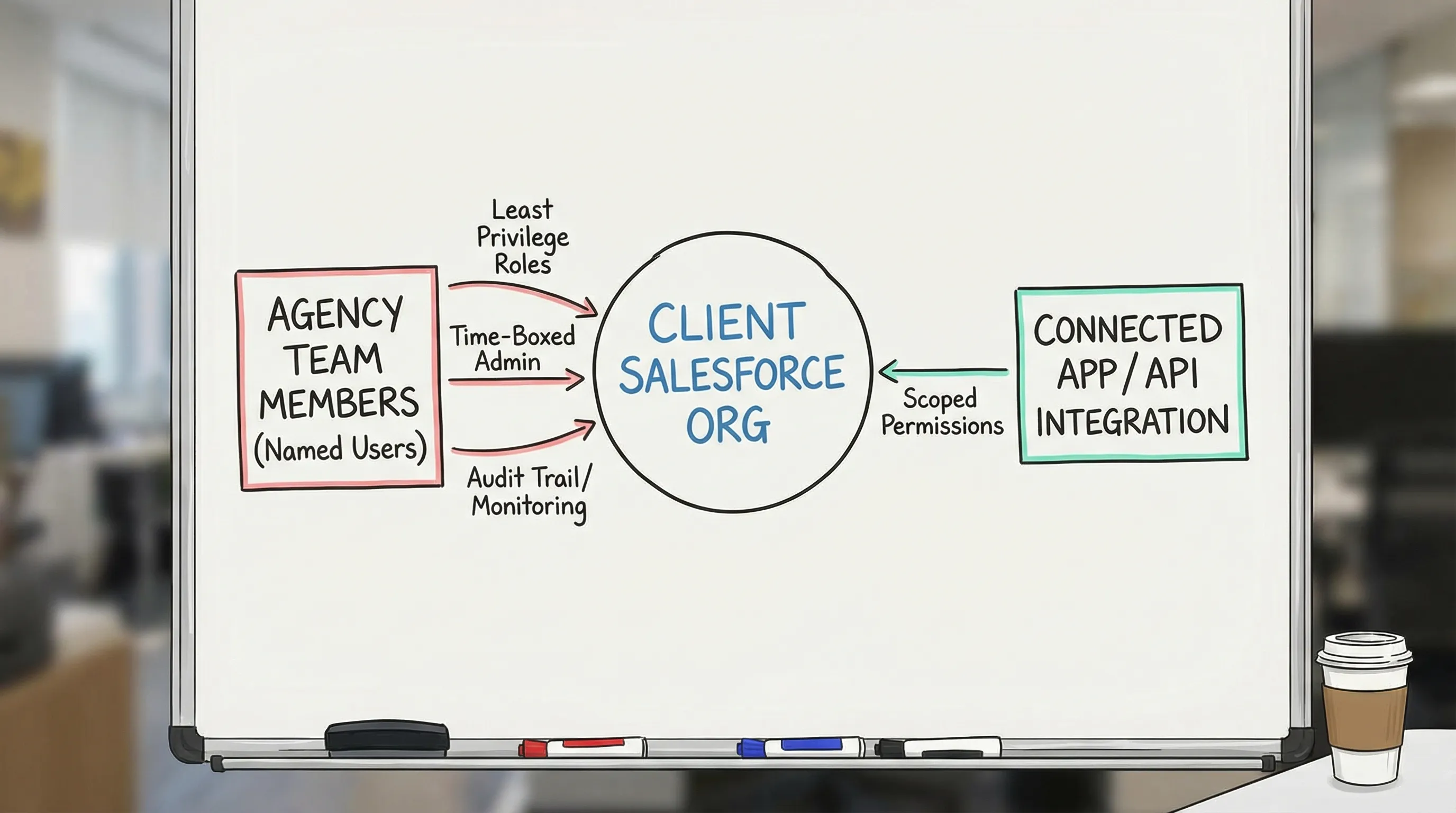
Client owns the Salesforce org and data, the agency gets named-user access (or scoped API access) with least privilege, time-boxed elevation when needed, and an offboarding plan from day one.
This aligns with widely accepted security practice (least privilege and separation of duties) and makes onboarding repeatable across accounts.
Pre-boarding: what agencies should confirm before requesting anything
Before you send an access request, confirm the context. Two clients can both say “We’re on Salesforce” and still have very different security and operating constraints.
Here’s a practical pre-boarding checklist to run with the client (or capture via an intake form) so your access request is precise.
| What to confirm | Why it matters | Example output you want |
|---|---|---|
| Which Salesforce org/environment(s) | Prevents “wrong org” mistakes and broken verification | Production only, plus a sandbox for testing if available |
| Identity and security baseline | Determines how users authenticate and how fast you can onboard | SSO enabled, MFA enforced, password policies defined |
| Who can approve access | Avoids multi-week delays | 1 primary admin approver, 1 backup approver |
| Scope of work inside Salesforce | Maps to permission sets and reduces overreach | Reporting only, lifecycle stage updates, campaign attribution fields |
| Data sensitivity constraints | Impacts what can be exported, stored, or integrated | PII restrictions, DPA requirements, no local exports |
| Integration needs (if any) | API access is a different risk surface than UI access | Connected app approach, integration user owner |
If your agency has ever lost days to “we gave you access, why can’t you see anything?” this step is the fix.
Define “done” for Salesforce access (so you can verify it)
“Access granted” is not the same as “access usable.” A safe approach includes an explicit definition of verified access.
For most agencies, verified Salesforce access means:
- Correct identity: the right named user account, not a shared login
- Correct org: the user can log into the intended Salesforce environment
- Correct permissions: access matches the agency’s job (not broader)
- Correct objects and fields: object-level and field-level security allow required work
- Correct reporting visibility: the agency can view the specific reports/dashboards needed
- Auditability: the client can later review who was provisioned and what was granted
If you want to operationalize this, make it an SLA (for example, “time to verified access”) and track it.
Least-privilege permission design: what to request by agency role
A safe data approach starts by mapping job to be done to minimum permissions. In Salesforce, this often means using a dedicated agency profile and one or more permission sets (the exact configuration depends on the client’s Salesforce setup).
Below is a conservative, agency-oriented access matrix you can use as a starting point.
| Agency function | Safest default access | When to elevate | Notes to reduce data risk |
|---|---|---|---|
| Strategy / account lead | Read-only reports and dashboards | Rarely | Prefer curated reports over broad object access |
| Analyst / attribution | Read-only to required objects, plus reporting | Sometimes | Avoid “Export Reports” unless truly required |
| RevOps / Salesforce consultant | Limited edit rights to specific fields/objects in scope | Sometimes | Define exactly which fields can be edited (example: lifecycle stage) |
| Marketing ops (campaign tracking) | Create/edit on Campaigns and related tracking fields only | Sometimes | Keep opportunity and forecast objects off-limits by default |
| Developer (integration or automation work) | Sandbox-first, metadata access where possible | Sometimes | Separate environments, avoid building directly in production |
| Temporary admin (break-glass) | Time-boxed admin, approved and revoked on a schedule | Only for specific tasks | Treat as an exception with a ticket, owner, and expiry date |
Two practical rules that make this work in real life:
- Start narrow, then expand. It is safer to add one permission set than to claw back admin access after a scare.
- Separate duties. The person building automations should not be the only person approving data exports.
UI access vs API access: treat them as different onboarding lanes
Agencies often blur these together. Don’t.
Lane 1: Named-user UI access
This is the default for most agency work (audits, reporting, workflow changes, field updates). Best practices:
- Use named users, not shared logins
- Enforce MFA and strong authentication where possible (Salesforce provides guidance and learning resources via Trailhead’s MFA content)
- Keep access scoped to the minimal set of objects, fields, and reports
Lane 2: API and integration access
If your agency needs to pull or push data (for example, syncing lead status or campaign attribution), you are now in “credential and token governance” territory.
Safer patterns include:
- Use an OAuth connected app approach rather than storing a human user’s password (Salesforce overview: Connected Apps)
- Use a dedicated integration identity (where appropriate) with minimal permissions
- Document token ownership, rotation expectations, and offboarding steps
The key idea is simple: API access is leverage. A narrowly-scoped UI user might be able to see a dashboard. A poorly-scoped API credential might be able to extract or modify large datasets.
The 30-minute Salesforce access verification sprint
A safe approach is not “slow.” In fact, the fastest agencies time-box verification.
Run a short live session (or an internal checklist right after access is granted) and confirm these items:
- Login works in a clean browser session and the correct org
- MFA challenge and recovery method are set up (if required)
- The agency can access the exact reports/dashboards required
- Object and field access match the scoped tasks (spot-check at least 2 to 3 critical objects)
- Any required exports are explicitly granted (or explicitly not granted)
- If integrations are part of scope, confirm connected app or OAuth flow works and is owned by the right client admin
If anything fails, you fix it while the approver still has context, instead of reopening the topic a week later.
Governance: staying safe after onboarding
Salesforce access risk typically increases over time, not on day one. Here are governance practices that protect clients and reduce agency fire drills.
Quarterly access review (minimum)
Agree up front that access will be reviewed on a schedule. The review should answer:
- Which agency users still need access?
- Did any roles change (and therefore require permission changes)?
- Are there any “temporary” admin grants that were never revoked?
Offboarding is part of onboarding
Make offboarding a standard clause in your process:
- Remove named users when the engagement ends
- Revoke permission sets granted for the project
- Rotate or retire integration tokens if they were created for agency use
- Provide the client with a short “what we touched” summary for audit continuity
Reduce data sprawl
A surprisingly effective policy is: don’t move Salesforce data out of Salesforce unless there’s a documented reason.
If exports are needed, set expectations on:
- Where exported data is stored
- Who can access it
- How long it is retained
- How it is deleted at the end of the engagement
How to make this repeatable across clients (without slowing down)
The operational challenge for agencies is consistency. You want every client to get the same safe, branded experience, even when:
- Multiple stakeholders need to approve access
- The client’s Salesforce setup is customized
- Your team spans strategists, analysts, and technical operators
This is where a dedicated onboarding layer helps.
Using Connexify to standardize Salesforce access requests
Connexify is a client onboarding software platform designed to streamline secure account access setup through a single, branded link.
For Salesforce access workflows, agencies commonly use a centralized onboarding flow to:
- Collect the right stakeholder contacts (who approves access, who owns security)
- Capture scope and map it to a “minimum permissions” request packet
- Keep the client experience branded and consistent across accounts
- Track completion status in a dashboard (so access does not disappear into email threads)
- Trigger handoffs into your stack using API and webhook integrations (for example, creating tasks once access is verified)
If your current process relies on scattered emails and “quick admin access,” a one-link flow is often the easiest way to raise security without adding friction.
Frequently Asked Questions
Should agencies ask for Salesforce admin access? In most cases, no. Start with least-privilege access aligned to the scoped tasks, and time-box admin elevation only when a specific change requires it.
Is a shared login ever acceptable for Salesforce? It is a common shortcut, but it increases audit and security risk. Named-user access is safer and easier to govern over time.
What’s the difference between UI access and API access in Salesforce onboarding? UI access controls what a user can do in the interface. API access typically involves tokens and connected apps, and can enable broader data movement if not tightly scoped.
How can we speed up Salesforce access without cutting corners? Define “verified access,” time-box a short verification sprint, and standardize your request packet so clients know exactly what to grant.
How do we prevent access creep over long retainers? Use scheduled access reviews, revoke temporary elevation, and include offboarding steps (user removal and token rotation) as part of your standard process.
Make Salesforce access secure, fast, and repeatable
If you want a safer data approach without adding more back-and-forth, use a single branded onboarding link to standardize how you request, verify, and track access across clients.
Connexify helps agencies streamline onboarding from days to seconds, with a branded experience, customizable permissions, secure data handling, and API/webhook integrations.
Get started with Connexify by booking a demo or starting a 14-day free trial at Connexify.