SOC 2 Questions Clients Ask About Onboarding Tools
02/26/2026


Security reviews used to happen late in the buying process. In 2026, they often happen before kickoff.
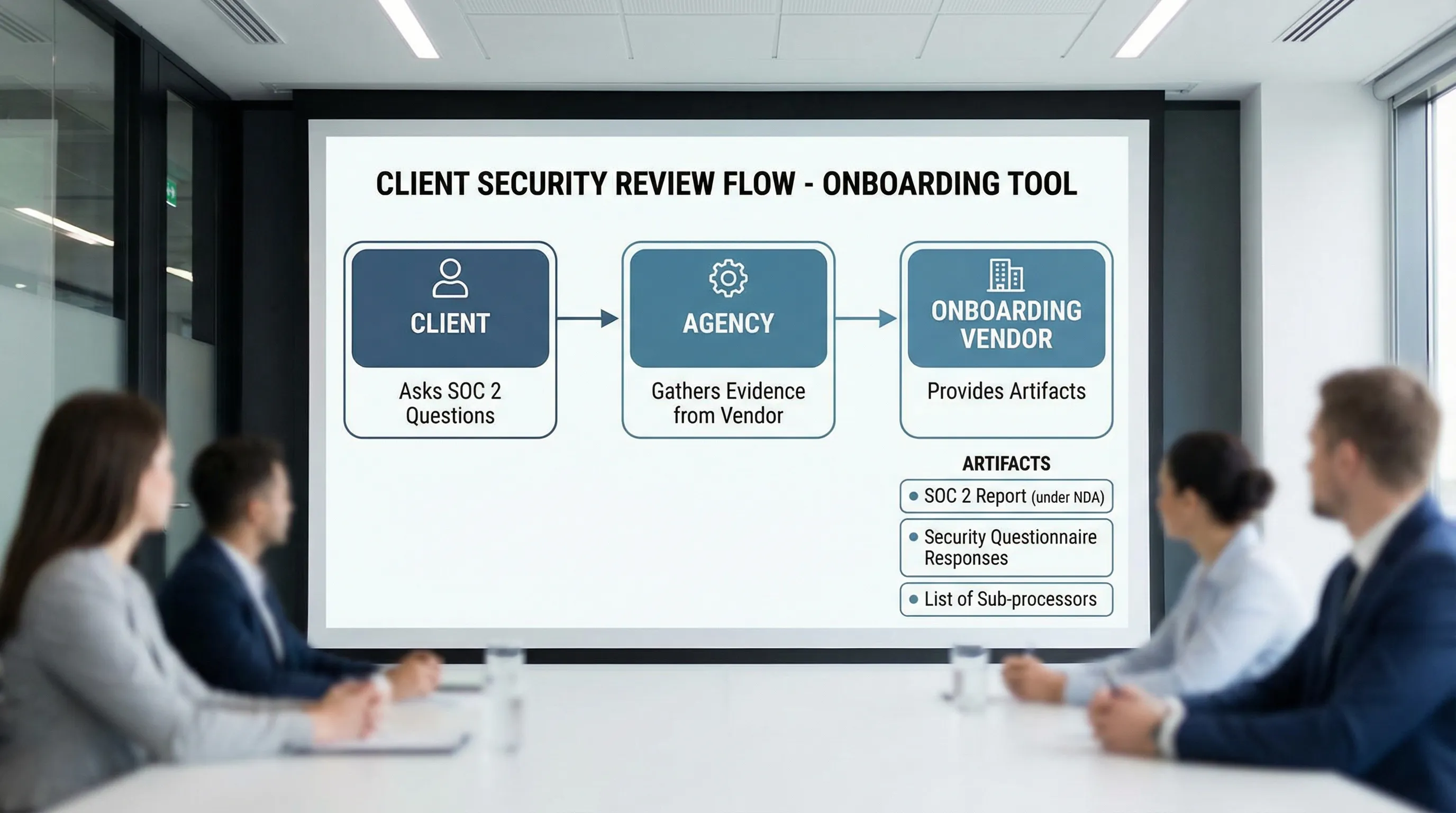
If you are an agency or service provider using a client onboarding tool to request access (Google, Meta, LinkedIn, analytics, project tools), clients will ask some version of: “Is this SOC 2 compliant?” What they usually mean is: “Can we trust this tool with our accounts, our data, and our approvals?”
Below are the most common SOC 2 questions clients ask about onboarding tools, how to answer them clearly, and what evidence to request from your vendor so you can keep deals moving.
Why SOC 2 comes up for onboarding tools
Onboarding tools sit in a sensitive part of the workflow:
- They often touch identity (who is logging in)
- They may broker access to third-party platforms (ads accounts, analytics, social profiles)
- They collect operational details (asset IDs, billing contacts, DNS requests, approvals)
- They create an audit trail of who requested what and when
That is exactly the kind of system a client’s security team will scrutinize.
SOC 2 in plain English (what it is and what it is not)
SOC 2 is an independent attestation report (issued by a CPA firm) that evaluates a service organization’s controls against the AICPA Trust Services Criteria (most commonly Security, and optionally Availability, Confidentiality, Processing Integrity, and Privacy).
Two common report types:
- SOC 2 Type I: Controls are designed appropriately as of a point in time.
- SOC 2 Type II: Controls operated effectively over a period of time (often 3 to 12 months).
SOC 2 is not a “perfect security” badge, and it is not the same as ISO 27001. It is evidence that the vendor has a defined control environment and that it has been assessed.
For an overview straight from the source, see the AICPA’s SOC resources: AICPA SOC for Service Organizations.
The SOC 2 questions clients ask (and how to answer)
1) “Do you have SOC 2? Type I or Type II?”
What they are really asking: Has an independent auditor reviewed your controls, and do they run over time?
A strong answer sounds like:
- “We can provide the vendor’s SOC 2 report under NDA. It states whether it is Type I or Type II, the period covered, and the scope.”
What to request from the vendor:
- SOC 2 report (usually shared under NDA)
- Report period (for Type II) and the auditor’s opinion
- A current bridge letter (if the report period is not recent)
2) “What is the scope of your SOC 2 report?”
What they are really asking: Which product, services, and environments are covered, and which are not?
SOC 2 is often scoped to specific systems. Clients want to know whether the exact onboarding product you are using is included.
What to request from the vendor:
- Scope statement and in-scope systems
- In-scope Trust Services Criteria categories
- Any carve-outs and complementary user entity controls (controls the client or agency must perform)
3) “Are you collecting or storing our passwords?”
What they are really asking: Are you introducing credential-sharing risk?
For onboarding tools, the safest pattern is: no password collection, use vendor-native access mechanisms (invites, partner access, OAuth) wherever possible.
How to answer as an agency:
- “We do not ask for personal passwords. We use role-based access methods (like partner access or platform invites) and verify access during kickoff.”
What to request from the vendor:
- A clear statement in their security docs or questionnaire about credential handling
- Details on supported authentication and authorization flows (for example, OAuth where applicable)
4) “How do you enforce least privilege and role-based access?”
What they are really asking: Can we limit access to only what is necessary, and can we prove it later?
Least privilege matters in onboarding because it is easy to over-request access to “avoid delays,” then never reduce it.
Evidence to provide:
- Permission templates or role presets (what is requested per platform and per service)
- An explanation of how permissions can be customized per client
- Documentation of how access is reviewed and removed (offboarding)
5) “Do you support SSO, MFA, and access controls for your own app?”
What they are really asking: Is your internal access to the onboarding tool controlled like a serious system?
Even if the onboarding tool never touches client passwords, it still contains sensitive operational data (contacts, asset IDs, approvals, links).
What to request from the vendor:
- Authentication options (SSO if available, MFA requirements, session timeouts)
- Administrative controls (user management, permissions, access reviews)
- How privileged access is managed internally
If you cannot get a direct “yes,” ask what compensating controls exist (for example, enforced MFA for all users, restricted admin roles, audit logs).
6) “Is our data encrypted in transit and at rest?”
What they are really asking: Are basic security baselines in place?
This is a standard procurement question. Most reputable SaaS platforms will say yes, but clients want it confirmed and documented.
What to request from the vendor:
- Encryption statement (in transit and at rest)
- Key management approach at a high level (you do not need deep details, but you do want assurance it is managed intentionally)
7) “Where is data hosted, and do you restrict data residency?”
What they are really asking: Are we exposed to cross-border compliance issues?
This matters for regulated industries and for clients with strict vendor policies.
What to request from the vendor:
- Hosting regions and whether region selection is supported
- Whether data is processed outside the primary region
If the client cares about residency, address it early because it can block legal approval late.
8) “Do you have an audit trail? Can we see who did what?”
What they are really asking: Can we investigate incidents and support internal audits?
Onboarding is a common source of “who approved this?” confusion. Logs reduce risk.
What to request from the vendor:
- Examples of logged events (link created, invite sent, access granted, permissions changed)
- Log retention period
- Export options (or API access) if needed
9) “Who are your sub-processors (third parties)?”
What they are really asking: Which other vendors touch our data, and can we review them?
In SOC 2 conversations, sub-processors matter because they shape real risk, even if the onboarding tool itself is secure.
What to request from the vendor:
- Sub-processor list
- Purpose of each sub-processor
- Whether the vendor has a process for onboarding and monitoring sub-processors
10) “What is your data retention and deletion policy?”
What they are really asking: Can we minimize data exposure over time?
Retention is easy to ignore until a contract ends and the client asks for confirmation that data is removed.
What to request from the vendor:
- Retention policy for customer data
- Deletion workflow (what is deleted, what is anonymized, what is retained for legal reasons)
- Timeline for deletion after request and after contract termination
11) “How do you handle incidents and breach notification?”
What they are really asking: If something goes wrong, will we find out fast, and will the vendor act professionally?
What to request from the vendor:
- Incident response policy overview
- Breach notification commitments in the contract (timeframes, channels)
- Security contact and escalation process
Do not overpromise as an agency. If the client needs a specific notification window, route that requirement to the vendor contract.
12) “Do you do penetration tests or vulnerability scanning?”
What they are really asking: Do you actively look for issues, or do you just react?
SOC 2 does not automatically mean “pen tested,” but many vendors do testing as part of their program.
What to request from the vendor:
- High-level vulnerability management policy
- Whether third-party penetration tests are performed, and whether an executive summary is available
13) “Can we limit who at your company can access our data?”
What they are really asking: Internal access controls and separation of duties.
What to request from the vendor:
- Policy for internal access to production systems
- Whether access is logged and reviewed
- Support workflows for data access (for example, time-bound access approvals)
14) “How does your tool avoid becoming a backdoor into our accounts?”
What they are really asking: If the tool is compromised, can an attacker pivot into ad accounts, analytics, or social profiles?
This is where you should explain the difference between:
- Requesting access (invites, partner access, approvals)
- Owning access (long-lived keys, shared logins)
As an agency, a good security posture is to keep clients as asset owners and get access through platform-native, revocable permissions.
A practical evidence pack (what to prepare before clients ask)
If your onboarding tool is part of your standard delivery, keep a small “security evidence pack” ready. It should include:
- SOC 2 report access process (who signs the NDA, how it is delivered)
- A short security overview (1 to 2 pages)
- Sub-processor list
- Data retention and deletion policy
- Incident response and breach notification summary
- A statement on credential handling (ideally, “we do not collect passwords”)
This reduces cycle time when procurement gets involved.
Here is a simple mapping you can reuse with prospects:
| Client question | Why it matters | What to provide (best practice) |
|---|---|---|
| Do you have SOC 2 Type II? | Validates controls operated over time | SOC 2 Type II report under NDA, report period, bridge letter if needed |
| Are passwords stored? | Prevents credential-sharing risk | Written statement, description of OAuth or platform-native invites |
| Who can access our data? | Limits insider risk | Internal access policy summary, logging and approval approach |
| Is data encrypted? | Baseline technical assurance | Encryption statement (in transit and at rest) |
| Who are your sub-processors? | Third-party risk visibility | Sub-processor list and purpose |
| How do you delete data? | Reduces long-term exposure | Retention and deletion policy, timeline |
How to answer SOC 2 questions without slowing onboarding
When a client asks “Are you SOC 2?”, avoid a one-word answer. Use a short, calm script that shows you have a process.
A client-ready response you can adapt:
- “Yes, we take security seriously. For the onboarding tool, we can share the vendor’s SOC 2 documentation under NDA, plus their sub-processor list and data retention policy. We also follow least-privilege access and never request passwords. If your security team has a questionnaire, send it over and we will route it to the vendor.”
This keeps momentum while respecting procurement.
Where Connexify fits (without making security claims you cannot verify)
Connexify is a client onboarding software platform designed for agencies and service providers to streamline access setup through a single branded link, support multiple platforms, and reduce manual onboarding steps.
If you are evaluating Connexify (or any onboarding software), use the questions above as your due diligence checklist. For product details, start here: Connexify.
Frequently Asked Questions
Is SOC 2 required for onboarding tools? Not always. Many SMB clients will accept strong security practices without SOC 2. Larger companies often require SOC 2 (usually Type II) to approve a vendor.
What is the difference between SOC 2 Type I and Type II? Type I evaluates control design at a point in time. Type II evaluates whether controls operated effectively over a defined period.
Can a vendor share their SOC 2 report publicly? Often no. SOC 2 reports are commonly shared under NDA because they contain sensitive details about systems and controls.
If an onboarding tool is SOC 2 compliant, does that mean our onboarding is secure? It helps, but your process still matters. Least-privilege access, no password sharing, live verification, and regular access audits are still necessary.
What should we do if a client asks for SOC 2 but our vendor does not have it? Offer alternative evidence (security policies, pen test summary, sub-processor list), reduce scope, and involve the client’s security team early to avoid a late-stage block.
Make onboarding fast, and defensible
If you are tired of access setup dragging on for days (and turning into a security debate), a dedicated onboarding layer can help you standardize both the experience and the evidence.
Connexify lets you send a single branded onboarding link to set up client access across platforms with customizable permissions, plus API and webhook integrations for operational handoffs.
Book a demo or start the 14-day free trial: connexify.io.