Running a Social Media Manager Company With Smooth Onboarding
12/24/2025

If you run a social media manager company, smooth onboarding is the single biggest lever you have for trust, speed, and margins. The difference between three weeks of back and forth and a 48 hour launch often comes down to how you capture access, assets, and approvals. This playbook shows how to operationalize onboarding so your team can publish faster, stay compliant, and make a great first impression every time.
What “smooth onboarding” looks like in a social media manager company
Smooth onboarding is not just a faster kickoff call. It is a predictable operating system that:
- Centralizes client intake through one branded link, so there is no chasing screenshots or passwords
- Requests least privilege access across platforms, so compliance and security stay intact
- Verifies access live, so your team knows exactly what is ready and what is blocked
- Pulls brand assets and approvals into one flow, so creative work starts immediately
- Triggers automatic handoffs to your PM and CRM tools, so nothing falls through the cracks
For a deeper dive into why trust and onboarding speed compound over the relationship, see our guide on building agency trust, then use the step by step process below to implement at your firm.
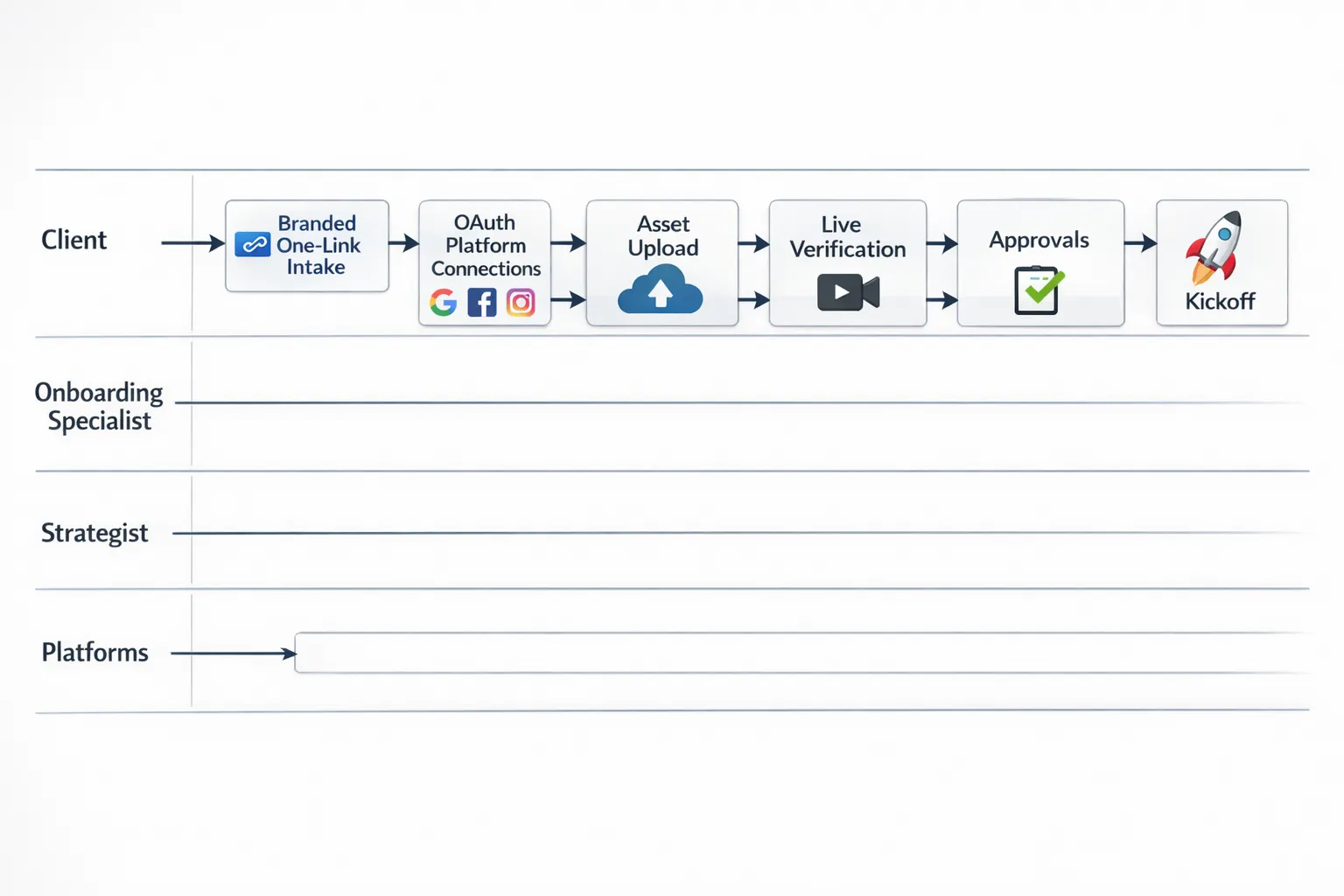
Your Onboarding Operating System, step by step
Step 1: Pre sale alignment
Clarify scope and roles before a contract is signed. Confirm platforms you will manage, what your team needs to access, who will approve content, and any legal constraints. Bake onboarding SLAs into your proposal so buyers understand exactly how you will get live.
Step 2: Pre boarding setup
Prepare your templates and automations once, then reuse them for every client.
- Access templates by service tier, for example Organic, Paid Social, Analytics only
- A brand asset checklist and a content intake form
- A kickoff agenda that includes live access verification
- Webhooks that create tasks in your PM tool when each permission is granted
Step 3: Send a single, branded onboarding link
Use a one link flow so clients connect the right assets in minutes. The experience should carry your brand, request only the permissions you actually need, and support multiple platforms in one session. This reduces confusion and eliminates manual credential collection.
Step 4: Live verification during kickoff
Schedule a 30 minute kickoff where you verify access with the client present. You will save days of email threads by checking platform by platform while they are on the call. If something is missing, your playbook should include a plain language explanation and the exact next step for the client contact.
Step 5: Brand and creative intake
Collect logos, fonts, tone of voice notes, sensitive topics to avoid, competitor list, and any legal disclaimers. Confirm brand responses to common scenarios, for example negative comments or refund requests. Align on your content calendar cadence and the approval workflow.
Step 6: Approvals and governance
Establish who signs off on posts, what counts as implicit approval, and how fast approvals are expected. For paid social, confirm billing ownership, data sharing settings, and measurement policies so you can set up pixels or event sources correctly.
Step 7: Automate handoffs
When access is verified and assets are in, your system should automatically open tasks for the strategist, analyst, and creative, populate your content calendar template, and record an audit log of what was granted. The goal is a repeatable week one that does not depend on memory.
For a detailed SOP that compresses “client access to ready to work” into minutes, review our Client Access in Minutes SOP.
Role by role responsibilities
- Account Director, owns the relationship, sets onboarding expectations and SLAs
- Onboarding Specialist, runs the one link flow, verifies access, closes gaps
- Social Strategist, finalizes the first 4 weeks of content themes and calendar
- Creative Lead, assembles brand asset library and creative templates
- Analyst, validates tracking and reporting baselines where applicable
- Paid Social Manager, confirms ad account access, billing guardrails, and audiences
Access by package: what to request and why
| Service package | Access you typically request | Why it matters |
|---|---|---|
| Organic Social Management | Page or profile publishing rights, content library access, community management permissions | Schedule posts, respond to comments, maintain brand consistency |
| Paid Social Add on | Partner or role based access to ad accounts, audiences, pixels or event sources | Launch campaigns, measure performance, stay compliant with least privilege |
| Analytics and Reporting | Read access to analytics dashboards, link tracking tools | Establish baselines, build weekly and monthly reports |
| Creative Production | Asset repository access, approval tool access | Move from concept to approved creative quickly |
If you manage Meta assets, our Meta Business access checklist walks through the exact IDs and roles to request.
SLAs and metrics that keep onboarding honest
Define these metrics in your proposals and review them weekly with your team. Targets will vary by client size, but the ranges below work well for most small and mid size engagements.
| Metric | Good target | How to measure |
|---|---|---|
| Time to first publishing right granted | Under 24 hours from contract signature | Timestamp of contract vs timestamp of first platform permission |
| Time to first approved post or ad | 3 to 5 business days | Calendar date of first scheduled item approved |
| Access correction cycle time | Under 1 business day | Time from detection to fix |
| Approval latency | Under 48 hours for standard posts | Average hours between submission and approval |
| Onboarding NPS or CSAT | 8 out of 10 or higher | One question survey after week one |
International or cross border clients
If your social media manager company supports clients expanding into new markets, align early on local regulations, naming conventions, and business entity requirements. For example, when an Australian client is entering the UAE market, business setup and documentation can affect page ownership, billing, and verifications. Point them to a specialist if needed. A resource like Dubai business setup assistance for Australians can streamline entity formation and documentation, which in turn simplifies your access and verification steps.
Automations that remove manual work
A few practical automation wins that map cleanly to your onboarding OS:
- Fire a webhook when each platform permission is granted, create tasks in your PM tool automatically
- Trigger a welcome email and an internal checklist when the client completes the one link flow
- Post a summary to your team chat with the assets connected and the gaps to close
- Push a read only onboarding status to your client portal so stakeholders see near real time progress
A 7 day sprint to first value
Use this as your default week one plan, then adjust for enterprise or regulated clients.
| Day | Focus | Outcome |
|---|---|---|
| Day 0 | Preflight and templates | Access templates, creative intake, calendar ready |
| Day 1 | Send one link, client completes | Core platforms connected, brand assets uploaded |
| Day 2 | Live verification call | All permissions verified or clear gap list assigned |
| Day 3 | Strategy and calendar | First month themes and content calendar drafted |
| Day 4 | Creative production | Drafts created and submitted for approval |
| Day 5 | Approvals and adjustments | Final approvals secured, adjustments applied |
| Day 6 | Dry run and QA | Test publish or ad preview, links and tracking checked |
| Day 7 | First post or campaign live | Public launch and reporting baseline captured |
Onboarding bill of materials
Capture these items once through your branded intake and you will accelerate every downstream task.
| Item | Why we collect it |
|---|---|
| Legal business name and billing contact | Maps to platform ownership, invoicing, and verifications |
| Primary and backup approver | Prevent delays when someone is on leave |
| Brand assets and style guide | Unblocks creative production |
| Competitors and negative keywords or topics | Avoid conflicts and sensitive areas |
| Crisis response protocol | Pre approved process for negative comments or PR issues |
| Past performance snapshots | Benchmark and set targets |
For channel specific onboarding tips, see our guide to choosing Instagram services with streamlined onboarding.
How Connexify makes this simple
Connexify was built for agencies and service providers that want onboarding to run itself.
- One link client onboarding, eliminate manual credential collection
- Branded onboarding experience, present a polished, trust first flow
- Supports multiple platforms, connect the social channels you manage
- Customizable permissions, request least privilege access by package
- White label options, keep your brand front and center
- API and webhook integrations, automate task creation and status updates
- User friendly dashboard, see who connected what and what is missing
- Secure data handling, designed for safe, scoped access
- No installation required, get started quickly with your team and clients
- 14 day free trial, test it on a live client and measure the time you save
Agencies that implement a single link intake plus live verification routinely cut onboarding from weeks to days. If you have already standardized your SOPs, Connexify is the missing layer that makes them effortless at scale. If you are just getting started with standardization, our post on streamlining digital marketing onboarding can help you map your journey.

Frequently asked questions
What is the biggest onboarding mistake social media manager companies make? Sending scattered emails and forms. Consolidate intake and permissions into a single, branded link and verify access live to avoid week long delays.
How fast should we aim to publish the first post? A realistic goal for most engagements is within 3 to 5 business days of contract signature, provided stakeholders are responsive.
Do we need admin access to client accounts? Usually no. Follow least privilege. Request the minimum roles you need to perform the agreed work and document why you are asking for each permission.
How do we handle clients without a Meta Business Manager or similar? Provide a short, client friendly checklist and offer a 15 minute setup slot. During kickoff, walk them through setup, then request partner access. Our Meta access checklist linked above can help.
What if approvals are slow on the client side? Create a default approval SLA in your contract, add a backup approver, and agree on what counts as implicit approval if no response by a set time.
How is Connexify different from a generic form or password manager? Connexify is purpose built for onboarding. It provides a branded one link experience, scoped permission requests, multi platform support, webhooks, and a dashboard to verify access and track status. It is not a shared credentials vault and it does not require installation.
Get your next client live in days, not weeks
If you want a repeatable onboarding system that feels great for clients and effortless for your team, see Connexify in action. Start a 14 day free trial or book a demo to experience one link onboarding, branded flows, customizable permissions, and automation out of the box.
Get started at Connexify.