FB Ad Agency Toolkit: Faster Client Access Requests
12/21/2025

Client access is where Facebook ad engagements win or stall. You can have the best creative and media plan, but if your client cannot grant the right Meta permissions quickly, your launch timeline slips, your team context switches, and confidence erodes. This toolkit gives FB ad agencies the exact assets, scripts, and process moves to make client access requests fast, predictable, and secure.
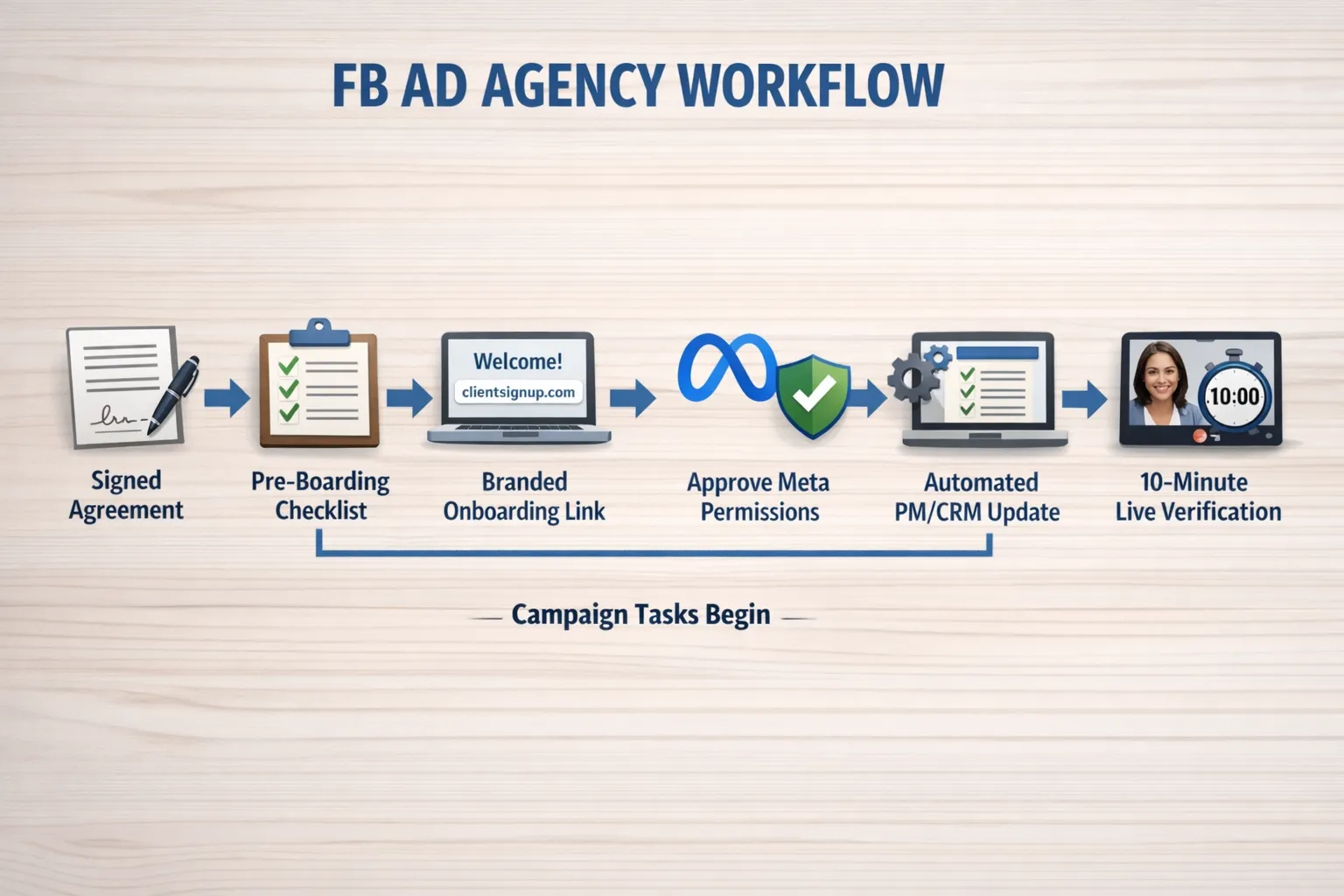
What a faster client access request looks like in practice
Fast access does not mean rushing, it means removing choices and manual steps for clients. The winning pattern is consistent across top-performing FB ad shops.
- Pre-board requirements before the kickoff, identify the client’s Meta Business ID, owned assets, and verification and 2FA status.
- Use a single, branded link to capture all permissions, avoid scattered invites, email threads, and one-off screenshots.
- Request least privilege by default, escalate only when a task truly requires it.
- Run a 10-minute live verification immediately after access is granted, then start your first measurable task the same day.
- Automate handoffs to your PM or CRM so nothing waits in someone’s inbox.
If you need a deeper step by step reference for Meta, see our in depth Facebook Business Manager Access checklist.
Meta assets and permission request matrix
Use this table as your default ask. Tailor per scope, then document exceptions. The goal is to unblock ads work without overreaching on admin controls.
| Asset | Default access to request | When to escalate | Notes |
|---|---|---|---|
| Business access method | Partner access to selected assets | Request Business Admin only if you must manage people, payment settings, or system level setup | Partner access is the cleanest path, it avoids personal logins and keeps ownership with the client. |
| Ad Account | Advertiser | Admin if you need to add users, change billing, or edit account level settings | Advertiser can create and manage campaigns, billing changes require Admin. |
| Facebook Page (New Page Experience) | Create ads and view performance | Add Manage Page only if you also produce organic content or handle community management | For paid only, ads tasks do not require full page management. |
| Pixel | View, escalate to Manage when implementing CAPI or event changes | Manage for Conversions API setup, event deduplication, and aggregated event edits | Many analytics tasks need only view, implementation requires manage. |
| Conversions API connection | Access via Events Manager on the relevant Pixel | N, A | Ensure you have the correct pixel and server event source before touching production. |
| Catalog | Advertiser | Manage if you must edit feeds or product sets | Dynamic ads require catalog access, often Advertiser is enough. |
| Instagram account | None directly if connected to the client’s Page | Request if IG is not linked to the Page and you run IG only campaigns | Paid placements usually flow through the Page relationship. |
| Domains and event configuration | View | Manage only if contracted to handle verification and event prioritization | Keep governance tasks on the client unless explicitly in scope. |
If the client prefers request access instead of partner access, align to the same permission levels. For secure setup steps across verification, 2FA, and governance, review Meta Business Setup, secure access steps for agencies.
Copy and paste client messages that get approvals fast
Clarity and brevity win. Pair a single link with an expectation of time and outcome.
Primary email, one link and one minute
Subject, Approve FB access in one minute so we can start ads today
Hi [First name],
Here is your secure onboarding link to approve the exact Facebook assets and permissions for our scope, [Your branded link]. It takes under a minute, you will see each item listed and can approve with your existing Meta login. No passwords are shared.
Once approved, we will immediately verify the ad account and pixel, then begin [first task, for example building the campaign shell and QA].
If anything looks off, reply here and we will fix it live.
Thank you, [Your name]
Slack or Teams DM, short nudge with value
Hi [First name], quick one. This secure link gives us the ad account and pixel access we need today, [Your branded link]. Approve and we will share your first campaign preview by [time].
Fallback, manual partner invite
If your IT or security team blocks external links, here is the manual path. In your Meta Business settings, go to Users, Partners, Add, Give a partner access to your assets, paste our Business ID [Your agency BM ID], then select the Ad Account (Advertiser), Page (Create ads), Pixel (View or Manage if we are implementing CAPI), and Catalog (Advertiser). If you prefer, we can walk through this live, it takes under 5 minutes.
For a fully detailed checklist and troubleshooting, bookmark our Facebook Business Manager Access guide.
10 minute verification checklist before you build
After the client approves access, confirm the foundation immediately. This prevents hidden blockers during launch week.
- Ad account loads in Ads Manager, time zone, currency, and billing look correct.
- You can create a draft campaign, ad set, and ad without errors.
- Pixel shows recent events in Events Manager, view content or page view in the last 24 hours.
- If Conversions API is in scope, confirm the server connection is visible and deduplication is configured.
- The Page is selectable for ad placement and Page transparency shows the client is the owner.
- The Catalog is linked to the ad account if dynamic ads are planned.
- Any required audiences or custom conversions are visible or you have a plan to create them.
If something fails in verification, escalate with a screenshot and a single requested action. For stubborn platform issues, the triage in our Meta ads support playbook can save days.
The nudge cadence that respects your client’s time
Most access delays are simple availability problems. A clear cadence keeps momentum without nagging.
- Day 0, Send the one link email and DM, set the expectation that you will verify the same day and share first outputs.
- Day 1, Nudge on DM with a single value reminder, Approve the link and we will deliver your first preview by end of day.
- Day 3, Escalate with a choice, Would you prefer a 5 minute live session now or should we send the manual partner invite steps to your IT lead
- Day 5, Executive summary to sponsor, We are ready to start ads as soon as access is approved, here is the one click link and the two tasks we will deliver within 24 hours of approval.
Automation quick wins for FB access requests
Small automations remove waiting and mistakes. Start with low risk, observable steps.
- Auto create a ticket when a client clicks your onboarding link, include their Business ID, asset IDs, and a due date.
- Post a Slack message when permissions are granted, include who approved and which assets were shared.
- Trigger a verification checklist in your PM tool, assign it to the media lead with a 2 hour SLA.
- When verification passes, create the campaign skeleton and a pinned kickoff note that lists the next three deliverables the client will see.
If you want to automate with a purpose built layer, Connexify provides API and webhook integrations plus a user friendly dashboard so your team can track progress without switching tools.
Train the team on permissions and language
Permission names and Meta terminology can be confusing. Weekly 20 minute refreshers and a shared glossary help junior coordinators request only what the scope needs. If you operate in Spanish speaking markets, consider Spanish language upskilling programs aligned with LinkedIn Learning to standardize terminology and workflows across regional teams.
Metrics that prove your access process is working
Instrument your access request from the start, then show improvements month over month.
| Metric | Definition | Target |
|---|---|---|
| Time to granted access | From sending the first request to permissions confirmed | Under 24 hours median, under 3 days 90th percentile |
| First value time | From access granted to first client visible output, for example preview link | Under 1 business day |
| Rework rate | Percent of requests that require a second permission change | Under 10 percent |
| Admin request rate | Percent of engagements needing Admin level on any asset | Under 20 percent unless scope demands more |
| Support escalations | Cases opened with platform support during onboarding | Near zero, spikes trigger a retrospective |
A 48 hour rollout plan to upgrade your FB access requests
- Map scope to the permission matrix above, define your default and escalation path by service tier.
- Write your three messages, primary email, short DM, manual fallback.
- Centralize your ask into a single, branded link that lists assets and permissions in plain language.
- Build the 10 minute verification checklist in your PM tool, set the SLA and owner.
- Add two automations, a Slack alert on approval and a PM task when verification starts.
- Pilot with two current clients, measure time to granted access and first value time, refine.
Where Connexify fits in your toolkit
The fastest path to clean, secure Meta access is one link, one branded experience, one dashboard. Connexify was built to make that simple for agencies.
- One link client onboarding with customizable permissions so clients see only what is needed for your scope.
- Branded onboarding experience and white label options so approvals feel professional and trustworthy.
- Support for multiple platforms in one flow, helpful when your engagement spans Meta, analytics, and tagging.
- API and webhook integrations that update your PM or CRM the moment access is granted.
- Secure data handling, no installation required, your team works from a user friendly dashboard.
Agencies use Connexify to compress onboarding from days to seconds, then prove the result with metrics. If you want to test the flow with your next engagement, start a 14 day free trial or book a demo at connexify.io.
