Digital Marketing Services for Small Business: Quick Start Guide
12/18/2025

Most small businesses do not need a hundred tactics to start winning online. They need a focused plan, clean measurement, and fast execution. This quick start guide shows you how to select the right digital marketing services, stand them up in days, and avoid the onboarding bottlenecks that cost you weeks.
The essentials: what to launch first and why
Start with a stack that delivers signal fast and compounds over time.
| Service | Best for | Time to first signal | Starter budget split | Key requirement |
|---|---|---|---|---|
| Search ads (Google, Bing) | High intent leads and sales | 24 to 72 hours | 40 to 60 percent | Conversion tracking configured |
| Local SEO and Google Business Profile | Local discovery and calls | 7 to 30 days | 10 to 20 percent (time, not media) | Complete GBP profile with reviews |
| Paid social (Meta, TikTok, LinkedIn) | Audience building, remarketing | 3 to 7 days | 20 to 30 percent | Quality creative and a lead gen or shop destination |
| Email and CRM automation | Nurture, repeat purchase | 7 to 14 days | 5 to 10 percent | Opt-in capture and a welcome flow |
| Analytics and conversion tracking | Decisions and budget shifts | Same week | 5 percent (time) | Tagging plan and access |
Notes:
- Treat these splits as a starting point. Reallocate toward what proves profitable in your market.
- If you sell locally or services by appointment, prioritize search ads and Google Business Profile. If you sell visually appealing products, paid social may scale faster once creative wins.
A 30 day quick start plan
This timeline assumes you have a website or landing pages, a basic brand kit, and can approve creative quickly.
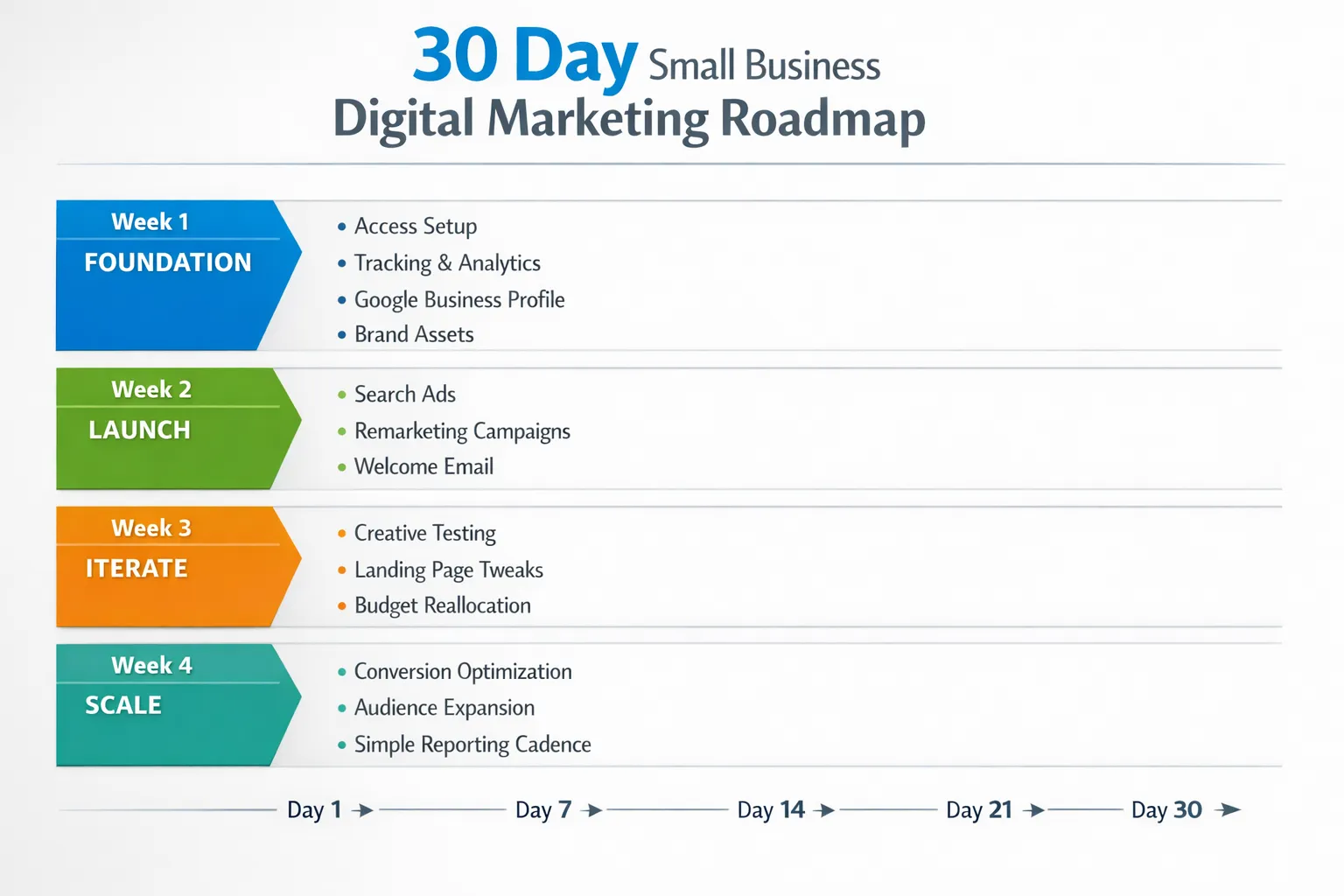
Week 1, foundation and measurement
- Create or confirm accounts: Google Ads, Google Analytics 4, Google Tag Manager, Google Business Profile, Meta Business Manager, and your CRM or email platform.
- Turn on two factor authentication for all accounts and use role based access, never share passwords.
- Define one primary conversion for each funnel, for example a purchase, a booked appointment, or a qualified lead form with required fields.
- Publish or refine a minimum of one high intent landing page with a clear call to action, fast load time, and mobile friendly layout.
- Build a tagging plan in Tag Manager, at minimum pageview, key button clicks, form submit, and purchase or lead events mapped into GA4 and ad platforms.
Helpful resource to set clean access on Meta, see the Facebook Business Manager access checklist that walks through the exact permissions to request. Facebook Business Manager access checklist
Week 2, launch search and remarketing
- Launch branded and bottom funnel non branded search campaigns with exact match and phrase match for your core offers. Use ad group structure that mirrors service categories.
- Set up simple remarketing, website visitors in the last 30 days with a single creative set and a clear offer.
- Publish your welcome email automation, subject line focused on value, for example quick start guide, coupon, or onboarding checklist.
- Complete your Google Business Profile, hours, categories, services, photos, Q and A, then encourage first reviews from recent customers who opted in.
Week 3, creative and landing page iteration
- Add at least three creative variations per audience on paid social or display remarketing, one benefit led, one objection handling, one proof driven with testimonial or UGC.
- Tweak the landing page based on early data, tighten headlines to match search intent, move primary call to action above the fold, collapse secondary links.
- Extend your remarketing windows and exclude converters to prevent waste.
- Shift budget toward the campaigns that are already producing your primary conversion at or near target cost.
Week 4, optimize and scale
- Expand match types or add closely related keywords once your search terms report shows winning themes.
- Layer lookalike or similar audiences on paid social based on converters and high engagement visitors.
- Add a second email automation, abandoned cart or booking reminder, and a monthly newsletter cadence.
- Establish a simple weekly report, spend, primary conversions, cost per conversion, top search terms or audiences, page speed and form completion rate.
If you are working with an agency, ask them to standardize this plan and compress onboarding. Many teams lose days chasing IDs and approvals. This is avoidable with a structured intake and a single link onboarding experience.
For deeper onboarding design, read how to package your services with a frictionless flow that reduces time to first value. Frictionless onboarding guide for packaged services
What to prepare before you hire or launch
Collect these items so your first week is productive.
- Brand kit, logo files, fonts, color codes, and approved messaging pillars.
- Product or service list, pricing, availability by region, and any legal disclaimers.
- Access ready, business verified accounts, two factor on, and a clear owner for each platform.
- Content and creative, five to ten product images, one short video per key offer if possible, testimonials with names and permission.
- Measurement expectations, what counts as a qualified lead, average order value or customer lifetime value, and your breakeven cost per acquisition target.
If your agency cannot get access in under a day, point them to a standardized process that removes friction. See how teams streamline client onboarding to cut days of back and forth.
Onboarding matters, how to recognize a smooth process
A professional onboarding experience saves you time and reduces risk. Here is what to look for and why it matters.
| Onboarding capability | Why it matters | What to ask your agency |
|---|---|---|
| Single link onboarding | Eliminates email ping pong and missing IDs | Will you send one branded link to authorize all platforms |
| Branded experience | Builds trust for your team and clients | Can the onboarding page use our logo and domain |
| Supports multiple platforms | Reduces setup work across Ads, Analytics, social, CRM | Which platforms can we connect in one session |
| Customizable permissions | Least privilege access improves security | Can we granularly select roles per asset |
| White label options | Keeps your client experience consistent | Can you present onboarding under our brand only |
| API and webhook integrations | Automates handoffs to PM and CRM tools | Can onboarding data flow into our systems instantly |
| User friendly dashboard | Visibility into access status and gaps | Do we get a clear view of what is connected |
| Secure data handling | Protects credentials and PII | How do you secure tokens and handle audits |
| No installation required | Start today, less IT overhead | Will this work in the browser without software installs |
This is exactly the type of workflow Connexify enables. It provides a branded, one link onboarding experience across platforms with customizable permissions, APIs and webhooks, a clean dashboard, secure data handling, and no installation required. If you are an agency serving small businesses, you can shorten onboarding from days to seconds and deliver value faster.
Minimal tech stack for small business marketing
Keep it simple and standard so you can operate, measure, and improve.
- Website or funnel builder with fast hosting and SSL.
- Analytics and tag management, GA4 and Google Tag Manager.
- Ad platforms, Google Ads for intent, Meta Ads for reach and remarketing, optionally LinkedIn for B2B or TikTok for visual products.
- CRM and email automation that integrates with your forms and checkout.
- Creative tooling, a lightweight editor for image and video variants.
If you plan to automate outreach, nurture, and sales tasks without hiring a larger team, consider adding an AI growth engine for SMEs alongside your core stack. It can help with lead generation workflows, CRM optimization, and always on outreach while keeping costs predictable.
Choosing the right provider for your small business
Use these criteria to evaluate agencies or freelancers before you sign:
- Onboarding speed and security, do they use role based access, two factor, OAuth, and a single branded onboarding link.
- Clear measurement plan, can they explain exactly how conversions are tracked and reported.
- Channel focus aligned with your goals, they should lead with intent channels for lead gen, or with creative driven social for visual products, not everything at once.
- Transparent pricing and scope, what is included in monthly services, what is media versus management, and what happens in month one.
- Reporting rhythm, a weekly snapshot and a monthly review is reasonable for most small businesses.
A 72 hour go live runbook
Use this checklist to move from zero to live campaigns in three days.
- Confirm access to GA4, Tag Manager, Google Ads, Google Business Profile, Meta Business Manager, and your CRM.
- Enable two factor on all platforms and grant agency access with least privilege roles.
- Publish or refine one conversion focused landing page per offer.
- Implement conversion events in Tag Manager and verify real time in GA4 and ad platforms.
- Launch branded and exact match search campaigns with site links and call extensions.
- Turn on a 30 day website visitor remarketing audience with one or two evergreen creatives.
- Configure a welcome email flow with a strong first offer and a plain text variant.
- Complete Google Business Profile with photos and first five reviews.
- Set daily budgets and alerts, enough to capture at least 10 to 20 clicks per ad group per day.
- Schedule a weekly 30 minute review to inspect search terms, audiences, and conversion paths.
Common pitfalls to avoid
- Credential chaos, shared passwords and personal profiles lead to lockouts and risk. Use role based access.
- Over segmentation early, too many campaigns with tiny budgets slow learning and inflate costs.
- No single source of truth, ensure conversions are de duplicated and consistent across GA4 and ad platforms.
- Creative without a destination, ads should point to a matching landing page with a single primary call to action.
- Skipping negative keywords and exclusions, a daily search terms pass in the first two weeks pays for itself.
Where onboarding software fits
If you are an agency or consultant supporting small businesses, onboarding is your first impression. Connexify gives you one link client onboarding, a fully branded experience, support for multiple platforms, customizable permissions, white label options, API and webhook integrations, a user friendly dashboard, secure data handling, and no installation required. That combination shortens time to first value and prevents the usual access chase.
- Want to see how it works, book your demo at Connexify.
- Ready to try it with a client, start a 14 day free trial at Connexify.
By focusing on the essentials, enforcing clean measurement, and insisting on a smooth, secure onboarding flow, small businesses can launch high impact digital marketing in days and create a foundation that scales without chaos.