Kickoff Call Agenda That Gets Access in 15 Minutes
03/03/2026


Client onboarding often fails for a boring reason: nobody can start work until access is real. Not “we sent an invite” access, but verified access where the right person can open the right accounts, see the right assets, and confirm tracking and billing aren’t blocked.
This kickoff call agenda is built for agencies and service providers who want to get access in 15 minutes, without password sharing, chaos, or a week of back-and-forth emails. It is also designed to work whether you manage paid media, SEO, analytics, CRM, or multi-platform delivery.
What “access in 15 minutes” actually means
A 15-minute kickoff is realistic if you treat it like an access verification sprint, not a general introduction call.
Your objective is simple:
- Identify who can grant access (the client’s admin)
- Request only the least-privilege permissions required for the agreed scope
- Confirm access live (so there is no “we think it worked” limbo)
- Capture proof (screenshots, IDs, or a logged confirmation) so your team can move
If you want a clean operational definition, align it to Time-to-Verified-Access (TVA), an onboarding SLA that measures the time from request to confirmed, usable access. (If you want to formalize this internally, see: Time-to-Verified-Access: the SLA that prevents delays.)
The non-negotiables before the call (5 minutes of prep that saves days)
The fastest kickoff calls are the ones where you pre-decide what will happen.
1) Require the right attendee
Invite language to use:
“Please have the person who can grant tool access join the first 15 minutes. If they cannot attend, we will use the time for planning, but access will move to the next business day.”
This eliminates the most common failure mode: a call full of stakeholders who cannot approve anything.
2) Send an “access bill of materials” 24 hours before
Keep it short and concrete. For most marketing and growth engagements, the minimum list includes:
- Ads (Google Ads, Meta, LinkedIn, TikTok, etc.)
- Analytics (GA4)
- Tagging (Google Tag Manager)
- Website/CMS (read access is usually enough to start)
- CRM (if you report pipeline or offline conversions)
If you already have a broader onboarding flow, you can embed this into a single intake. Connexify is designed for this exact moment, one branded link that collects and provisions access across platforms.
3) Set the security rule upfront (no passwords)
Make the security posture explicit:
- No shared passwords
- No personal logins
- Named accounts only
- Least privilege by default
This aligns with widely accepted security practice (for example, least privilege is a core control in NIST SP 800-53 Rev. 5, AC-6).
4) Create a single “access target” per system
Before the call, decide the exact identity that should receive access (your agency Business ID, your manager email, or your organization’s partner ID, depending on the platform).
If you show up undecided, the client will stall.
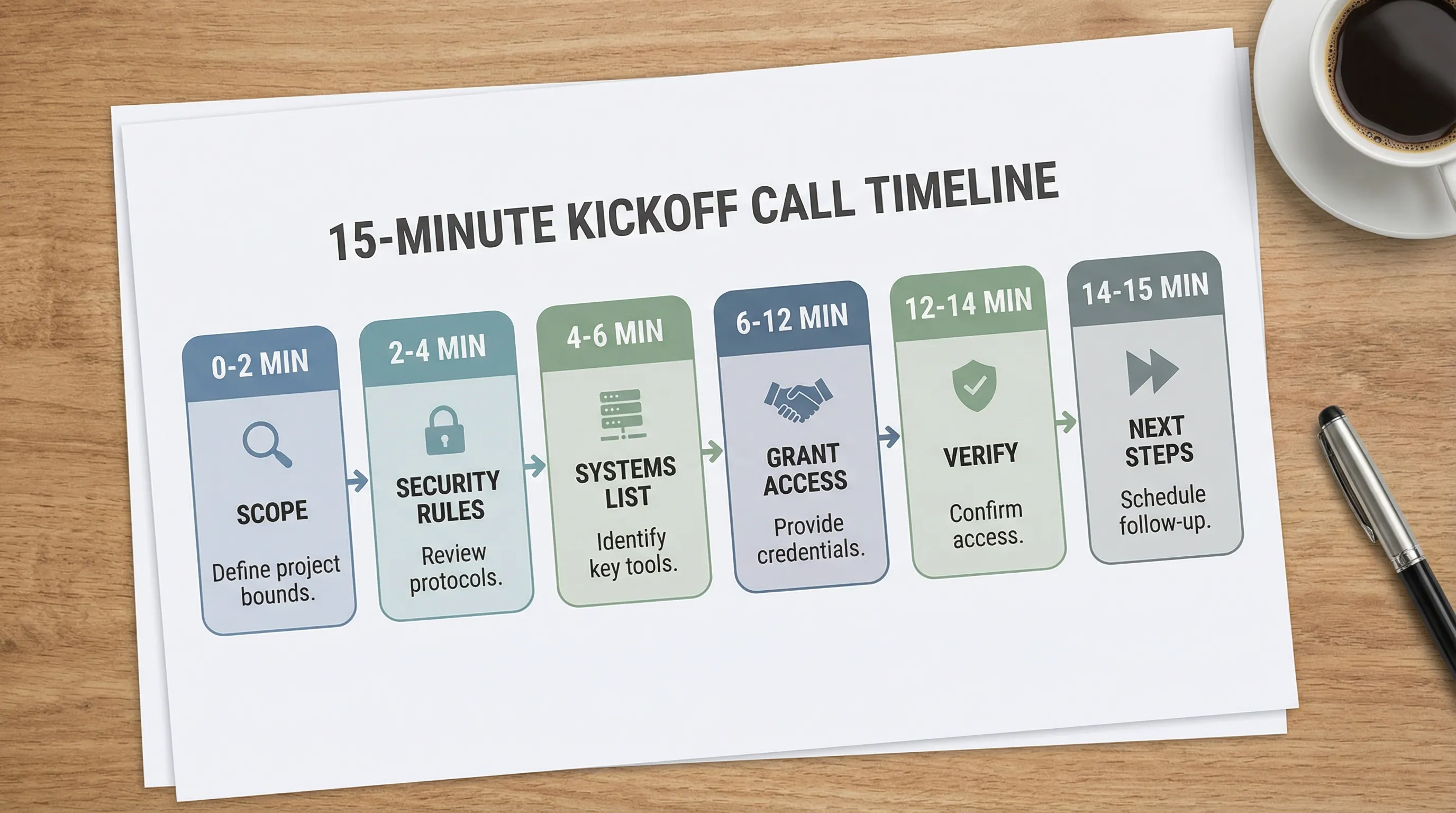
Kickoff call agenda that gets access in 15 minutes (timeboxed)
Use this as your default. It assumes you already have the SOW and scope.
| Time | Segment | Goal | Output (Definition of Done) |
|---|---|---|---|
| 0:00 to 2:00 | Context + decision check | Confirm who can grant access and what “done” means today | Named admin confirmed, list of systems confirmed |
| 2:00 to 4:00 | Security baseline | Prevent bad shortcuts | Agreement: no passwords, 2FA where required, least privilege |
| 4:00 to 6:00 | Access map | Confirm what you need now vs later | “Today list” (must-have) and “Later list” (nice-to-have) |
| 6:00 to 12:00 | Live access grant | Client grants access while you guide | Invites sent correctly (right entity, right role) |
| 12:00 to 14:00 | Live verification | You prove it works | You can open the account/asset and see what you need |
| 14:00 to 15:00 | Handoff + next action | Keep momentum and accountability | Owner named, next meeting and first deliverable scheduled |
Minute 0 to 2: Context + decision check
Script:
“Today we are using the first 15 minutes to get verified access so we can start work immediately. Are you the right admin to grant access for (systems list), or is someone else needed?”
If the answer is “someone else,” do not argue. Move to a reschedule for the access sprint and use the remaining kickoff time for planning.
Minute 2 to 4: Security baseline
Script:
“To keep this secure and audit-friendly, we do not use shared passwords. We will use partner access, invites, or OAuth connections with least-privilege roles. If a platform requires 2FA, we will enable it as part of onboarding.”
This gives clients confidence and prevents the common “just use my login” trap that creates long-term risk.
Minute 4 to 6: Confirm what access is required for the next 7 days
Do not request everything. Request what unblocks work.
Script:
“For the first week, we only need access that lets us (specific outcomes). Anything outside that can be added later.”
Examples of “first-week outcomes”:
- Audit current campaigns and tracking
- Validate conversion events
- Prepare a launch plan
- Build a baseline report
Minute 6 to 12: Live access grant (guided)
Your job is to remove ambiguity. Most delays come from “where do I click?” confusion.
Use a consistent pattern:
- Confirm the client is in the right admin area (business settings, access manager, user management)
- Provide the exact identifier to add (email, partner ID, business ID)
- Name the role to choose (admin vs standard vs analyst)
- Repeat back what you saw (“I see the invite sent to X with role Y”)
If you support multiple platforms, do not try to explain each system from scratch on the call. Keep it procedural.
If you want a multi-platform SOP to complement this agenda, see: Online Marketing Company SOPs: Client Access in Minutes.
Minute 12 to 14: Live verification (the part most teams skip)
Verification is what turns access from “pending” to “usable.”
Do a 2-minute smoke test:
- Open the tool in a clean session
- Confirm you can see the required asset(s)
- Confirm the permission level is correct (not too high, not too low)
If measurement is in scope, add a lightweight check:
- Can you see the conversion events surface?
- Can you confirm the right property/container/account?
Do not attempt a full tracking audit here. This is a kickoff sprint, not a deep dive.
Minute 14 to 15: Next steps + ownership
Script:
“We now have verified access. Next, we will (first deliverable). We will send a recap today with what is complete, what is pending, and who owns each item.”
Assign one owner on both sides. “The team” is not an owner.
Your 15-minute “Definition of Done” checklist (copy into your template)
Use this table to keep your internal team aligned and to make the result auditable.
| Item | Verified means | Owner | Evidence to capture |
|---|---|---|---|
| Ads platform access | Correct account visible, correct role | Agency | Screenshot of access page or confirmation text |
| Analytics access | Right property visible, can view reports | Agency | Screenshot showing property name |
| Tagging access | Right container visible, publish rights only if needed | Agency | Screenshot of container list |
| Billing responsibility | Who pays and where billing lives is documented | Client | Written confirmation in recap email |
| Primary point of contact | One operational owner named | Both | Name + email in recap |
Common blockers (and what to do in under 60 seconds)
Blocker: “I’m not the admin”
Fix: Stop the access sprint, schedule a 15-minute “admin-only access call,” and continue kickoff planning.
Blocker: wrong email or wrong business entity
Fix: Ask the client to read back what they added. Most issues are typos or adding a person instead of a partner entity (or vice versa).
Blocker: the client tries to give you full admin “to make it easy”
Fix script:
“Thank you. For security and governance, we only request the minimum access required for the work. If we hit a real blocker, we can request a temporary escalation for a specific task.”
Blocker: multi-stakeholder approvals
Fix: Split the call into two lanes:
- Lane A: access grant with the admin
- Lane B: creative and messaging alignment with stakeholders
Trying to do both at once is how 15 minutes becomes 45.
How to make this repeatable (so every kickoff gets faster)
A one-time agenda helps. A system is better.
Standardize three assets
- A kickoff invite that requires an admin attendee
- A one-page access bill of materials (must-have vs later)
- A recap email template that documents verified access, pending items, and owners
If you want ready-made messaging for the follow-ups, you can adapt parts of: Client onboarding email sequence for agencies (copy-paste).
Instrument one metric
Track Time-to-Verified-Access for every client, and review it monthly. The goal is not perfection, it is predictability.
Use a single branded onboarding link when you need scale
If you onboard clients across multiple platforms, the fastest teams stop doing access collection through scattered emails and screenshots.
Connexify is a SaaS platform built to streamline this step with:
- One-link client onboarding (fast, consistent handoff)
- Branded onboarding experience (looks like your agency)
- Multi-platform support and customizable permissions
- White-label options
- API and webhook integrations to connect onboarding events to your systems
- A user-friendly dashboard, secure data handling, and no installation required
Frequently Asked Questions
Can you really get access in 15 minutes? Yes, if the correct admin is on the call, the scope is pre-defined, and you timebox the flow to “grant + verify,” not “discuss.”
What should I do if the client insists on sharing passwords? Decline and offer the secure alternative (invites, partner access, or OAuth). Explain it protects both sides and keeps access auditable.
What permissions should we request on the kickoff call? Only what unblocks Week 1 outcomes. Default to least privilege, and escalate temporarily only when a specific task requires it.
How do we prevent access from stalling after the kickoff? Capture a clear Definition of Done, name one owner on each side, and track Time-to-Verified-Access as an SLA.
Want this to run automatically instead of manually?
If you like the 15-minute kickoff sprint but want to avoid chasing emails, scattered permissions, and inconsistent handoffs, use a dedicated onboarding layer.
Connexify helps agencies streamline client onboarding with a single branded link that works across platforms and supports secure, role-based access. You can also connect onboarding events into your workflow with API and webhooks.
Start with a demo, or explore the platform with the 14-day free trial at Connexify.