Client Onboarding Timeline: What Happens in Week 1
03/02/2026


Week 1 is where most client engagements either gain momentum or quietly stall. Not because strategy is unclear, but because the basics are not verified: the right people do not have the right access, tracking is not testable, and approvals have no owner.
A reliable client onboarding timeline for Week 1 does one thing above all: it turns “we sent invites” into “we can operate safely and ship work.” Below is a practical view of what should happen in Week 1 (what the client sees, what your team does, and what “done” really means).
The real goal of Week 1 (3 outcomes that prevent delays)
Think of Week 1 as three parallel tracks that converge by Friday:
- Governance and access: Your team can log in, with least-privilege permissions, without shared passwords.
- Measurement readiness: You can observe at least one end-to-end test event (lead, purchase, signup, booking, etc.) and trust where it lands.
- Operational momentum: There is a clear backlog, approval path, and first deliverable shipped (or ready to ship).
If you want a single operational yardstick, use Time-to-Verified-Access (TVA), the elapsed time from sending the access request to confirming access is correct and usable (not just “granted”). Connexify has a deeper breakdown of TVA and how to implement it here: Time-to-Verified-Access: The SLA That Prevents Delays.
Client onboarding timeline: Week 1 at a glance
This is the Week 1 sequence most agencies aim for (adjust the depth based on scope, not the order).
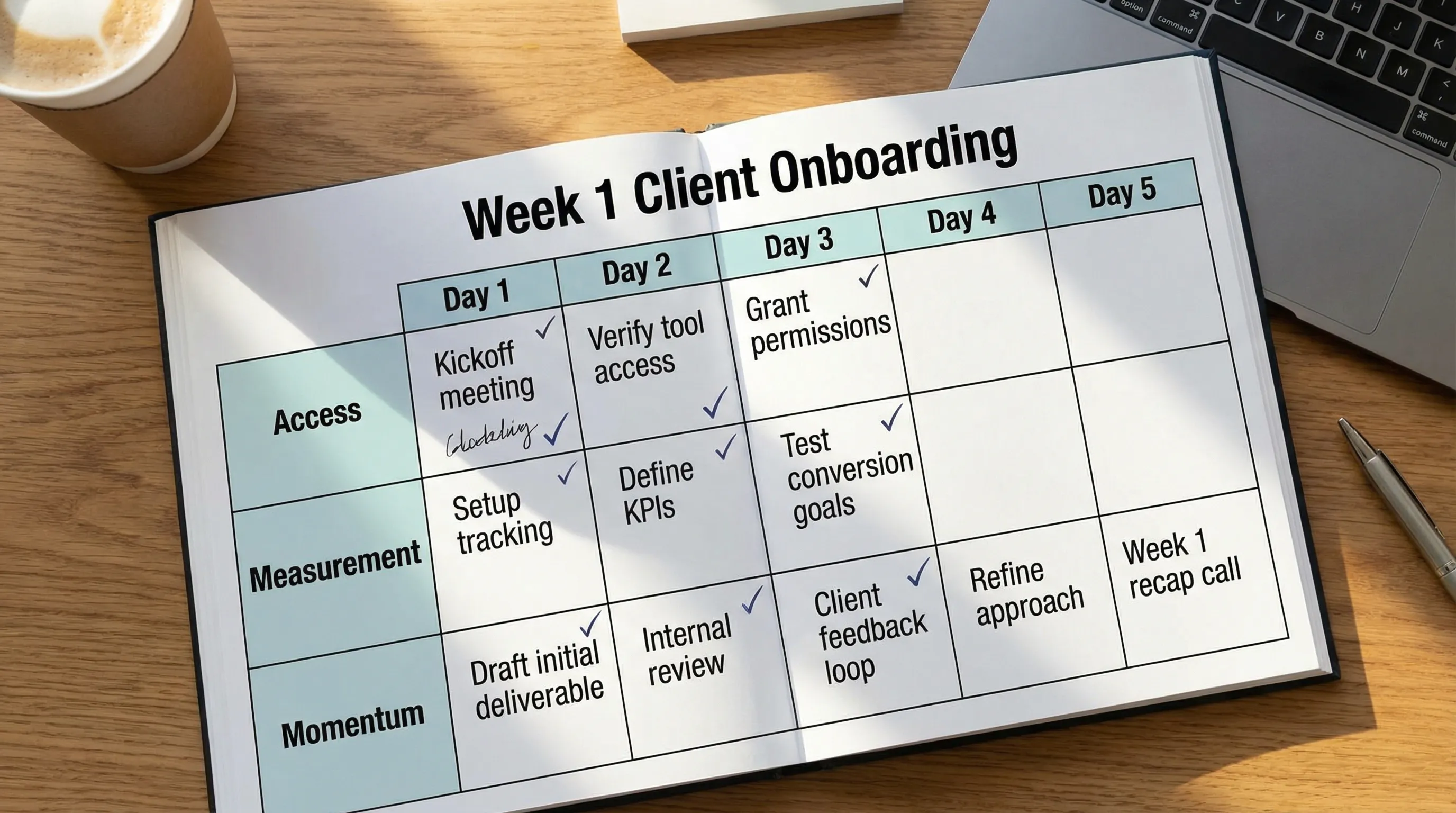
| Day | Client-facing milestone | Agency internal focus | Definition of done (gate) |
|---|---|---|---|
| Day 1 | Kickoff + “here’s what we need” | Set scope, owners, assets list | One owner per system and a confirmed onboarding path |
| Day 2 | Secure access requests sent | Verify logins and permissions | Verified access for priority systems (ads, analytics, CMS/CRM as scoped) |
| Day 3 | Tracking sanity check | Validate events, UTMs, destinations | At least one test event observed end-to-end |
| Day 4 | First output review | Draft deliverable + approvals | One tangible deliverable approved or queued with a date |
| Day 5 | Week 1 recap | Plan Week 2 execution | Recap sent, backlog agreed, risks logged with owners |
Day 1: Kickoff and a clean handoff (what “good” looks like)
Day 1 is not about collecting everything. It is about deciding how you will collect and verify what you need, and who will do it.
A strong kickoff produces three artifacts:
-
A one-paragraph win definition (what result matters first, and what proxy signal you expect within 2 to 4 weeks).
-
A responsibility map for Week 1. The fastest teams decide, in the meeting, who owns access for each system (client-side) and who verifies it (agency-side). If ownership is vague, Week 1 becomes a thread of “checking in.”
-
A Week 1 plan that respects dependencies. Example: you cannot QA conversion tracking if the domain is not accessible, the tag container is not published, or consent tooling blocks events.
A practical 30-minute kickoff agenda
Keep it short and operational:
- 5 minutes: Scope confirmation (what is in, what is not)
- 10 minutes: Systems map (ads, analytics, website/CMS, CRM, creative storage, approvals)
- 10 minutes: Week 1 gates (Verified access, test event, first deliverable)
- 5 minutes: Owners, deadlines, and the next checkpoint
If your work depends on regulated claims or brand/legal review, define the approval lane on Day 1. Otherwise, you can ship great work and still wait a week for sign-off.
Day 2: Access setup and verification (secure, least privilege, no chaos)
Day 2 is typically where onboarding slows down because teams confuse “requesting access” with “having access.” The fix is to treat access like a product with pass criteria.
Best practice baseline for agency access (across most platforms):
- Use named user accounts (no shared logins).
- Enable multi-factor authentication (MFA) for anyone with meaningful permissions.
- Request least-privilege permissions that match the scope you sold.
- Prefer partner or delegated access models where supported, instead of transferring ownership.
For general security guidance around digital identity and authentication, NIST’s Digital Identity Guidelines (SP 800-63) are a commonly cited reference.
What the client experiences on Day 2
Your client should experience a single, clear flow: one place to connect platforms, grant permissions, and see what is still missing. When clients receive multiple emails, spreadsheets, and “can you add us here?” messages, completion rates drop and mistakes rise.
This is the point where a dedicated onboarding layer can materially change the timeline. Instead of asking clients to stitch together five different platform invite flows, you give them a guided experience and then you verify.
Day 3: Measurement readiness (the verification sprint)
Day 3 is where you prevent the most expensive mistake in marketing operations: launching work before measurement is trustworthy.
Your goal is not “Pixel installed” or “GA4 exists.” Your goal is observable, attributable signal.
A practical Day 3 verification sprint usually checks:
- Event source: the website/app is sending the right events
- Event destination: events are visible where they need to be (ads platform, analytics, CRM if relevant)
- Naming and governance: UTMs, conversion labels, and key events are consistent
- Basic data integrity: duplicates, missing parameters, obvious breaks
If you run a lot of campaigns across clients, lightweight UTM governance pays off quickly. Connexify has a simple standard you can copy here: UTM Governance: A Simple Standard Clients Will Follow.
Day 4: First deliverable and approvals (ship something, even if small)
By Day 4, you want to produce a visible artifact that reduces client anxiety and proves you are moving. It can be small, but it must be real.
Common “first deliverables” include:
- A channel audit with 3 prioritized fixes
- A draft campaign structure and initial targeting plan
- A creative direction board and first draft concepts
- A landing page teardown with a short list of changes
Day 4 is also where approval systems start to matter. If your process requires three stakeholders to approve but nobody owns final sign-off, you will have “feedback” but no decision.
If approvals are a recurring bottleneck, a simple risk-based workflow (fast lane vs standard lane) can help. See: Creative Approvals Workflow That Doesn’t Slow Production.
Day 5: Week 1 recap (make the next week inevitable)
A Week 1 recap is not a status update. It is a control document.
A useful recap includes:
- What gates are passed (verified access, test event, first deliverable)
- What is still blocked and who owns the unblock
- What will ship in Week 2 and on what dates
- What you need from the client (one clear list, with owners)
When this recap is missing, Week 2 becomes reactive. When it exists, your timeline becomes predictable.
Common Week 1 blockers (and how to fix them fast)
These issues repeat across agencies, stacks, and client sizes.
| Blocker | What it looks like | Fast fix | Best owner |
|---|---|---|---|
| Wrong identity | Client “added you,” but you cannot see the right account | Confirm which email/user was invited and which business context you are in | Agency operator + client access owner |
| Over-permissioning fear | Client hesitates to grant access | Request least-privilege, explain “why,” and time-box escalations | Agency lead |
| Missing asset IDs | “Which account is it?” threads | Standardize an asset ID collection step | Agency operator |
| Tracking not testable | Pixel exists but no reliable conversion signal | Run a test event and verify end-to-end before planning launch dates | Analytics owner |
| Approvals have no decider | Feedback loops, no final sign-off | Assign a single approver per lane and set response SLAs | Client sponsor |
Where onboarding software helps most in Week 1
Week 1 gets compressed when you eliminate two sources of drag: manual collection and fragmented verification.
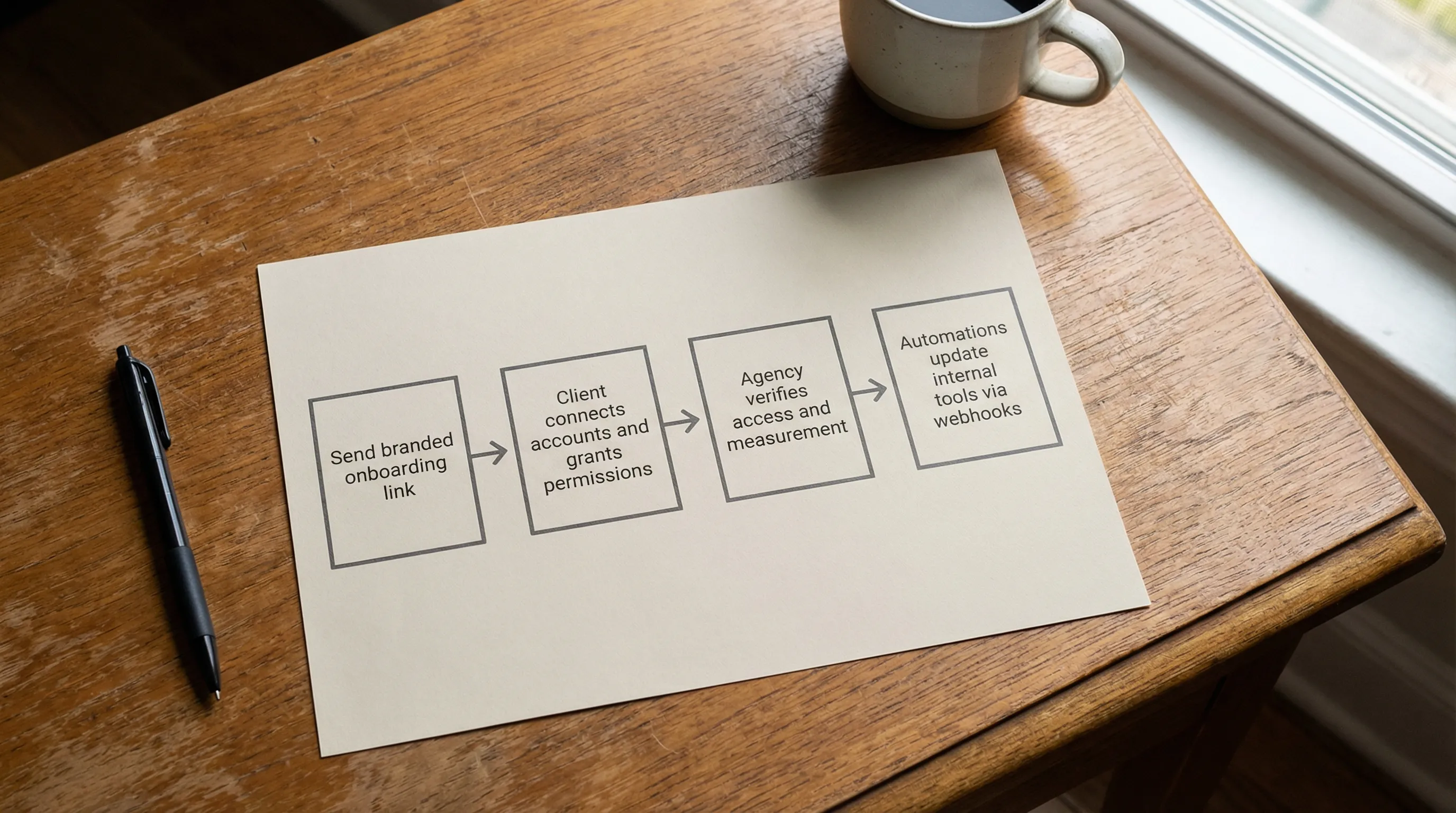
Connexify is built to streamline client onboarding for agencies and service providers by centralizing access setup through a single, branded onboarding link. Instead of managing scattered emails and platform-specific steps, you can standardize the flow (including permissioning) across multiple platforms, then track completion in one place.
In practice, teams use a dedicated onboarding layer to:
- Send one branded link for access setup (instead of multiple request threads)
- Use consistent permission patterns (so you ask for the minimum required)
- Reduce rework by verifying access quickly and early
- Push status updates into existing systems via API and webhook integrations (so onboarding is visible, not hidden)
What to measure in Week 1 (so you can improve it)
You cannot scale what you cannot observe. Week 1 is the ideal time to instrument your onboarding process.
| Metric | What it tells you | Practical target |
|---|---|---|
| Time-to-Verified-Access (TVA) | How fast you reach usable access, not just “invited” | Measure in hours, track percentiles (p50, p90) |
| Access completion rate | How often clients finish the requested access steps | Identify drop-off points by platform |
| Time-to-measurement-ready | How quickly you can trust conversion signal | Should happen before launch commitments |
| Approval cycle time | How long work waits for decisions | Reduce stakeholders or create lanes |
| Week 1 “gate pass” rate | % of clients who pass all Week 1 gates | Your onboarding reliability score |
If you want a more granular checklist that breaks down actions day-by-day, see: Client Onboarding Checklist for Retainers: Day 0 to Day 7.
Frequently Asked Questions
What should be completed in the first week of client onboarding? Week 1 should complete verified access to priority systems, a measurement sanity check (at least one test event end-to-end), and a first tangible deliverable with a clear approval path.
Why does client onboarding usually get stuck in Week 1? Most Week 1 delays come from unclear ownership (who grants access), unverified permissions (invites sent but unusable), and missing measurement prerequisites that only show up during testing.
What is “verified access” (and why isn’t an invite enough)? Verified access means the right user can log in, see the correct assets, and perform the required actions for the scoped role. An invite alone can be sent to the wrong email, wrong business, or wrong permission level.
How do you keep onboarding secure without slowing it down? Use named accounts, MFA, least-privilege permissions, and partner or delegated access patterns where available. Security becomes faster when it is standardized and explained in plain language.
How can onboarding software improve a Week 1 timeline? The biggest gains come from consolidating steps into one branded flow, standardizing permission requests, tracking completion centrally, and integrating status into your PM/CRM via APIs or webhooks.
Make Week 1 predictable with a single onboarding link
If your Week 1 timeline is still driven by email threads and manual access chasing, it is hard to hit consistent launch dates.
Connexify helps agencies streamline client onboarding with one-link onboarding, a branded onboarding experience, multi-platform support, customizable permissions, and API/webhook integrations. If you want to see what a compressed Week 1 looks like in your workflow, you can book a demo or start with the 14-day free trial.