How to Write an Onboarding SOW That Prevents Rework
03/05/2026


Rework during onboarding rarely comes from “bad clients.” It usually comes from bad definitions: unclear scope, vague access language, missing decision owners, and timelines that assume everything is already set up.
An onboarding SOW (Statement of Work) is your chance to prevent all of that before it hits delivery. Done well, it becomes both a legal document and an operating system for Week 1.
What an onboarding SOW needs to prevent (and why it keeps happening)
Most onboarding rework clusters into four predictable failure modes:
- Access ambiguity: “Client will provide access” sounds fine until you learn they do not know what “Admin” means, or they invited the wrong email, or they shared a password instead of granting partner access.
- Hidden dependencies: Tracking cannot be verified until DNS, CMS, Tag Manager, or CRM fields are available, but none of that was listed as a prerequisite.
- Undefined success: The SOW says “onboarding complete,” but nobody agreed on what “complete” means (verified access, measurement ready, approvals in place, billing connected).
- No change control for onboarding: New channels and platforms appear mid-onboarding (TikTok, a second ad account, a new region), and the team treats it as “just part of setup.”
The fix is not more checklists in Slack. The fix is an onboarding SOW that makes rework harder to create.
The core idea: write onboarding like a deliverable with acceptance criteria
A rework-proof onboarding SOW treats onboarding as a product with:
- Inputs (assets, IDs, logins, stakeholders)
- Process (who does what, in what order)
- Outputs (verified access, measurement readiness, operational handoff)
- Acceptance criteria (objective pass or fail checks)
- Change control (what happens when the inputs change)
This is the same logic used in well-run implementation projects. The SOW should not say “we’ll set things up,” it should say what “set up” means and how you will prove it.
A practical onboarding SOW structure (with copy-ready language)
Below is a structure that works for marketing agencies, SEO providers, paid media teams, analytics implementers, and most service businesses that require account access.
1) Onboarding objective and definition of success
Start with a short, testable objective. Avoid subjective phrasing like “smooth transition.”
Example objective (copy-ready):
Objective: Complete onboarding so the Agency can securely access required client systems, verify measurement, and begin delivery with clear owners and timelines.

Onboarding is considered successful when:
1) Access is granted and verified for all systems listed in the Onboarding Bill of Materials.
2) Measurement readiness checks pass (as defined in Section X).
3) A kickoff call is completed with required attendees and documented decisions.
Why this prevents rework: it gives you a shared finish line, not a vague promise.
2) Onboarding bill of materials (BOM): systems, assets, and IDs
This is the most important section in an onboarding SOW. List every system you need and the specific asset types inside it.
A lightweight BOM table is usually enough.
| System / platform | What you need access to | Minimum role target | Who provides it | Verification method |
|---|---|---|---|---|
| Google Analytics (GA4) | Specific GA4 property | Viewer (or Analyst if needed) | Client | Agency confirms data visibility |
| Google Tag Manager | Container + publish rights if implementing tags | Read or Publish (scope-based) | Client | Agency confirms container access |
| Google Search Console | Verified property | Full user | Client | Agency confirms property visibility |
| CMS (Webflow, WP, Shopify, etc.) | Site/project | Editor or Admin (scope-based) | Client | Agency logs in and validates access |
| Ad platforms (Meta, Google Ads, LinkedIn, TikTok) | Ad account, pixel/events, billing visibility (as needed) | Least-privilege by channel | Client | Agency verifies correct business context |
| Brand assets | Logo files, fonts, brand guidelines, creative library | N/A | Client | Agency confirms receipt and usability |
Keep it minimal, but specific. If you have multiple regions, brands, or business units, list them.
Tip: If your work is measurement-heavy, add a measurement BOM (conversion events, CRM fields, offline conversions) instead of burying it in “notes.”
3) Roles, responsibilities, and a single decision owner
Most onboarding delays come from “committee ownership.” Your SOW should force clarity.
Include:
- Client onboarding owner (single person accountable for access and answers)
- Agency onboarding owner (single person accountable for progress and verification)
- Required attendees for kickoff (for example, marketing lead plus whoever controls access)
Example clause (copy-ready):
Client will assign one Onboarding Owner with authority to request, approve, or delegate access across systems listed in the BOM.
If the Onboarding Owner is unavailable for more than 2 business days, Client will assign a backup owner within 1 business day.
4) Deliverables and Definition of Done (DoD) for onboarding
This is where most SOWs fail. They list tasks, not “done.”
Use “deliverables + acceptance criteria.” For example:
-
Deliverable: Verified access pack
- Acceptance: Agency confirms access to each system listed in the BOM, documented with date/time and the identity used.
-
Deliverable: Measurement readiness confirmation
- Acceptance: Tracking status is confirmed (for example, GA4 receiving traffic, core conversions defined, and a test event observed where applicable).
-
Deliverable: Onboarding recap and handoff
- Acceptance: Decisions, responsibilities, and next steps documented and shared to both teams.
Example DoD language (copy-ready):
“Verified access” means the Agency has successfully logged in using named user accounts (no shared passwords), can see the required assets, and can perform the agreed scope of actions for the role requested.
If you want a timeboxed operating model, pair this with a kickoff agenda that verifies access live. (Connexify has a practical guide you can adapt: Kickoff call agenda that gets access in 15 minutes.)
5) Timeline, gates, and onboarding SLAs
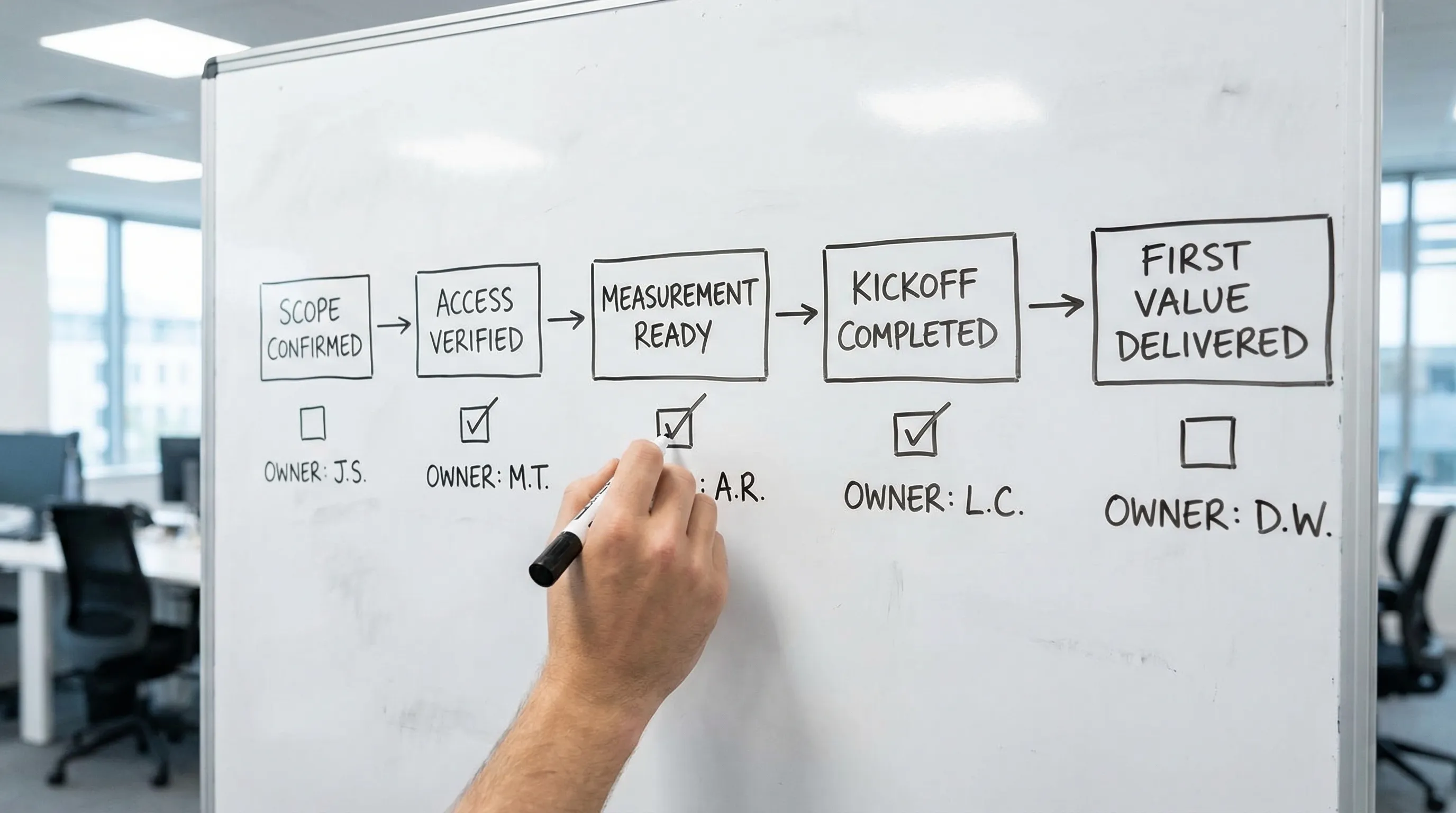
Your SOW should include a short timeline with gates. Gates reduce rework because they prevent you from starting delivery before prerequisites exist.
Common onboarding gates:
- Gate 1: SOW signed and kickoff scheduled
- Gate 2: Access requested and verified
- Gate 3: Measurement readiness checks pass
- Gate 4: First delivery sprint begins
Tie at least one SLA to onboarding. A strong, operational SLA is:
- Time-to-Verified-Access: elapsed time from sending access requests to verified access.
If you already run a Day 0 to Day 7 process, reference it as the execution plan. (Example: Client onboarding checklist for retainers: Day 0 to Day 7.)
6) Access and security requirements (make them explicit)
A rework-proof onboarding SOW includes basic security rules so you do not renegotiate them later.
Keep it plain:
- Named user access only (no shared passwords)
- Least privilege, role-based permissions
- MFA required where supported
- Partner access preferred where platforms support it
If your clients have compliance requirements, add a short “security questions” appendix or a link to your evidence pack process. (Related reading: SOC 2 questions clients ask about onboarding tools.)
You can also reference the AICPA SOC 2 overview for procurement teams, if relevant.
7) Assumptions and client responsibilities (the “rework shield”)
This section prevents rework caused by missing inputs. Be explicit about what you are assuming.
Examples that reduce onboarding chaos:
- Client will provide access within X business days of request.
- Client will provide brand assets in editable formats.
- Client will disclose existing agencies or access conflicts.
- Client will provide required stakeholder attendance for kickoff.
Copy-ready clause:
Delays in providing required access, assets, or approvals may shift timelines. Agency is not responsible for delays caused by third-party platform verification, client-side approval cycles, or unavailable client stakeholders.
8) Exclusions (especially around “setup”)
Onboarding scope creep often hides inside the word “setup.” Write exclusions so everyone understands what is not included in onboarding fees.
Common exclusions:
- Net-new website builds or redesigns
- Deep CRM re-architecture
- Data cleanup or historical backfills
- Legal review of policies
If you offer these as add-ons, mention that they can be scoped separately.
9) Change control that applies during onboarding
This is the section that stops rework from becoming free work.
Your onboarding SOW should define what counts as a change and what happens next.
Copy-ready change control language:
If onboarding requirements change (additional platforms, additional business units, new tracking requirements, new stakeholders, or new approval workflows), Agency will provide a written change request outlining impact on timeline and fees.
Work on the change begins after written approval.
This is not about being rigid, it is about being predictable.
Common onboarding SOW mistakes that guarantee rework
If you want a fast review checklist, scan your draft for these:
“Client will provide access” with no specifics
If you do not list systems, assets, identities, and verification criteria, you are signing up for endless back-and-forth.
No measurement readiness gate
Agencies launch campaigns, publish content, or ship landing pages before tracking works, then spend weeks untangling attribution and fixing pixels.
Onboarding tasks mixed into ongoing delivery
When onboarding is not separated, you lose the ability to timebox it, price it, and control changes.
No single client owner
If everyone owns access, nobody owns access. Your SOW must require one accountable onboarding owner.
No acceptance criteria
Without acceptance criteria, “done” becomes a debate. Debates cause rework.
How Connexify fits (without changing your stack)
If your SOW is strong but execution still causes rework, the bottleneck is usually the mechanics of collecting access and approvals across platforms.
Connexify is a client onboarding SaaS platform built for agencies and service providers that need fast, secure account access setup through a single branded link. It can help you operationalize what you wrote in the SOW by:
- Sending a one-link onboarding flow that requests the exact access listed in your BOM
- Enforcing a branded, client-friendly experience so fewer requests get ignored
- Using customizable permissions aligned to least-privilege standards
- Supporting multiple platforms in one place
- Handing off status via API and webhook integrations
If you want to test whether a more standardized intake reduces rework, you can explore Connexify here: Connexify client onboarding software.

Frequently Asked Questions
What’s the difference between an onboarding SOW and a regular SOW? An onboarding SOW focuses on prerequisites and enablement (access, measurement, stakeholders, approvals, handoff). A regular SOW often describes ongoing delivery. Separating them makes timelines, acceptance, and change control much clearer.
How detailed should the onboarding bill of materials be? Detailed enough that a new PM can run it without tribal knowledge. List platforms, the specific assets inside each platform (property, account, container), the minimum role needed, and how you will verify access.
Should onboarding have its own fee? Often, yes. When onboarding has a defined scope and Definition of Done, it becomes priceable, timeboxable, and easier to protect from scope creep.
What acceptance criteria actually reduce rework the most? “Verified access” (not just “invites sent”) and “measurement readiness” (not just “pixel installed”). These two remove the most common downstream surprises.
How do you handle clients who insist on sharing passwords? Put “no shared passwords” in the SOW, explain that named-user, least-privilege access protects both parties, and offer an approved alternative (partner access, delegated access, or time-boxed access where unavoidable).
Turn your SOW into a one-link onboarding experience
A strong onboarding SOW prevents rework on paper. The next step is preventing it in execution.
If you want to standardize access requests, reduce back-and-forth, and move onboarding from days to seconds, take a look at Connexify. You can book a demo or start with the 14-day free trial and run your next onboarding through a single branded link.