Meta Manager vs Business Manager: What Agencies Need
12/10/2025

Agencies juggle Pages, ad accounts, pixels and permissions every day, so it is no surprise that terms like Meta Manager, Business Manager, Business Suite and Ads Manager get used interchangeably. If you are trying to decide how to structure client access and which Meta tools matter for onboarding, this guide breaks it down clearly and shows a repeatable setup that works at agency scale.
Quick definitions, without the jargon
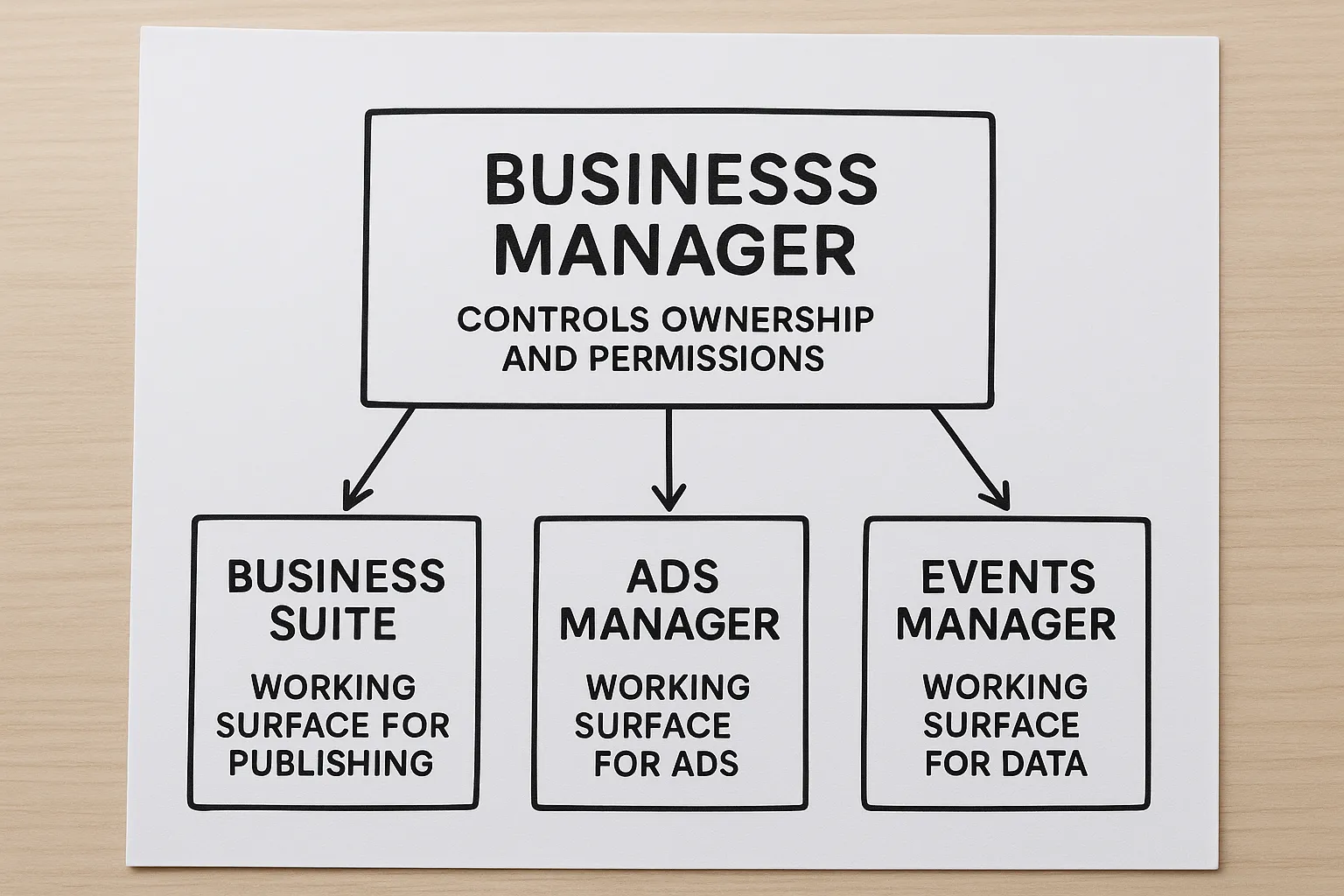
- Meta Business Manager, often shortened to Business Manager, is the backbone for asset ownership and permissions. You use it to own Pages, ad accounts, pixels, catalogs, apps and to grant or revoke access for people and partners.
- Meta Business Suite is the day to day publishing and engagement workspace for Pages and Instagram. Think scheduling, inbox, insights and some light ads tools.
- Ads Manager is where you create, manage and report on campaigns.
- Events Manager is the data layer for conversions and pixels, including Conversions API and aggregated event configuration.
Important clarification about the keyword Meta Manager. There is no single product officially called Meta Manager. People often use Meta Manager as shorthand, but in practice you will be working across Business Manager, Business Suite and Ads Manager.
Helpful official references from Meta:
- Business Manager overview: Meta Business Manager
- Business Suite product page: Meta Business Suite
- Ads Manager: Meta Ads Manager
- Events Manager: Events Manager
- Partner access setup: Assign a partner to assets
Meta Manager vs Business Manager, what is the difference agencies actually care about
Since Meta Manager is not an official product, the practical comparison agencies need is Business Manager vs the interfaces you use for production work. Use Business Manager for governance, and Business Suite or Ads Manager for execution.
| Tool | Primary purpose | Typical agency tasks | Who should manage it |
|---|---|---|---|
| Business Manager | Asset ownership, permissions, security and partner sharing | Request partner access, map assets, enforce 2FA, verify client business when required | Client admins and a small group of agency admins |
| Business Suite | Organic publishing, scheduling, inbox, insights | Content scheduling, community management, quick post insights | Day to day social managers |
| Ads Manager | Media buying, experiments, reporting | Campaign setup, optimization, budget pacing, reporting | Media buyers and analysts |
| Events Manager | Pixel and Conversions API setup, event configuration | Pixel creation, CAPI setup, aggregated events and domain verification alignment | Tracking and analytics specialists |
If you only remember one thing, remember this. Business Manager controls who owns what and who can touch it, everything else is a working surface.
The account architecture that works best for agencies
The safest and most scalable model is client owns, agency accesses as a partner.
- The client owns all core assets in their Business Manager, Page, ad account, pixel, catalog and Instagram account.
- The client shares those assets with the agency Business Manager using partner access with the minimum required permissions.
- The agency assigns people to assets through its own Business Manager, not via personal roles inside the client assets.
Why this matters:
- Clear ownership and continuity for the client, during and after the engagement.
- Cleaner audits and simpler offboarding for the agency.
- Lower platform risk, because you avoid moving assets between businesses or relying on personal profiles.
When agency owned ad accounts make sense
In some cases, the agency needs to front ad spend or start quickly before the client is verified or has payment set up. If you must create ad accounts in your agency Business Manager, isolate each client in its own ad account and document billing terms. Migrate ownership back to the client Business Manager as soon as practical to reduce risk and confusion.
Step by step, the right way to get client access
-
Confirm the client has a Business Manager. If not, point them to the official setup flow in the Business Manager link above.
-
Collect the IDs you will need, Business ID, Page ID, ad account ID, pixel ID and catalog ID if applicable.
-
Ask the client to add your agency Business Manager as a partner using Assign a partner to assets. Provide your agency Business ID and specify exactly which assets and permissions are required.
-
Enforce security best practices. Encourage the client to require two factor authentication for everyone with access, and to limit the number of admins. Use employee access for most users on the agency side.
-
Align billing. Use the client payment method on the client owned ad account. If you cannot, maintain a clear record of budgets and reconcile frequently.
-
Validate data setup in Events Manager. Confirm pixel firing, Conversions API status, event prioritization and domain verification where needed.
-
Document everything in a repeatable template, including naming conventions for campaigns and assets.
A practical onboarding checklist for Meta assets
Use this checkable list for every new client to avoid back and forth and rework.
- Client Business ID
- Page ID and Page ownership checked in Business Manager
- Ad account ID, currency and time zone confirmed
- Pixel ID and Events Manager access
- Instagram account status and connection to the Page
- Catalog ID, if you run catalog or Advantage+ catalog ads
- Domain verification status and event configuration
- Access levels needed for agency team, publish, moderate, create ads, view performance, manage campaigns, manage assets as applicable
- Billing method and invoicing owner
- Compliance items, special category declarations and credit line limits if used
Common pitfalls that slow agencies down
- Requesting personal access instead of partner access. Always connect business to business so you can manage internal permissions cleanly.
- Asking for admin when you only need advertiser or analyst. Limiting scope reduces risk and speeds up approvals.
- Skipping Events Manager verification. A misconfigured pixel or CAPI will tank optimization and reporting.
- Mixing assets between clients. Separate ad accounts, pixels and catalogs per client to keep data clean.
- No 2FA or too many admins. Enforce simple security rules from day one.
Where Meta Business Suite fits for agency workflows
Business Suite can replace a third party scheduler for some teams, especially when the scope is limited to Facebook and Instagram organic content. It also includes an inbox that consolidates messages and comments. That said, Business Suite does not replace Business Manager because it does not own the governance layer, and it does not replace Ads Manager for deep campaign management. Plan your processes accordingly.
Streamlining Meta access with a one link onboarding flow
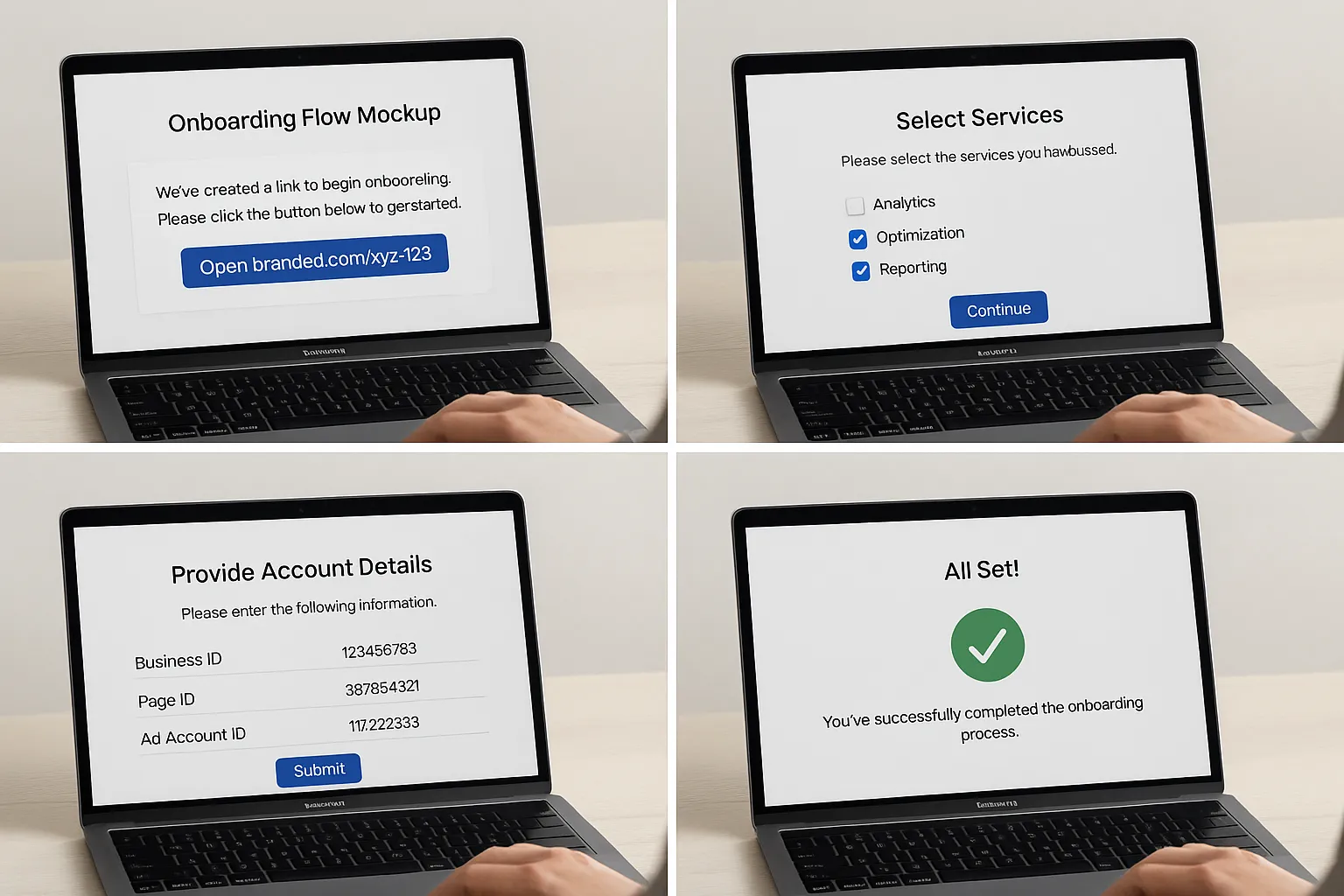
Even when you follow best practices, getting IDs, screenshots and the exact permissions you need can take days of email threads. This is why agencies standardize the intake process and remove guesswork for clients.
Connexify gives you a single, branded onboarding link that walks clients through what to provide and captures it in one place, then shares it with your team instantly. Agencies use it to request Business IDs, asset IDs and required permissions for Meta and the other platforms they support, with customizable checklists per service package.
- One link for clients, no accounts to create and no installation required
- Branded experience with white label options, so it feels like your agency
- Customizable permissions and steps to match Meta partner access best practices
- API and webhook integrations, so the data you collect can flow into your systems automatically
- A user friendly dashboard and secure data handling
- Supports multiple platforms, so you can bundle Meta together with the rest of your onboarding steps
- Start with a 14 day free trial and iterate your templates quickly
Result, you cut onboarding time from days to seconds, clients understand exactly what to do, and your team gets everything in a consistent format.
FAQ
Is Meta Manager a real product? No. People often say Meta Manager when they mean Business Manager, Business Suite or Ads Manager. The official products are listed above.
What is the difference between Meta Business Manager and Meta Business Suite? Business Manager controls ownership and permissions for assets. Business Suite is for publishing, inbox and some Page level insights. You still need Business Manager for governance and Ads Manager for campaigns.
Should my agency request admin access to a client Business Manager? In most cases, no. Ask the client to assign your agency Business Manager as a partner and grant only the permissions needed on specific assets. Reserve admin for a small number of trusted users on the client side.
Where do I set up the Meta pixel and Conversions API? Use Events Manager. You may need coordination with the client developer or tag manager admin to complete CAPI configuration.
Does the client need business verification? Some features and ad categories require business verification. If it is required, the prompt appears inside Business Manager. Follow the Meta guidance and complete it early to avoid campaign delays.
How do we avoid losing access when a client contact leaves? Use business to business partner access and require 2FA for everyone with access. Avoid relying on personal roles inside client assets. Keep a central record of Business IDs and assets.
Can Connexify automatically grant access inside Meta? Connexify standardizes and accelerates what you collect and how you guide clients through the process. The actual granting of access happens in Meta, using the partner access workflow.
Move faster on every client onboarding
If you are ready to stop chasing IDs and screenshots and want a smooth, branded client experience, try Connexify. Book a quick demo and start your 14 day free trial at connexify.io.