Lead Gen Agency Onboarding: Templates, Scripts, Permissions
12/15/2025

Speed is the make or break factor in a lead gen agency’s first 30 days. If your client can grant you clean access in minutes, you launch sooner, prove value faster, and protect margins. If they cannot, your pipeline stalls, teams context switch, and confidence slips.
This guide gives you a complete onboarding toolkit for lead gen agencies. You will get copy‑and‑paste templates, live call scripts, a permission matrix by platform, and QA checklists. You can run all of this manually or compress it to a single, branded link using Connexify so onboarding time drops from days to seconds.
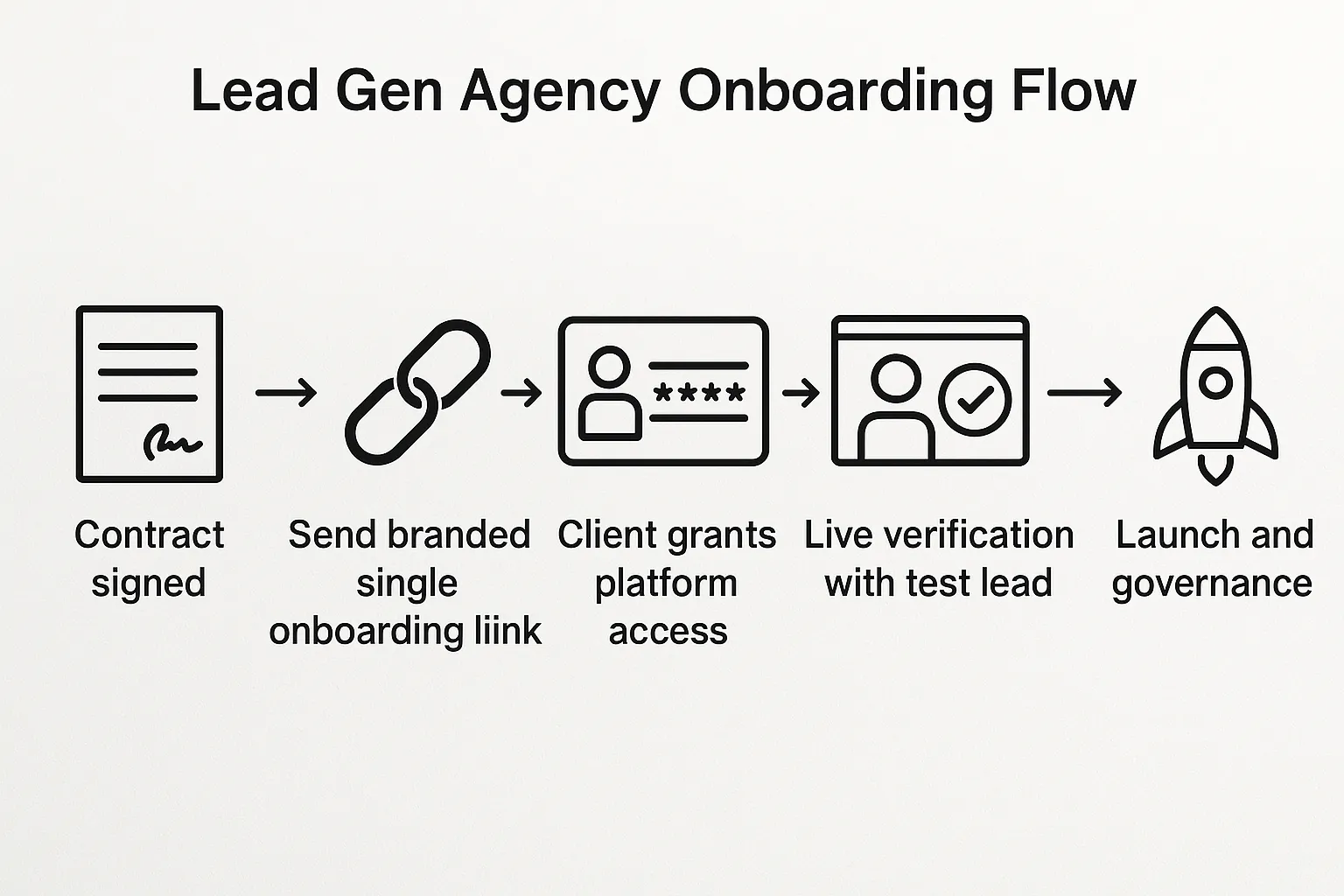
The lead gen onboarding blueprint
A predictable onboarding motion prevents rework and earns trust. Use this five-stage blueprint and adapt it to your scope.
-
Pre‑sale alignment: Set the expectation that access is provided through a single, branded onboarding link. Outline the exact assets and permission levels required, with least‑privilege by default and short, time‑boxed escalations only when needed.
-
Pre‑boarding checklist: Collect legal entities, billing owner, primary technical contact, domain list, form stack, CRM, and call tracking. Confirm 2FA is enabled on the client side where applicable.
-
One‑link access capture: Send a single, branded link that requests the minimal access for each platform, plus optional items by scope. Configure role defaults, scopes, and any required metadata. Connexify supports multiple platforms, lets you customize permissions, and presents a familiar, white‑label experience that reduces drop‑off.
-
Live verification: Hop on a 15‑minute call to validate access, run a test lead, confirm analytics and attribution, and align on go‑live tasks.
-
Governance: Document who has access, set auto‑reminders for quarterly audits, and define offboarding steps. Keep every grant to the least permission necessary.
Copy‑and‑paste templates you can use today
Use and adapt these to your voice. Replace bracketed sections with your details.
Proposal clause, access expectations
Access and Onboarding
Client agrees to grant [Agency Name] least‑privilege access to required platforms to execute services. Access will be requested via a single, branded onboarding link and will not require passwords. Admin privileges, if ever needed, will be requested with a stated purpose and a time‑boxed window, then reverted to standard access.
Kickoff email to client, one‑link onboarding
Subject: Quick onboarding for [Client Name] – takes ~7 minutes

Hi [First Name],

Welcome aboard. To launch quickly, please complete onboarding here:
[Your branded onboarding link]

What happens:
– You grant role‑based access to ads, analytics, CRM, and tracking.
– You choose the exact permissions. We default to least privilege.
– No passwords are shared.

When you are done, reply “Done” and share a good time for a 15‑minute verification call. We will validate access, send a test lead, and confirm measurement.

Thanks,
[Your Name]
Internal Slack handoff to delivery
New Client: [Client Name]
Scope: [Paid Search, Paid Social, Landing Pages, CRM automation]
Link status: Sent / Completed
Risks: [Billing not owned by client], [Pixel missing], [CRM unknown]
Live verification: [Date/Time]
15‑minute live verification call script
Goal: Confirm access, run a test lead, align on go‑live.

1) Access check: Google Ads, Meta ad account + pixel, LinkedIn Ads, GTM/GA4, CRM.
2) Test lead: Submit a form with UTM params; confirm CRM capture and notifications.
3) Measurement: Verify GA4 events, Ads conversions, and CAPI/server events if used.
4) Next steps: Creative approvals, budgets, landing page publishing, go‑live date.
Nudge sequence for incomplete onboarding
T+24 hours: Quick reminder – the onboarding link takes ~7 minutes. Reply if you prefer we do it live on a call.
T+72 hours: We are holding your launch slot. If you need help, book a 15‑minute white‑glove setup. Otherwise, here is the link again: [Your link].
Offboarding clause
Upon termination or completion, [Agency Name] will remove all users from client assets and revoke any API tokens within 3 business days. Client will retain ownership of all assets and data created on their behalf.
Permission matrix for lead gen essentials
Request the least permission required to do the job, and escalate only when there is a specific, temporary need. Names vary by platform, so verify before sending.
| Platform or asset | Why it matters | Minimum role or scope to request | When to escalate |
|---|---|---|---|
| Google Ads | Build and manage campaigns, import conversions | Standard | Admin only if you must manage users or link products, then revert |
| Google Analytics 4 | Validate conversions and audiences | Editor for property, Viewer for account | Administrator only if you must manage links, then revert |
| Google Tag Manager | Implement tags and pixels | Edit and Publish if you deploy tags, Read if audit only | None, avoid Admin unless you manage users |
| Google Search Console | Check indexed pages, submit sitemaps, monitor forms indexation | Full user | Verified owner only if you manage ownership or domain moves |
| Meta ad account | Build campaigns on Facebook and Instagram | Advertiser | Admin only for user management or account configuration, then revert |
| Meta pixel and CAPI | Configure events and verify signals | Manage pixel | Admin on Business Manager only if you handle partner assignments |
| LinkedIn Ads | Manage campaigns and audiences | Campaign Manager | Account Manager only if you must add users or change billing |
| HubSpot (if in scope) | Capture and route leads | OAuth scopes for contacts read/write and forms read, plus offline events if used | Additional scopes only if automation requires them |
| Salesforce (if in scope) | Create leads and attribute campaigns | Integration user with API access to Leads and Campaigns only | Temporary admin is discouraged, coordinate with CRM owner instead |
| Call tracking, for example CallRail | Attribute phone leads | Reporting or Manager depending on whether you create numbers | Admin only if you manage billing or users |
| Landing page builder, for example Unbounce or Webflow | Publish and test landing pages | Editor with publish rights | Account admin only if you create or manage users |
Scripts to request the right permissions
Use these short, plain‑language requests when you need to be precise.
Google Ads
Please add [your email or manager account ID] with Standard access to the Google Ads account [customer ID]. We do not need Admin access unless we are asked to manage users or product links. If an Admin window is required, we will ask for a 24‑hour escalation.
GA4
Please grant Editor on the GA4 property [property name] to [your email]. Administrator is not required, we are not changing user management.
GTM
Please assign us Edit and Publish on container [container ID]. If you prefer, we can submit changes for approval so you publish them.
Meta
Add our business as a partner to your Business Manager and grant Advertiser on the ad account, plus Manage permission on the pixel and any custom conversions we use. We do not need Admin on the business itself.
LinkedIn Ads
Please add [your email] as Campaign Manager on the LinkedIn ad account [account name]. Account Manager is only needed if you want us to add users on your behalf.
CRM
Connect via OAuth and allow read/write on contacts and form submissions. We do not need access to billing, users, or reports beyond lead capture and attribution.
QA checklist before launch
Quality gates prevent noisy data and wasted spend. Use this short checklist on your live verification call.
- Submit a real test lead with real contact details and UTM parameters.
- Confirm the test lead appears in the CRM with the right owner and lifecycle stage.
- Validate the same test is visible in Ads conversions and GA4 events within the expected time window.
- Check pixels and tags fire once and only once on landing pages. Verify consent logic if applicable.
- Confirm call tracking numbers display correctly and ring the intended destination.
- Review campaign naming conventions and audience mapping for consistency.
Automation and APIs during onboarding
Many lead gen agencies automate early tasks, from scheduling social posts to creating campaign scaffolds and syncing offline conversions. If you manage social scheduling at scale, this mLabs API guide and migration plan is a useful reference for understanding endpoints, authentication, and a step‑by‑step approach to refactoring or migrating.
When you connect tools programmatically, keep to least privilege, use OAuth 2.0 where possible, rotate tokens, and centralize secrets.
What to measure about onboarding
Track a few simple metrics to keep onboarding healthy and predictable.
- Time to access, from contract signed to all critical permissions granted.
- Time to first validated lead, a real submission captured in the CRM with correct attribution.
- First‑pass completion rate, the share of clients who complete onboarding on the first try without back‑and‑forth.
- Escalation rate, the share of clients who required temporary Admin permissions.
- Test parity pass rate, percentage of accounts where the test lead appears across Ads, Analytics, and CRM.
How Connexify streamlines all of this
Connexify turns the entire checklist above into a single, branded onboarding experience that your clients can complete in minutes. You can tailor required versus optional permissions by package, support multiple platforms in one flow, and present your logo and language with white‑label options. The user‑friendly dashboard shows status at a glance, APIs and webhooks let you trigger downstream workflows, secure data handling keeps credentials safe, and there is no installation required. Most teams see onboarding time drop from days to seconds once they switch to a one‑link flow.

Lead gen onboarding bill of materials (copy this)
Bundle this with your proposals so clients know exactly what to expect.
- Legal entity name and billing owner for ad platforms.
- Platform list in scope, for example Google Ads, Meta, LinkedIn, landing pages, analytics, CRM, call tracking.
- Required access levels per platform and why each is needed.
- Primary technical contact for website, domains, and forms.
- Two‑factor authentication confirmation on client accounts.
- Live verification call time and calendar link.
- Offboarding policy summary, how and when access is removed.
Common pitfalls and how to avoid them
- Admin by default: Ask for only what you need. Time‑box escalations and revert quickly.
- Password sharing: Use platform invites or OAuth connections. Never collect passwords.
- Unowned assets: Ensure clients own their ad accounts and pixels. Agencies should request partner access, not ownership, except for temporary testing assets.
- Tracking misalignment: Test a real lead, confirm analytics and ad platform conversions, then launch.
- Fragmented communication: Use one link and one scheduled verification call to reduce back‑and‑forth.
FAQ
What is the fastest way to get clean access without delays? Use a single, branded onboarding link that requests only the roles you need. Pair it with a 15‑minute verification call to validate access and run a test lead.
Which permissions should a lead gen agency request by default? Standard on Google Ads, Editor on GA4, Edit and Publish on GTM if you deploy tags, Full user on Search Console, Advertiser on Meta ad accounts with Manage on pixels, Campaign Manager on LinkedIn Ads, and minimal CRM scopes for contacts and forms.
How do we handle temporary Admin needs? State the purpose, request a short window, complete the task, and downgrade. Document the change in your onboarding record.
How can we keep clients comfortable with security? Emphasize least privilege, OAuth connections, no password sharing, 2FA, short escalations, and a clear offboarding policy with revocation timelines.
What if a client is missing a required asset like a pixel or tag manager access? Provide a short, written instruction or offer to create it on a call. Use the verification slot to set it up together and confirm signal health.
Ready to streamline lead gen onboarding and launch faster with fewer headaches? Try Connexify’s one‑link, branded onboarding experience. Start a 14‑day free trial or book a demo at Connexify.