How Content Agencies Standardize Client Access and Approvals
12/27/2025

Clients hire content agencies for ideas and execution, not for weeks of back-and-forth to get into a CMS or chase sign‑offs. The fastest teams have standardized two things across every client: how access is granted and how approvals happen. When those are consistent, time to first publish shrinks, error rates fall, and trust climbs.
Below is a practical blueprint you can adopt in days, not months. It focuses on repeatable permission patterns, a simple approvals framework, and measurable guardrails that scale from startup blogs to enterprise editorial programs.
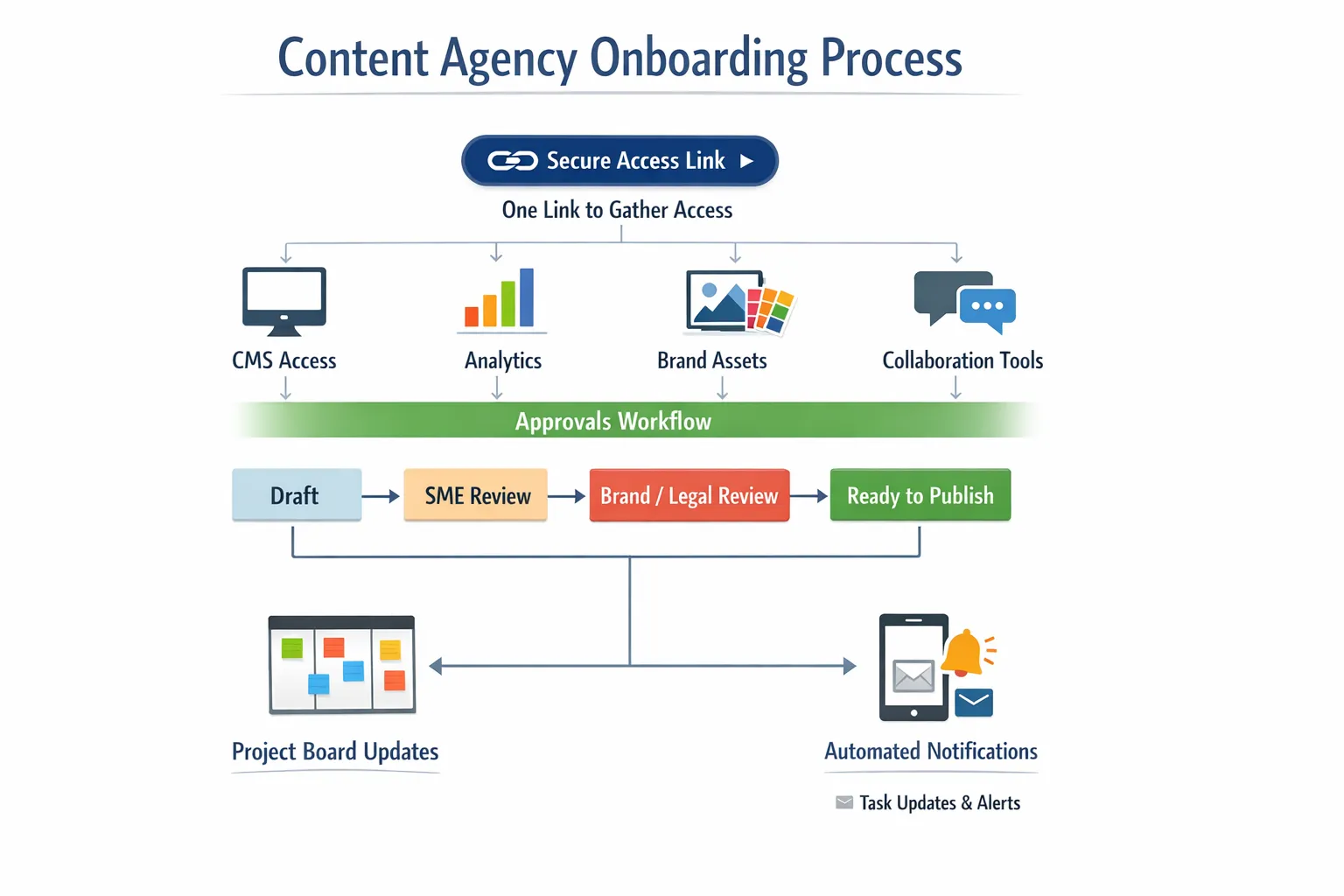
What “standardized access and approvals” means
Standardization is not about one tool for everything. It is about one way of doing the same things every time, regardless of client stack.
- Access, the minimum set of roles and permissions your team needs to draft, collaborate, publish, and measure, while keeping ownership with the client.
- Approvals, a predictable path with clearly named stages, accountable roles, and timeboxed SLAs so content does not stall.
When you define both as products in your onboarding, you eliminate bespoke chaos and create a brand experience clients can trust.
The minimum access kit for content teams
Use this matrix as your default. Adjust only when scope demands it, and document every variance.
| Asset or tool | Purpose in workflow | Client ownership model | Agency role | Recommended permission |
|---|---|---|---|---|
| CMS (WordPress, Webflow, Shopify blog) | Draft, edit, publish | Client owns site | Editor, occasional Publisher | Editor for most, Publisher only for lead or release managers |
| Staging CMS | QA before go‑live | Client owns staging | QA lead, Editor | Editor, publish to staging only |
| Digital Asset Management or shared drive | Brand files, images, legal docs | Client owns library | Designers, Writers | Contributor for assets, view for legal archives |
| Analytics (GA4 or equivalent) | Measure content performance | Client owns property | Analyst, Strategist | Read and analyze, no admin |
| Search Console | Indexing and search insights | Client verified owner | SEO lead | Full user, owner stays with client |
| Social scheduler or community tool | Distribution and repurposing | Client owns workspace | Social manager | Publisher or equivalent on approved channels |
| Email platform (newsletter) | Blog-to-email, RSS campaigns | Client owns account | Lifecycle or content ops | Campaign creation, no billing |
| Project management (Asana, Jira, Notion) | Status, tasks, dates | Client or agency system of record | All collaborators | Project or space-level access, no workspace admin |
| Comms (Slack, Teams) | Approvals, quick decisions | Client owns | Account manager | Guest access to relevant channels |
Principles to enforce every time:
- Client owns everything, the agency is added as a partner or user with least‑privilege roles.
- No shared passwords, use role-based accounts and audit trails.
- Separate staging from production, publish rights are limited to a release manager.
- Analytics access is read-first, only admins change data collection settings.
A simple approvals framework that does not break
Names and gates matter. Use a small, memorable set of stages the whole program understands.
- Draft, author completes a draft in the agreed template.
- SME review, subject matter expert checks facts and adds clarifications.
- Brand and legal, brand standards and required disclosures are verified.
- Design and SEO QA, visuals, links, metadata, and internal links are final.
- Ready to publish, release manager schedules or ships with agreed date.
- Published and measured, URL live, UTMs verified, initial metrics logged.
RACI pattern that fits most teams:
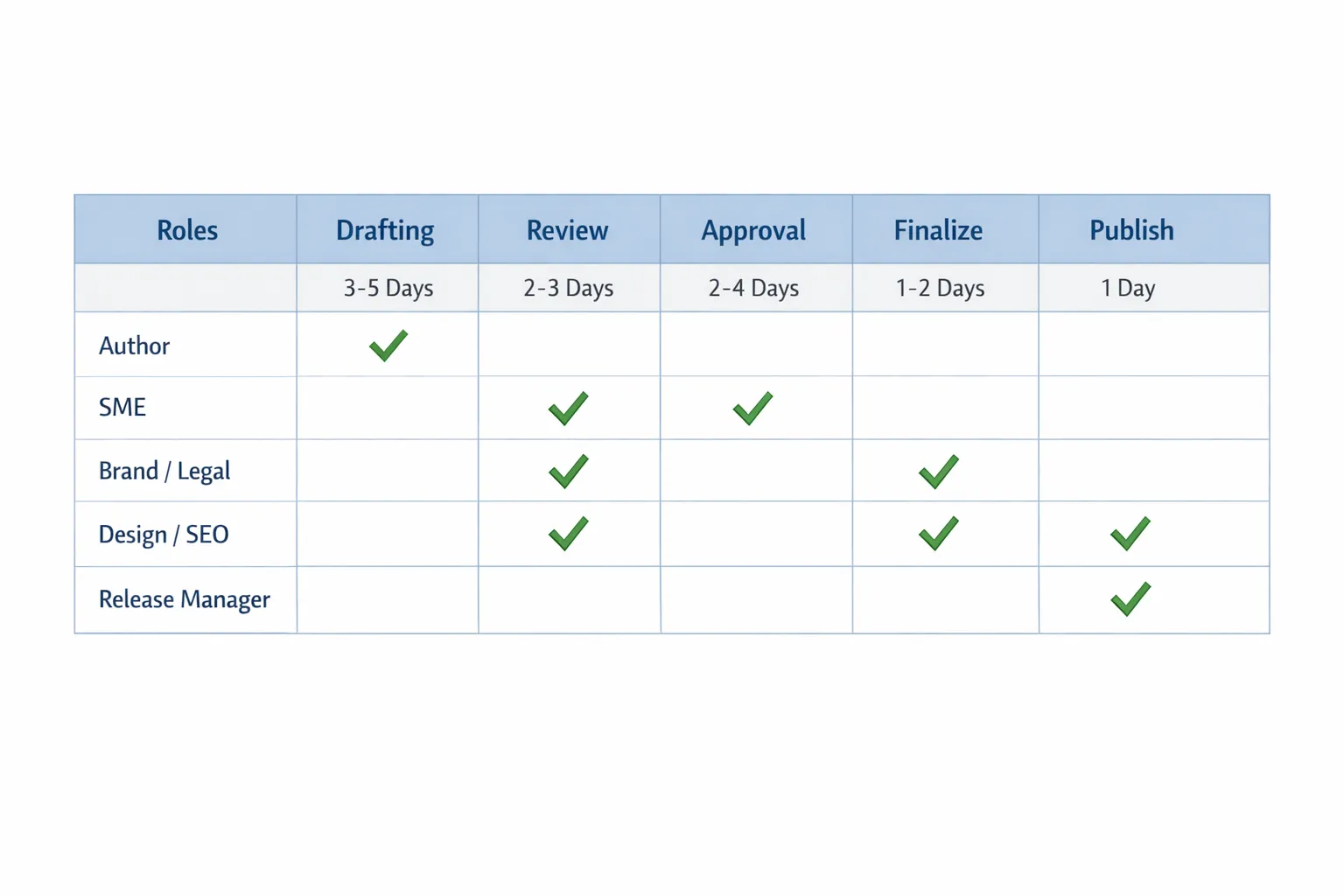
- Author is responsible for Draft.
- SME is accountable for SME review.
- Brand lead is accountable for Brand and legal.
- Design and SEO are responsible for QA.
- Account lead or release manager is accountable for Ready to publish.
Timeboxes you can communicate up front:
- SME review in 2 business days.
- Brand and legal in 1 business day for standard pieces, 3 for regulated content.
- Release within 1 business day of Ready to publish.
Escalation, if any stage exceeds its SLA, the account lead pings the owner, proposes a ship-with-edits or a slip, and documents the decision in the project tool.
Pre-approved components that speed sign‑off
Create a client-specific library of approved building blocks so repeat content bypasses brand or legal every time.
- Boilerplates, company and product one-liners for intros and CTAs.
- Claims list, statements that are already legal-cleared, with sources.
- Disclosures, industry-specific footers or disclaimers.
- Image rules, stock sources, logo and product usage guidelines.
- SEO elements, page title and meta description patterns that comply with brand tone.
Document where each lives, who maintains it, and when it must be re-certified.
Automations that hold the system together
A standardized system should feel lightweight to clients and enforce guardrails behind the scenes.
- One-link intake, send a single, branded link that requests only the permissions you need, grouped by function, so clients approve once.
- Permission templates, map your service packages to saved permission sets, for example Editorial only, Editorial plus Distribution, Editorial plus Analytics.
- Status sync, when a stage changes, automatically update the project task and notify the approver in Slack or email.
- QA gates, require completion of a short checklist before a task can move from Design and SEO QA to Ready to publish.
- Post‑publish logging, capture the live URL, date, and initial metrics in a central dashboard for reporting.
Connexify can operationalize this without new infrastructure. You get a branded onboarding link, customizable permissions, support for multiple platforms, a user-friendly dashboard, API and webhook integrations, secure data handling, and no installation required. That combination helps you turn the above into a repeatable client experience.
Security and governance, built into the process
Even content programs touch sensitive systems, so make security part of your pitch and your practice.
- Least privilege, start with the lowest role that unblocks work and elevate only when justified.
- Owner stays client-side, avoid taking ownership on core assets, especially domains and analytics.
- Two-factor everywhere, enforce 2FA on all systems that support it.
- Environment separation, stage everything, ship from a controlled account only.
- Offboarding plan, remove agency users within 24 hours of contract end, and archive artifacts.
- Quarterly access review, validate roles and revoke stale access.
In regulated verticals your bar is even higher. Clients expect the same discipline they apply elsewhere, for example, fast, compliance-ready onboarding with KYC and AML controls in iGaming. Studying how platforms deliver that level of rigor, such as a modular iGaming stack designed for rapid onboarding and compliance, can inform your own approach for content workflows. See a concrete example of a platform built for fast onboarding and compliance here: modular iGaming platform designed for fast onboarding and compliance.
Measure what matters
Put numbers on your access and approvals work so you can improve it.
- Time to first publish, days from contract sign to first live URL.
- Access success rate, percentage of required systems granted on first pass.
- Approval SLA adherence, percentage of pieces that meet SME and brand/legal SLAs.
- Revision loops per piece, how many times content re-enters Draft after SME or brand.
- Stage aging, average hours a piece spends in each stage.
- Publish accuracy, percentage of pieces that ship with zero post‑publish fixes.
Set a baseline, review weekly in standups, and pick one constraint to remove each sprint.
Rollout plan, implement in 10 steps
- Inventory, list the exact tools and roles you touch across current clients.
- Define roles, name your internal roles and the minimum permission they require.
- Draft the approvals map, adopt the six stages above and assign RACI owners.
- Build templates, copy templates for briefs, drafts, SME reviews, QA, and legal notes.
- Create permission sets, one per service package, mapped to client systems.
- Configure one-link intake, group asks by function and add short, plain‑English reasons for each.
- Pilot with one client, run a real piece end to end with timers on each stage.
- Debrief, capture blockers, edit your templates and permission sets.
- Train the team, run a 60‑minute workshop and record it for new hires.
- Roll to all new deals, then backfill to existing clients during the next content cycle.
Client-facing language you can reuse
Clients need reassurance that this is safe, fast, and reversible. Try these talking points in sales decks and kickoff calls.
- You retain ownership of every asset, we request scoped, revocable access only.
- We use a single, branded link to collect access, so you do this once instead of sending logins.
- Approvals are timeboxed, if a review slips we escalate with options, not surprises.
- Publishing rights are limited to a release manager and every change has an audit trail.
- You can see status at any time in your project board or weekly recap.
Where Connexify fits in your stack
You do not need to build the plumbing yourself. Connexify is a client onboarding platform for agencies and service providers that compresses setup from days to seconds.
- One-link client onboarding collects all required access in a branded experience.
- Customizable permissions and white‑label options match your packages and brand.
- API and webhook integrations push status and access events into your PM or CRM tools.
- Secure data handling means you avoid risky password collection.
- No installation required and a 14‑day free trial to validate the workflow.
If you already have strong SOPs, Connexify turns them into a smooth, client‑friendly journey. If you are starting from scratch, it gives you guardrails out of the box.
Frequently Asked Questions
What if a client refuses to grant publish permissions? Make the release manager a client user. Your team can hold Editor roles, then hand off to the client for final ship. The workflow still benefits from standardized stages and QA gates.
How do we handle multiple CMS platforms without chaos? Keep the permission intent the same, Editor for drafting and Publisher for controlled release. Only the click path changes per CMS. Document the path once per platform in a short runbook.
Can we use email for approvals instead of a project tool? You can, but it is harder to track SLAs and audit decisions. If email is required, summarize the final decision in the project task and attach the approval message for traceability.
What is the right role for Search Console access? Keep verified ownership with the client and request Full user for your SEO lead. That provides the insights you need without transferring control.
How do we keep legal from becoming a bottleneck? Create a pre-approved claims and disclosures library, set a specific SLA for legal reviews, and triage pieces into standard and regulated tracks. Most posts should clear brand checks only.
What is the best way to offboard cleanly? Remove all agency users within 24 hours of contract end, export and hand off working files, and provide a short access audit showing what was added and what was removed.
Our SME misses review windows, what now? Offer a short, structured SME review template that takes under 10 minutes, and set an escalation rule, for example, if no response by end of day two, the account lead proposes ship-with-edits or a slip.
Do we need to share passwords at any point? No. Use platform invitations and role-based access. Your standard should explicitly forbid password sharing.
Want to turn this playbook into a client experience that wins deals and ships content faster? See how a single branded link and customizable permissions can standardize access and approvals across your portfolio. Start your 14‑day free trial or book a demo at Connexify.