Business TikTok Setup: Share Access Without Headaches
12/29/2025

If setting up Business TikTok feels harder than making a viral video, you are not alone. Between Business Center, Ads Manager, Pixels, creator permissions, and billing, the biggest headache is usually sharing access securely with teammates and agencies without breaking anything or exposing your account. This guide shows a clean, secure pattern to set up Business TikTok, share the right access in minutes, and keep governance tight as you scale.
What “clean access” looks like on Business TikTok in 2025
A clean setup has four pillars: client-owned assets, partner-based access for agencies, least-privilege roles for people, and auditability across everything. In practice, that means the business owns the Business Center, ad accounts, and pixels. Agencies are added as partners to specific assets, not as admins to the entire Business Center. Teammates get scoped roles that match their jobs, and there is a visible trail of who changed what.
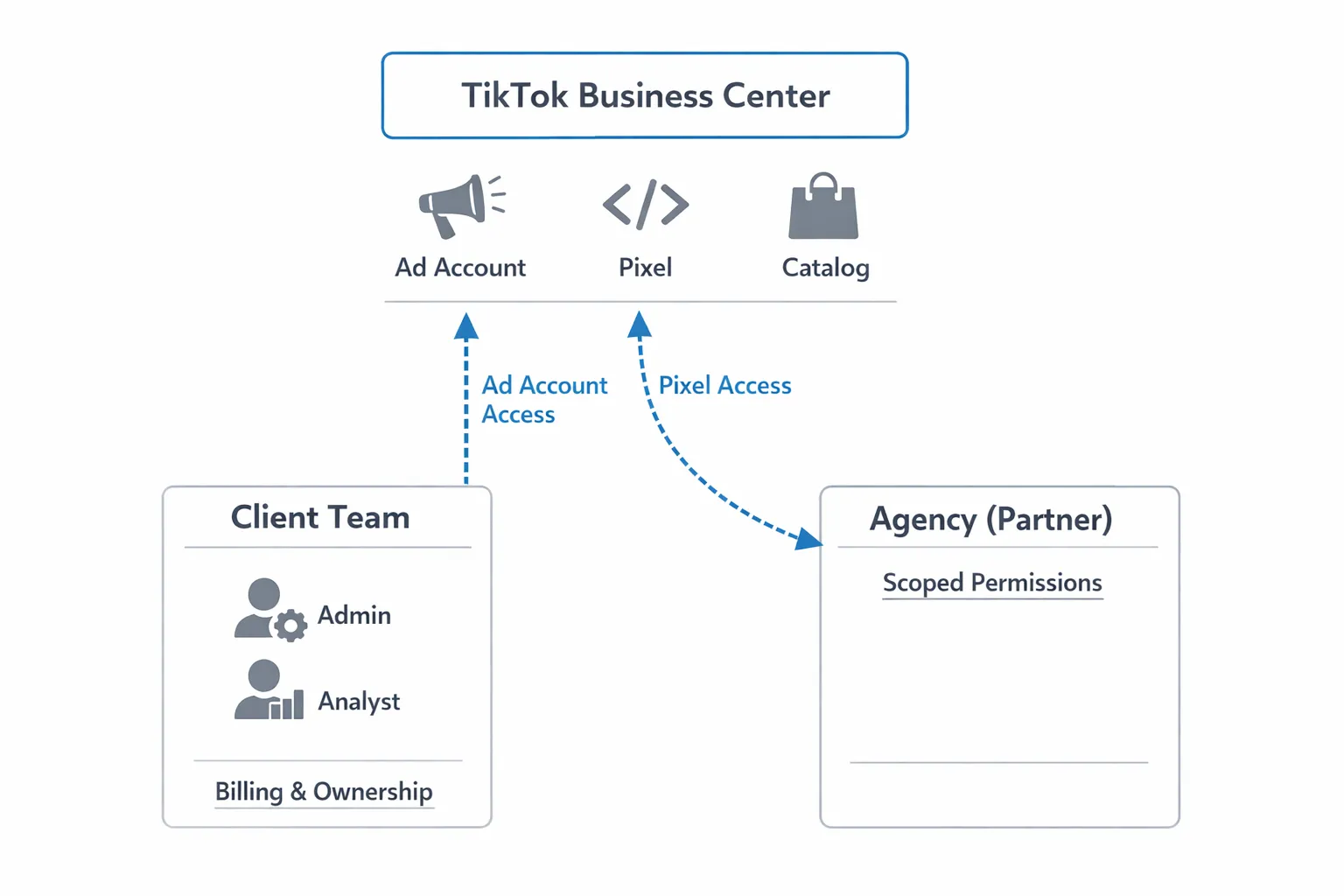
TikTok changes product labels occasionally, so the exact names you see can vary by region or UI version. The core concepts remain the same: Business Center groups your assets, Ads Manager runs campaigns, and you can share each asset with people or partners. If you need official references, the TikTok Business Help Center is the best source to confirm current labels and paths. You will find it under Ads Manager support in the TikTok Business Help Center.
Prerequisites that prevent access headaches
Before you invite anyone, make sure the foundation is solid. Two short checks here can save days later.
- A verified Business Center using a domain email, with two-factor authentication enforced for all members
- At least one ad account created in the correct currency and time zone for billing and reporting alignment
- A payment method on file owned by the business, or a clear plan for who pays and how invoices are handled
- A TikTok Pixel created and assigned to the ad account that will run campaigns, with Events API planned if you need higher signal quality
- A primary point of contact who can accept invites, confirm access, and approve creator whitelisting for Spark Ads
If you are working with an agency, confirm ownership up front. The safest pattern is client owns everything, the agency gets scoped partner access to run campaigns and manage measurement.
Share access the right way
Do not share passwords. Use Business Center partner access and asset-level permissions instead. Start with the smallest role that allows the work to happen, then escalate only if required. This reduces risk and makes offboarding simple.
| Goal | Where to do it | What the agency needs | What the client keeps |
|---|---|---|---|
| Let your agency run campaigns in your ad account | Business Center, add Partner, share Ad Account | Permission to create and manage campaigns and view reports | Ownership of Business Center, billing control, admin on ad account |
| Enable conversion tracking | Business Center, create Pixel, assign to Ad Account used by agency | Ability to view events and configure basic settings, access to the assigned ad account | Pixel ownership and edit rights, final control of Events API tokens |
| Share creative libraries and catalogs if used | Business Center, share Asset Library or Catalog with Partner | View and use shared creative or product feeds in ads | Ownership of libraries and catalogs |
| Keep reporting transparent | Ads Manager and Business Center reporting, share with team and agency | Read access to performance and diagnostics | Control of what is shared and how frequently |
If you need to grant access to teammates rather than an agency, add them as people in Business Center and assign only the assets they will touch. Analysts do not need edit rights, and creators do not need billing access.
A quick-start runbook, from invite to first campaign
Start by adding your agency as a Partner in Business Center, then assign the ad account and pixel. Once the invite is accepted, ask your agency to confirm they can create a draft campaign, view your pixel events, and see your billing status without changing ownership. That single loop resolves most permissions issues in one pass. If you have not assigned a payment method yet, do it before the agency pushes anything live. If you need Spark Ads, plan those authorizations in parallel so whitelisted posts can be used as soon as campaigns are ready.
If your agency uses a standardized onboarding link to capture IDs and permission needs, use it to avoid back-and-forth. It should collect Business Center ID, ad account, pixel, target markets, and primary contacts. With that information, partner access is straightforward and testable on a short kickoff call.
Spark Ads without chaos
Spark Ads require the creator to authorize their organic posts for advertising. You can collect creator authorizations via codes or in-app whitelisting, then attach those posts to your ads without logging in to the creator’s account. Coordinate creator approvals early, set expectations on time windows, and keep a shared sheet of post links and authorization status. TikTok’s help center includes the latest details on Spark Ads setup in the TikTok Business Help Center.
Two small tips keep Spark smooth. Confirm the ad account that will use the Spark authorization before the creator grants it, and standardize your naming conventions for Spark assets so approvals are easy to trace later.
Governance that scales
Good governance prevents future access fires. Use a shared naming convention for ad accounts, pixels, and campaigns that includes brand, market, and objective. Enforce two-factor authentication across Business Center. Document who has which role and why, and review access quarterly. Keep billing owned by the business, and do not grant billing edit rights unless absolutely necessary. When the engagement ends, revoke partner access and remove people from assets. Clean offboarding is as important as clean onboarding.
Troubleshooting the top blockers
If an invite is pending for days, confirm the recipient’s email matches a user that can access Business Center and that two-factor authentication is turned on. If the ad account is missing when an agency accepts your partner invite, you likely shared the Business Center but not the asset itself, so assign the ad account explicitly. If the pixel is not visible in the ad account, check that it is assigned to that ad account and that events are firing. If billing fails, confirm the payment method country matches the ad account settings and that the business is verified.
Small region or UI differences can make the menu paths look a little different. When in doubt, search the term you need in the TikTok Business Help Center by asset name and you will usually land on the right place.
Post-setup checklist that keeps performance steady
Once access is clean, validate measurement and delivery so you do not chase ghosts later. Fire a few test events on key pages and confirm they appear in Events Manager. Compare TikTok-reported conversions against your analytics platform to catch mismatches early. Review attribution settings with your agency, and agree on the default reporting window. If you use offline conversions or the Events API, document token ownership and refresh policies.
Finally, align on a reporting cadence. Weekly summaries that include spend, reach, cost per action, top creatives, and next steps keep everyone focused on outcomes, not logins.
Bonus: turn conversations into campaigns
With access squared away, fill your content pipeline with real questions from potential customers. Reddit is particularly rich for product discovery and use case debates. If you do not have time to monitor threads manually, tools that automate discovery can help you spot and join relevant discussions. One option is to turn Reddit conversations into customers by automatically finding threads that match your offer and flagging engagement opportunities for your team.
How Connexify removes the friction
If you are tired of trading screenshots and chasing IDs, Connexify gives agencies and service providers a single, branded onboarding link that captures everything in one flow. Clients click a secure link, choose the platforms they use, and approve scoped permissions. Your team gets instant visibility in a user-friendly dashboard, along with API and webhook integrations that push clean access data into your CRM or project management tools. No installation is required, data handling is secure, and everything is white-label ready.
Most importantly for Business TikTok, you cut out the repetitive steps that cause delays. Instead of explaining where to click in Business Center for every client, your one-link flow collects the Business Center ID, the ad account and pixel you will use, the approvals you need, and the contacts to verify access on a short kickoff call. That means less time on logistics and more time on creative and performance.
Ready to see it in action and compress onboarding from days to minutes? Start a 14-day free trial or book a demo at connexify.io.
Frequently Asked Questions
Do I need a Business Center to advertise on TikTok? You can run ads from a standalone ad account, but a Business Center makes sharing access, organizing assets, and managing partners far easier. It is the recommended approach for any brand working with an agency or multiple markets.
Should the agency create the ad account, or should the client own it? For most brands, the client should own the ad account and billing. The agency should receive partner access with a role that allows campaign management but does not transfer ownership.
How do I give my agency access without making them an admin of everything? Add the agency as a Partner in Business Center, then share only the specific assets they need, like the ad account and pixel. Start with the smallest role that enables their work.
What is the cleanest way to handle Spark Ads permissions? Have creators authorize specific posts for Spark Ads and keep a log of post links and expiration dates. There is no need for creators to share their login details.
Why can my agency see the Business Center but not the ad account? You likely shared the Business Center but did not assign the ad account asset. Assign the ad account under Partner sharing so they can manage campaigns.
Can I revoke access later without breaking campaigns? Yes. Remove the partner or person from the specific assets in Business Center. If you plan an agency transition, set an end date and ensure your team retains admin and billing control.
Need a headache-free handoff for Business TikTok and your other platforms in one go? Streamline it with a single branded onboarding link, customizable permissions, APIs and webhooks, and a secure, no-install experience. Book a demo or start your 14-day free trial at Connexify.