Facebook Business Website: Setup and Access Basics
01/26/2026

When someone searches for a Facebook Business website, they’re usually trying to do three things:
- Create a credible business presence on Facebook (a Page).
- Set up the Meta business layer that controls ads, people, permissions, and assets.
- Connect their actual website (domain, tracking, conversions) without creating access headaches.
If you’re an agency, “setup” also includes one more requirement: clean access (no password sharing, no “make everyone admin,” no endless follow ups).
What a “Facebook Business website” actually is (and isn’t)
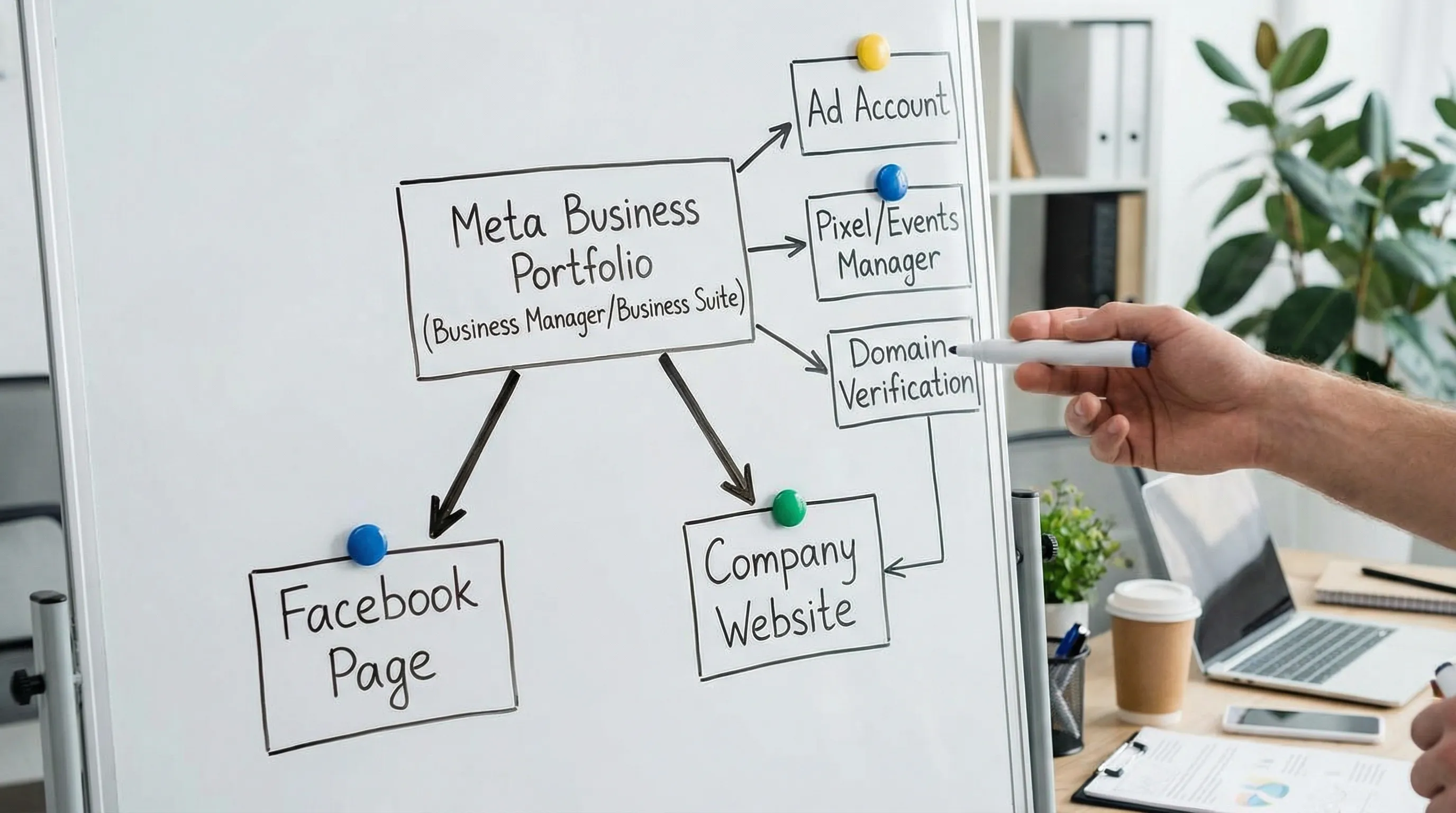
Facebook doesn’t host your main website (unless you’re using something like Instant Experiences for campaigns). In most cases, your “Facebook Business website” setup means:
- Facebook Page: Your public business presence (address, hours, website URL, posts, reviews, messaging).
- Meta Business Suite / Business Manager (Business Portfolio): The admin layer where you manage people, partners, ad accounts, Pixels, domains, catalogs, and security.
- Your own website: The site you link on your Page and connect to Meta for tracking (Pixel, Conversions API) and domain verification.
This distinction matters because most setup problems come from mixing up where something lives (Page settings vs Business Settings vs Events Manager).
Setup basics: the fastest “clean” starting point
Below is a practical, lowest drama path that works for most small businesses and agencies onboarding clients.
Step 1: Create (or claim) the Facebook Page
Your Page is what customers see. Create it with a real business email, and add the essentials:
- Website URL
- Business category
- Address (or service area)
- Hours
- A profile image and cover image
Meta’s Page creation flow changes occasionally, but the canonical reference is the Meta Business Help Center.
Step 2: Create a Business Portfolio (Business Manager) for ownership and governance
A Page alone is not enough if you plan to run ads, add multiple team members, or collaborate with an agency.
In the business layer you can:
- Assign roles to specific people
- Add an agency as a partner (instead of sharing logins)
- Manage ad accounts, Pixels, catalogs, and domains
Tip: If you already have multiple Business Portfolios floating around, decide which one will be the “source of truth” before you add more assets.
Step 3: Lock down security before you invite anyone
Access problems often start as security shortcuts. A clean baseline is:
- Use named user accounts, not shared logins
- Turn on two factor authentication (2FA)
- Keep the number of admins small
Meta has increasingly pushed businesses toward stronger authentication, especially for ad related access. If your team keeps getting blocked by checkpoints, start here.
Quick reference: what you’re setting up, where it lives, and who should own it
| Item | Where you manage it | Should be owned by | Why it matters |
|---|---|---|---|
| Facebook Page | Page settings / Business Suite | Client (or your company if you are the brand) | Brand presence and messaging |
| Business Portfolio | Business Settings | Client (recommended) | Central governance and auditability |
| Ad Account | Business Settings / Ads Manager | Usually client | Billing control and continuity |
| Pixel / Events | Events Manager | Usually client | Conversion tracking and optimization |
| Domain verification | Business Settings | Client | Required for some measurement and prioritization workflows |
Website connection basics: link, verify, track
Once the Page and Business layer are stable, connect the actual website in a way that supports measurement and reduces future rework.
Add the website URL to the Page (the public part)
This is the simplest step, but it affects trust and conversions (people will click it before they message you).
Make sure:
- The URL uses the correct protocol (https)
- It resolves to the right version (www vs non www)
- The landing page matches what your Page promises
Verify your domain (the governance part)
Domain verification happens in the business layer, not on the Page. It helps establish which Business Portfolio is authorized to manage specific domain related settings.
Meta’s official instructions live in the Business Help Center domain verification docs. In practice, you’ll choose one method:
- DNS TXT record (most common for agencies)
- HTML file upload
- Meta tag
If you hit “already verified,” it usually means the domain was verified in a different Business Portfolio (common in businesses that have worked with multiple vendors).
Set up conversion tracking (the performance part)
For ads, tracking is where most “we launched but nothing works” stories begin.
At a minimum:
- Install the Meta Pixel (via your site platform or Google Tag Manager)
- Confirm events in Events Manager
If you have server side resources, explore Conversions API (CAPI) for improved resilience. Meta maintains guidance in the Events Manager documentation.
Optional but high impact: collect on site feedback tied to campaigns
If you are sending paid traffic from Facebook to your website, a simple way to improve conversion rate (and reduce guesswork) is to capture visitor feedback directly on site.
A lightweight option is Modalcast’s feedback widget, which can help you collect user feedback, share updates, and capture leads without rebuilding your site.
Access basics: how to add people and partners without chaos
Whether you’re a business owner delegating tasks or an agency onboarding a client, the goal is the same: least privilege access with clear ownership.
Use partner access for agencies (instead of asking for admin)
The cleanest agency model is:
- The client owns the Business Portfolio and assets
- The client adds the agency as a Partner
- The agency assigns access internally to named users
This reduces risk for the client and reduces support load for the agency because roles are explicit and revocable.
Know the two common permission layers
Meta permissions can feel confusing because there are multiple layers. At a high level you will encounter:
- Business level access (people and their role)
- Asset level access (what someone can do inside a Page, Ad Account, Pixel, etc.)
When something “looks right” but still fails, it’s usually because one of these layers is missing.
What you should collect before you request access
If you want fewer back and forth messages, standardize the inputs you ask for. For most Facebook ad and website tracking work, collect:
- Business Portfolio ID (or confirmation of which Business Portfolio to use)
- Facebook Page URL
- Ad Account ID
- Pixel ID (or confirmation it doesn’t exist yet)
- Website domain (the one you will verify)
If you’re an agency, this is also where you define exactly what roles you need for media buying, creative, analytics, and developer work.
Common setup and access issues (and what to check first)
“I can’t see the ad account”
Most often:
- You are logged into the wrong Facebook profile
- You are in the wrong Business Portfolio context
- You have business access but not asset access (or the reverse)
Try switching profiles, confirming Business Portfolio selection, and reviewing the asset permissions in Business Settings.
“Domain verification says it’s already verified”
This typically means the domain is verified under a different Business Portfolio. You’ll need to identify where it lives before you can move forward.
“We’re stuck in 2FA or security checkpoints”
Treat this like an onboarding prerequisite:
- Ensure each user has a named login
- Ensure 2FA is configured consistently
- Avoid sharing devices and logins across multiple people
“We added the Pixel but conversions don’t show”
Before changing campaigns, validate tracking:
- Confirm the Pixel is firing on the right pages
- Check events in Events Manager
- Verify that the domain is correct and consistent across redirects
How agencies make this repeatable (and why it matters)
If you onboard one client per quarter, manual steps are annoying. If you onboard multiple clients per month, manual steps become a revenue leak.
A repeatable onboarding flow usually includes:
- A single client friendly intake
- Clear permission templates by service scope
- A way to track what’s missing (and who owns the next step)
- Secure handling of sensitive data
Connexify is built for this agency and service provider reality: it streamlines onboarding through a single, branded link that can set up fast, secure access across platforms, with customizable permissions, white label options, and API/webhook integrations. If you want to remove the “Facebook access ping pong” that delays launch, you can explore Connexify at connexify.io and start with the 14 day free trial.