Ad Agency Facebook Workflow: From Contract to Launch
01/24/2026

Most Facebook ad accounts do not lose money because the media buyer “picked the wrong bid strategy.” They lose money because the work between contract signed and campaign launched is sloppy: missing access, unclear ownership, broken tracking, unapproved creative, or a billing constraint discovered 10 minutes before go-live.
A high-performing ad agency Facebook workflow is really an operations workflow. It turns a closed-won deal into a measurable, compliant launch with clear gates, owners, and a short time-to-first-signal.
The goal: compress “contract-to-launch” without cutting corners
You are optimizing for two things at once:
- Speed (so you can start learning before the client’s momentum and attention fades)
- Control (so you do not launch blind, violate policy, or inherit preventable security risk)
A practical benchmark many agencies aim for is:
- Time-to-verified-access: same day
- Time-to-measurement-ready: 24 to 48 hours
- Time-to-first-impression: 3 to 7 days (faster for simple offers, longer for complex setups)
The easiest way to hit those numbers is to run a repeatable, stage-based workflow.
The 6-stage ad agency Facebook workflow (with owners and deliverables)
Treat your workflow like a mini implementation project. Each stage has a single “definition of done,” and you do not progress without it.
| Stage | Target SLA | Primary owner | Definition of done (DoD) |
|---|---|---|---|
| Sales-to-delivery handoff | Day 0 | Account lead | Win definition, scope, constraints, and contacts documented |
| Access + governance | Day 0 to Day 1 | Ops / AM | Partner access granted, correct roles, no password sharing |
| Measurement readiness | Day 1 to Day 2 | Analytics / buyer | Pixel and/or CAPI events verified, conversion goals agreed |
| Creative + offers intake | Day 1 to Day 3 | Creative lead | Approved angles, assets, and compliance notes in one place |
| Build + QA | Day 2 to Day 4 | Media buyer | Campaigns built, naming standards applied, QA checklist passed |
| Launch + first 72h | Day 4 to Day 7 | Buyer + AM | Controlled go-live, monitoring cadence, first insights delivered |
This structure is simple, but the details inside each stage are what prevents “launch week chaos.”
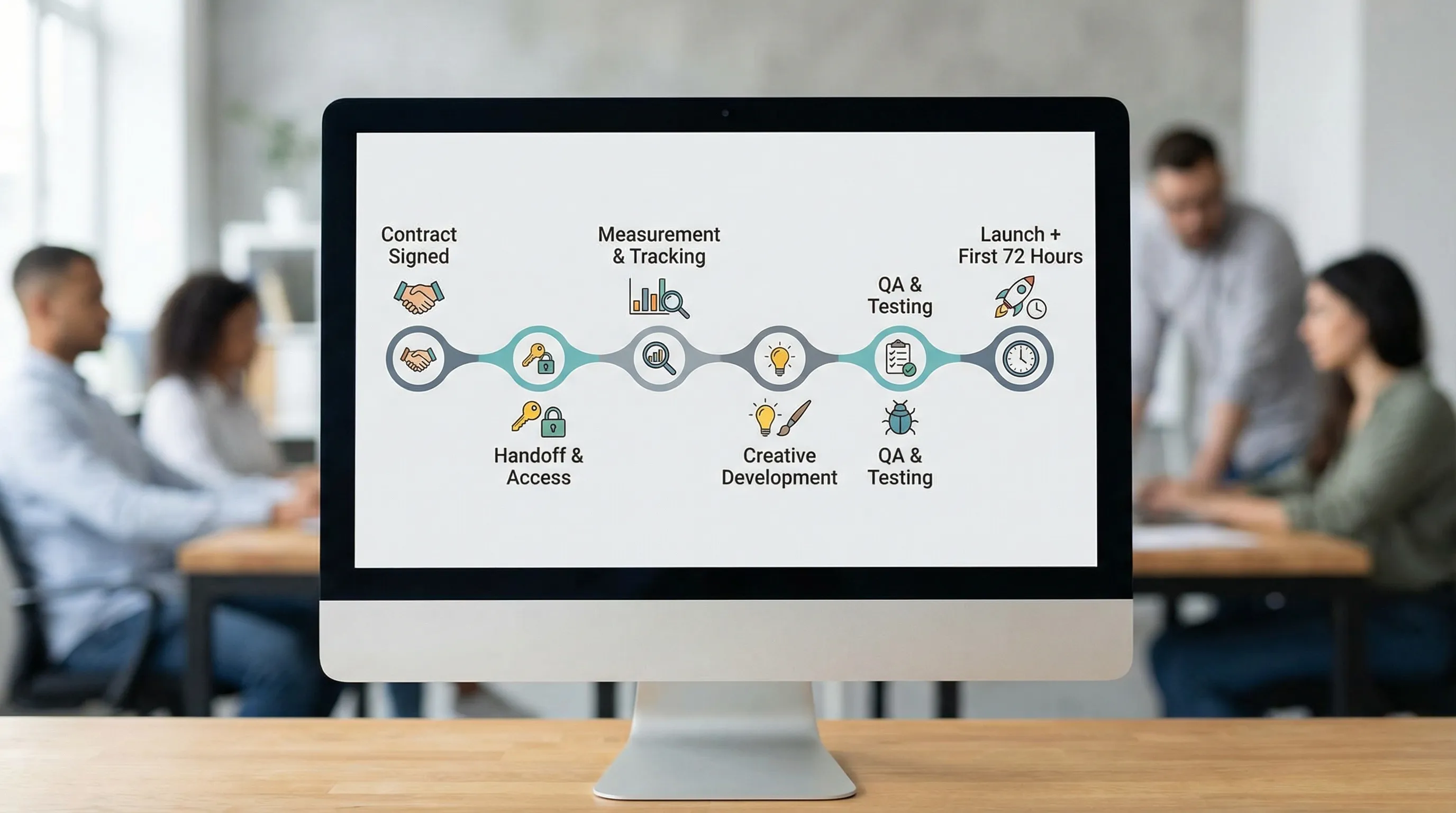
Stage 0 (Day 0): sales-to-delivery handoff that eliminates rework
If sales closes a deal and tosses a Slack message to the delivery team, you will pay for it in rework.
Your handoff should produce a short, unambiguous “launch brief” that answers:
- What is the win definition for the first 30 days (not vague goals, but measurable outcomes)?
- What is in scope (and explicitly out of scope)?
- What is the offer, the target customer, and any compliance constraints (claims, regulated categories, financing terms, targeting restrictions)?
- Who approves creative and who owns billing?
- What assets are client-owned vs agency-owned?
A useful internal standard is: No access request is sent until the win definition and owners are named. Otherwise, you collect credentials first and discover strategy later.
Contract language that protects speed
You do not need legal complexity, you need operational clarity. Many agencies add SOW language that covers:
- Client will provide access and required IDs within X business days.
- Client will enforce 2FA and provide named user access (no shared logins).
- Agency will not launch until measurement is verified (prevents “we spent money and learned nothing”).
This is not about being strict, it is about setting expectations that prevent delays you cannot fix after the fact.
Stage 1 (Day 0): send a single onboarding request, not 12 follow-ups
The fastest agencies avoid fragmented onboarding across email threads, spreadsheets, and DMs.
Instead, they send one branded intake that captures:
- Client points of contact (approver, billing owner, technical owner)
- Meta Business Portfolio / Business Manager identifiers (where applicable)
- Ad account(s), Pages, Instagram account, Pixel/Dataset, Catalog
- Domain and website details
- Any existing agency/partner relationships (to avoid access conflicts)
This is where a dedicated onboarding layer helps. Connexify is designed for exactly this, one branded link to set up account access across platforms with customizable permissions, plus API/webhook integrations so your ops stack stays in sync. The aim is to reduce onboarding time from days to seconds by eliminating manual steps, without sacrificing security.
Stage 2 (Day 0 to Day 1): access + governance for Meta (Facebook)
For Facebook ads work, “access” is not one thing. It is a set of assets with different permission models.
The best-practice direction from Meta is to use business-level structures and avoid sharing passwords. Start in the official Meta Business Help Center if a client is new to partner access concepts.
What you should collect and verify
Capture the minimum set of assets you need to execute, and the minimum permissions required per role.
| Asset | Why it matters before launch | What you need from the client |
|---|---|---|
| Meta Business Manager / Business Portfolio | Central place to manage assets and partners | Business ID and partner add flow |
| Ad Account | Where spend, campaigns, and billing live | Ad account ID, role assignment |
| Facebook Page | Identity for ads and messaging | Page access or asset assignment |
| Instagram account | Identity for placements, DMs, and IG attribution | IG account connection to Page |
| Pixel / Dataset | Conversion measurement and optimization | Pixel/Dataset ID, event status |
| Domain verification | Required for certain tracking and configuration | Verified domain in Meta |
| Product Catalog (if ecom) | Dynamic ads, product feeds | Catalog ID and permissions |
Role-based access: least privilege by job
A common cause of client distrust is over-requesting access. Ask for what you need, nothing more.
| Agency role | Typical Meta permissions needed | Common mistake to avoid |
|---|---|---|
| Media buyer | Manage campaigns on ad account, view performance, manage pixel connection as needed | Requesting full admin when “advertiser” plus specific asset access is enough |
| Analyst | View access to ad account + pixel event visibility | Giving publish permissions to a reporting-only role |
| Creative / editor | Page/IG access for previews and asset management (only if required) | Adding creative users to billing or ad account admin |
| Developer (CAPI) | System user / token workflow (when applicable) | Passing personal access tokens around via chat |
| Finance | Billing access only | Mixing finance users into campaign roles |
If you standardize this table inside your agency, you will reduce back-and-forth with clients and shorten time-to-verified-access.
Stage 3 (Day 1 to Day 2): measurement readiness gate (do not skip)
Launching without verified measurement is the most expensive form of “moving fast.” Your workflow needs a hard gate.
Your measurement readiness gate should confirm:
- The correct conversion events exist (lead, purchase, qualified lead, booked call, etc.)
- Events are firing on the right pages and are not duplicated
- Attribution expectations are agreed (especially if the client expects perfect CRM matching)
- If Conversions API is used, ownership and implementation details are clear
Meta maintains technical documentation for server-side tracking in the Conversions API docs.
A simple operating rule that reduces future arguments is to write down, in plain language:
- What counts as a conversion
- Where it is recorded (Meta, GA4, CRM)
- What you will optimize for in Meta during the first test period
When a client later asks “Why does Meta show 43 leads but the CRM shows 31?”, you have an agreed baseline for reconciliation.
Stage 4 (Day 1 to Day 3): creative + offer intake that prevents disapprovals
Most agencies think “creative intake” means “get some brand assets.” For Facebook ads, you want to intake decision constraints and claims constraints just as much as logos.
Focus on collecting:
- The offer and the non-negotiables (price, terms, geography, exclusions)
- A short list of approved claims (and disallowed claims)
- Landing page URLs and who can edit them
- Brand voice examples and creative references
- Approval process (one approver, one path, clear SLA)
Keep the approval path simple. If three stakeholders can veto ads asynchronously, you will fail your launch timeline even with perfect media buying.
Stage 5 (Day 2 to Day 4): build + QA inside Ads Manager
This is where process discipline shows up. Two agencies can build the same campaign, but only one will be able to explain it, audit it, and scale it.
Naming and structure are not “nice to have”
Standard naming improves:
- Debugging (what changed, when, and why)
- Reporting (especially across multiple clients)
- Handoffs (vacations, turnover, contractor support)
Decide on a simple naming scheme and stick to it. The exact format matters less than consistency.
A lightweight QA gate before launch
You do not need a 60-item spreadsheet for every client. You need a repeatable gate that catches expensive mistakes:
- Correct ad account, Page, and IG identity selected
- Correct pixel/dataset selected and prioritized event verified
- UTM conventions applied (or documented if not used)
- Correct geo, age, language, and placement decisions
- Budget and schedule aligned with client expectations
- Billing method confirmed and not near a spend limit
If your agency uses tools like Connexify to centralize onboarding data and access state, QA becomes faster because IDs, roles, and status are not scattered.
Stage 6 (Day 4 to Day 7): launch + first 72 hours cadence
The first 72 hours are a controlled monitoring period, not a panic cycle.
Set expectations with a simple cadence:
- 0 to 4 hours: Confirm delivery, links, and event firing. Pause only for clear errors.
- 24 hours: Check basic health (spend pacing, CPM volatility, disapprovals, conversion tracking integrity).
- 72 hours: Deliver first learning summary, what you changed, what you will test next.
This cadence is what clients experience as “professionalism.” It also prevents random mid-day edits that ruin learning.
Where agencies quietly win: automation and visibility
Once your workflow is defined, the next step is to remove avoidable manual work.
Common automation wins:
- Standardized onboarding requests and permission templates
- Automatic handoff to your PM/CRM when onboarding is completed (webhooks)
- A single dashboard view of onboarding status across clients
Connexify is built around these outcomes, one-link onboarding, branded experience, multi-platform support, white-label options, and API/webhooks so onboarding becomes part of your operating system, not a recurring fire drill. If you want to evaluate whether it fits your stack, start with the basics on the Connexify site: connexify.io.
Separately, if you are trying to keep your pipeline full while your team focuses on delivery, many agencies also reduce marketing overhead by automating content production with tools like BlogSEO for SEO content autopilot. Keep that system separate from delivery ops, but consistent with your positioning.
Score your workflow: the few metrics that actually matter
If you cannot measure onboarding and launch, you cannot improve it.
| Metric | What it tells you | What “good” often looks like |
|---|---|---|
| Time-to-verified-access | How fast you can start real work | Same day (or next business day) |
| Access completion rate | Whether clients get stuck in setup | 85%+ within 48 hours |
| Time-to-measurement-ready | Whether you launch with signal | 24 to 48 hours |
| Time-to-first-impression | End-to-end speed from signature to live | 3 to 7 days |
| Rework rate (setup) | How often you redo onboarding/build steps | Trending down month over month |
These metrics are also leadership tools. They help you identify whether delays come from sales promises, client bottlenecks, unclear permissions, or internal handoff gaps.
A workflow your team can run without you
The best ad agency Facebook workflow is the one that survives:
- New hires
- Client team changes
- “Urgent” launches
- Multiple concurrent onboardings
The path there is not more meetings. It is clear gates, clear owners, and a standardized onboarding experience that clients can complete quickly and securely.
If you want to productize the “contract-to-launch” motion with a single branded onboarding link, multi-platform access support, customizable permissions, and integrations, Connexify offers a 14-day free trial and a demo option at connexify.io.