Connexify White Label
🌐 How to Connect Your Custom Domain
You want your welcome page to be available under your own domain (like www.yourbrand.com)?
Here's how to do it in just a few minutes.
🔁 Step 1: Enter Your Domain
- Visit https://www.connexify.io/white-label
- Scroll down to the domain part of the page and paste in the domain you want to use (e.g.
https://www.yourbrand.com) - Click Connect Domain
🛠 Step 2: Create a CNAME Record
Now go to your domain registrar (e.g., GoDaddy, Namecheap, Cloudflare) and add the following DNS record:
| Type | Name / Host | Value | TTL |
|---|---|---|---|
| CNAME | www | bf3fac32021e0ecd.vercel-dns-016.com | Default or 3600 |
🔎 Tip: If you're using a different subdomain (like
app.yourbrand.com), replacewwwwith your chosen subdomain.
❗ Important: Make sure to remove any existing A or AAAA records for this subdomain - they can conflict with the CNAME setup.
🔍 Step 3: Verify Your Domain (If Required)
Sometimes Vercel requires additional verification, especially if your domain is already in use elsewhere on Vercel. If your domain is not validated immediately, you'll see an error message.
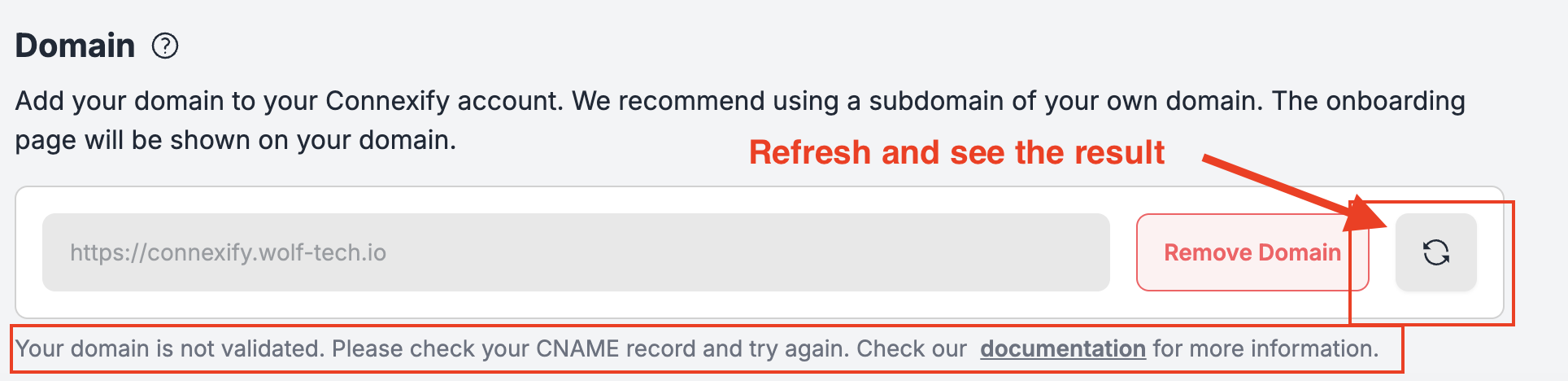
Follow these steps to complete verification:
- Click the refresh button next to your domain and wait for the validation message to appear
- If verification fails, you'll see a new message
- Look for a TXT record requirement in the error message - it will display a specific TXT record value you need to add
- Go to your DNS provider (same place where you added the CNAME record)
- Add a new TXT record with the provided value:
| Type | Name / Host | Value | TTL |
|---|---|---|---|
| TXT | _vercel | (copy the value from the message) | Default or 3600 |
- Wait a few minutes for DNS propagation
- Click the refresh button again to re-verify your domain
💡 Why is this needed? This TXT record proves to Vercel that you own the domain, especially when the domain is already registered with Vercel under a different account.
⏳ Step 4: Wait for Propagation
DNS updates can take anywhere from a few minutes to a few hours. Once your domain is pointing correctly, we'll automatically detect it and mark your domain as activated. You will see it mentioned in your Domain settings: Your domain is validated. Your links will be published on your domain.
✅ Step 5: Done!
Once the domain is connected, you'll be able to access your platform at your own URL - fully branded and live. 🚀
If you run into any issues, reach out to our support team, and we'll help you out.