Custom Account Types
Connexify provides an extensive list of pre-configured account types, including both automated and manual connection options. For even more flexibility, we now offer Custom Account Types - a feature that lets you create your own account types for onboarding clients to any tool or service you use.
Overview
Custom Account Types integrate seamlessly into Connexify's intuitive onboarding experience, enabling you to:
- Create personalized account types for any third-party service or tool
- Provide detailed instructions to your clients for connecting their accounts
- Maintain consistent branding and user experience across all account types
- Manage all your custom account types from a centralized dashboard
Creating Custom Account Types
As a Connexify user, you can create and manage Custom Account Types directly from your dashboard.
Accessing the Custom Account Types Page
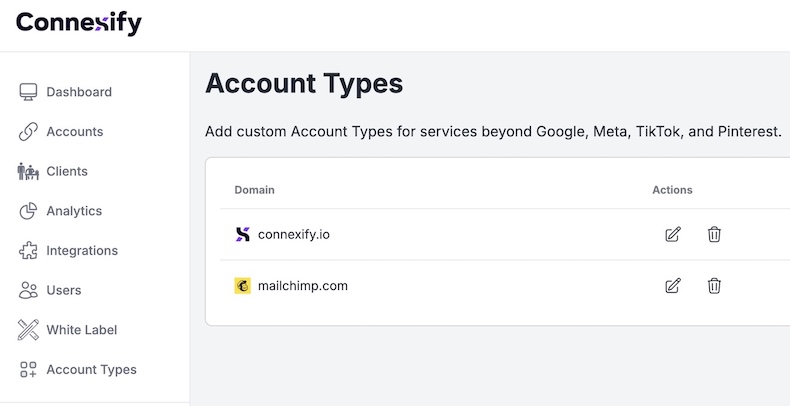
Navigate to Account Types from your dashboard sidebar to access the Custom Account Types management interface.
Adding a New Custom Account Type
- Click the "Add Account Type" button in the top-right corner of the Account Types page
- A dialog will appear with two required fields:
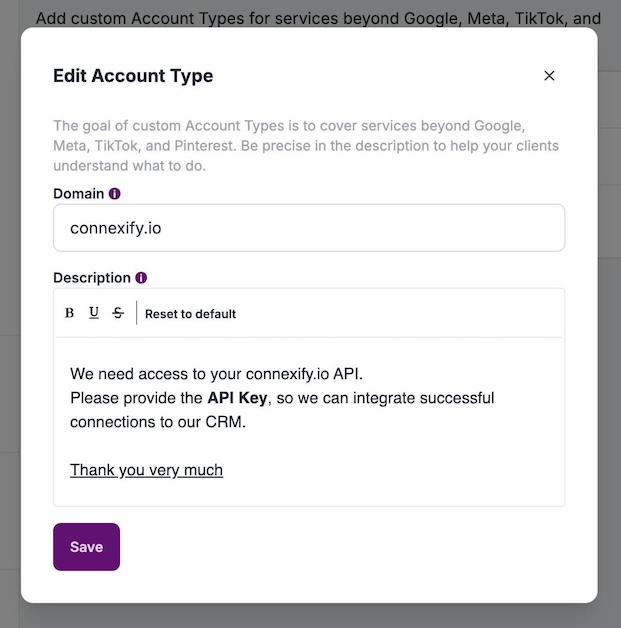
Domain Field
Enter the domain or URL of the service you want your clients to connect. The system supports various formats:
- Full URLs:
https://www.example.com - Domain only:
example.com - Subdomains:
app.example.com
Validation: The domain must be a valid URL or domain format. Connexify will automatically fetch the service's favicon to display alongside your custom account type.
Description Field
Provide clear, detailed instructions for your clients on how to connect their accounts.
Best Practices for Instructions:
- Be specific and step-by-step
- Include any necessary credentials or access information
- Mention where clients can find required information (API keys, account settings, etc.)
- Use formatting to highlight important steps or warnings
Example Description:
Please connect your Example Analytics account.

**Steps:**
1. Log into your Example Analytics dashboard
2. Navigate to Settings > API Access
3. Copy your API key
4. Paste the API key in the field below
- Click "Save" to create your custom account type
Managing Custom Account Types
After creation, your custom account types appear in a table view where you can:
- Edit: Modify the domain or instructions at any time
- Delete: Remove account types you no longer need
- View: See all active custom types with their associated domains and descriptions
Using Custom Account Types in Links
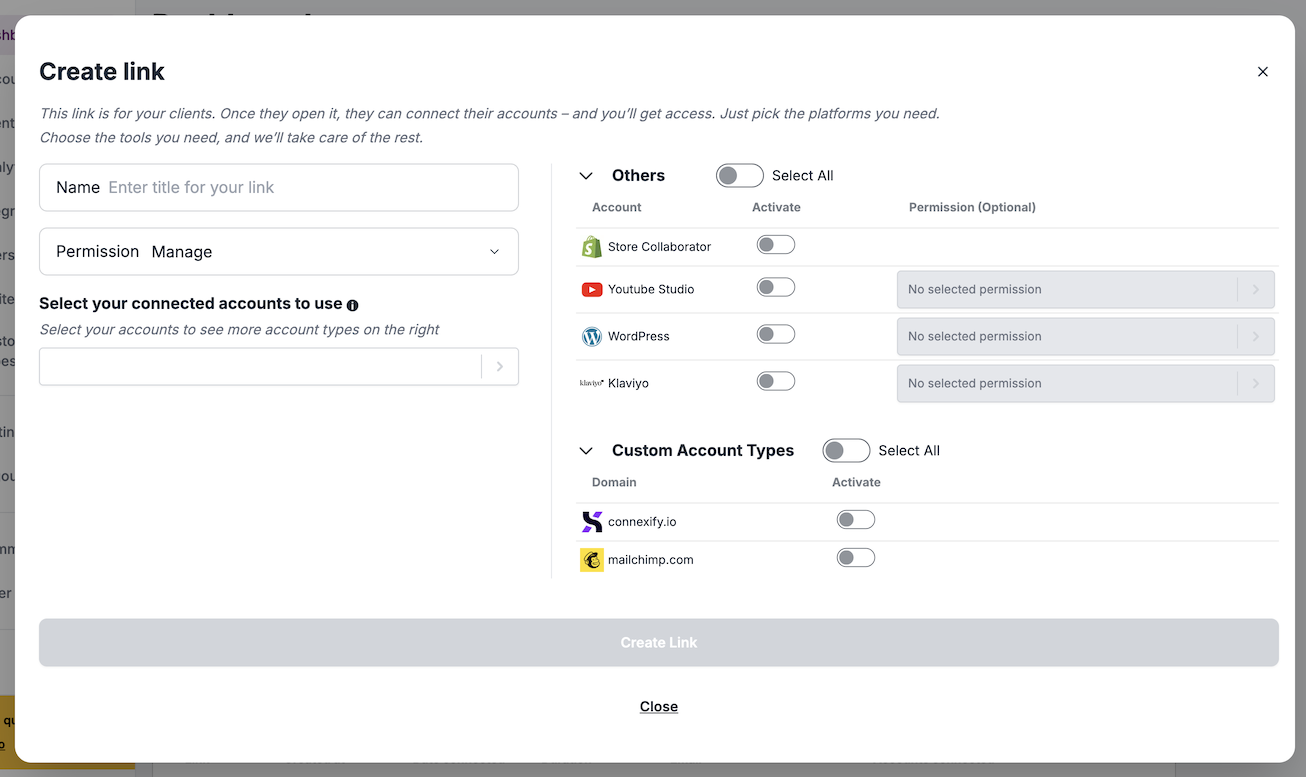
Once created, Custom Account Types can be assigned to your onboarding links, just like pre-configured account types.
Assigning Custom Account Types to Links
When creating or editing an onboarding link:
- Open the link creation/edit dialog
- Scroll to the Custom Account Types section
- Use the toggle switches to select which custom types should be available for that link
Client Onboarding Experience
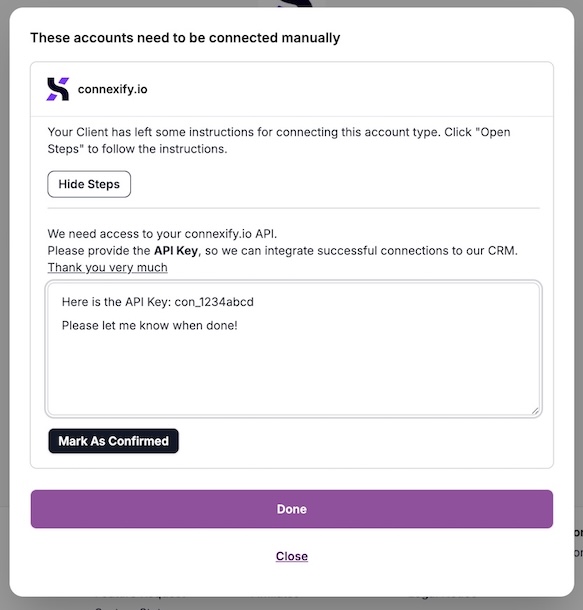
When clients access your onboarding link that includes Custom Account Types, they will see:
Data Privacy and Security
Important: For your security and privacy, the sensitive information your clients provide when connecting custom account types is not stored in Connexify.
Instead:
- The connection details are sent directly to you via email
- Connexify only stores that a connection was made, not the actual credentials or sensitive data
- This ensures maximum security for both you and your clients
- You maintain full control over sensitive client information
Future Enhancements
Custom Account Types represent the first version of this feature. We're actively working on expanding capabilities to include:
Planned Features
- Complex Questionnaires: Multi-step forms with conditional logic for gathering detailed client information
- Digital Signatures: Built-in signature capture for contracts and agreements during onboarding
- Embedded Videos: Add tutorial videos directly in the onboarding flow to better guide your clients
- File Uploads: Allow clients to upload documents, images, or other files during connection
- Custom Validation: Define validation rules for the information clients provide
- Templates: Pre-built templates for common services and connection types
These enhancements will help you onboard your clients even more effectively while maintaining the simple, intuitive experience Connexify is known for.
Feel free to share your ideas at https://feedback.connexify.io
Need help with Custom Account Types? Contact our support team for assistance.