Digital Marketing Website: Must-Have Pages in 2026
02/03/2026

In 2026, a digital marketing website is not just a brochure. It is your sales rep, your proof library, and (increasingly) your onboarding layer. Buyers are moving faster, comparing more options asynchronously, and asking tougher questions about security, measurement, and operating rigor before they book a call.
That reality changes what “must-have pages” means. The goal is not to publish more pages. It is to publish the right pages, each with a single job, a clear next step, and enough credibility that a decision-maker can say “yes” without a 10-email back-and-forth.
Start with the 3 journeys your site must support
Before you create or redesign pages, define these three paths, because page needs are downstream of intent:
- New demand (cold visitors): “Can you solve my problem, and are you credible?”
- Active evaluation (shortlist buyers): “How do you work, what will this cost, and what will the first 30 days look like?”
- Post-sale (new clients): “What happens next, what do you need from me, and how do we get access set up securely?”
A high-performing site in 2026 makes all three journeys obvious.
The non-negotiable pages for a digital marketing website in 2026
The pages below cover the minimum conversion architecture most agencies and service providers need. If you are missing one, you will usually feel it as lower lead quality, longer sales cycles, or slow time-to-launch.
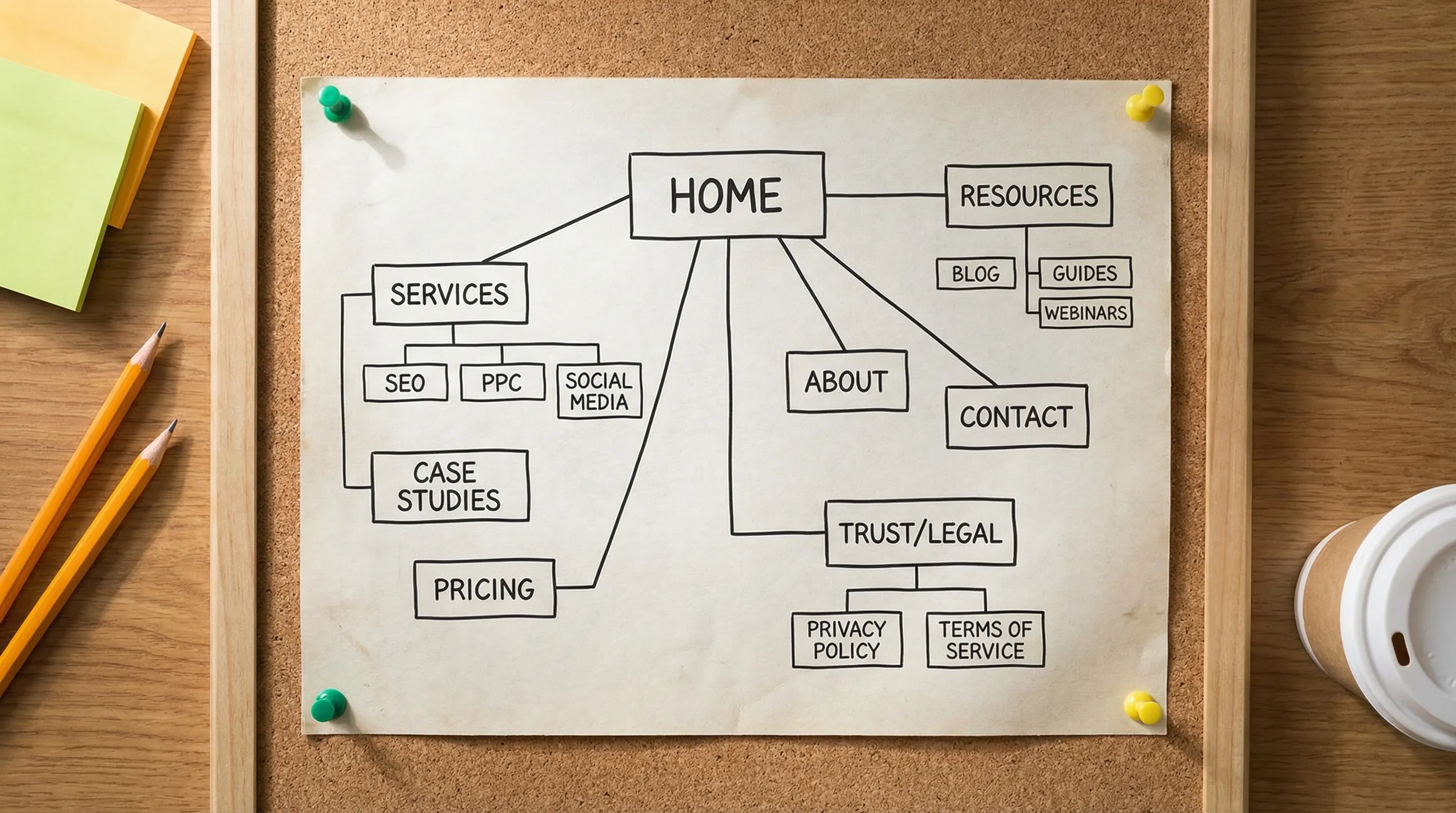
1) Homepage (positioning and routing)
Your homepage has two jobs: clarify what you do in 5 seconds, and route visitors to the right next page.
What “good” includes in 2026:
- A one-sentence promise (who you help, what outcome you drive, and how).
- Your primary CTA (book a call, request a demo, get an audit).
- Fast proof: 2 to 4 logos, one sharp case study result, and a short “why us” section.
- Clear paths for common intents: services, industries, case studies, pricing/process.
Homepage anti-pattern: vague language (“full-service growth partner”) without a measurable outcome or a specific ICP.
2) Services hub page (the map)
This is your navigation layer for searchers who already know what they want (SEO, PPC, lifecycle email, CRO, analytics). Keep it skimmable.
Include:
- A list of service categories with one-line definitions
- Who each service is (and is not) for
- Links to deeper service pages
- A single CTA that matches buyer stage (often “see case studies” or “book a fit call”)
3) Service detail pages (the converters)
In 2026, service pages win on specificity and operational clarity.
Each service page should answer:
- The problem you solve and when it shows up
- Your approach (not trade secrets, just your sequence of work)
- Deliverables and what “done” means
- Inputs required from the client (access, assets, approvals)
- How you measure success (what you track and how fast you validate it)
If you sell to multiple segments, consider one service page per segment or use case (for example: “Paid Search for B2B SaaS” versus a generic “Google Ads”). This supports both organic search and higher conversion.
4) Industry or use-case pages (the relevance builders)
Industry pages are still valuable in 2026, but only when they are real. Thin “we serve everyone” pages do not build trust.
Make them credible by including:
- Specific constraints (sales cycle length, compliance, seasonality, lead quality issues)
- One relevant mini case study
- The measurement stack you typically integrate with
- Common objections and how you handle them
5) Case studies (the proof engine)
For many agencies, case studies are the #1 page type that turns interest into pipeline.
A strong 2026 case study page includes:
- Context: company, market, constraints, baseline
- What you changed (strategy + execution)
- What you measured (primary KPI and guardrails)
- Outcomes with timeframe
- What happened in the first 14 to 30 days (buyers want early signals)
If you cannot share exact numbers, you can still publish credible proof by showing ranges, indexed lifts, or process outcomes (for example: “tracking verified in 48 hours,” “reduced lead response time,” “improved qualified rate”).
6) Pricing (or “packages”) page
Not every agency should publish exact pricing. But every agency needs a page that answers “how do you price, and what changes the cost?”
Options that work in 2026:
- Starting at pricing per service line
- Package tiers (good / better / best) with deliverables
- A pricing philosophy (what you include, what you do not, and typical ranges)
This page filters out bad fits and reduces sales calls that die on sticker shock.
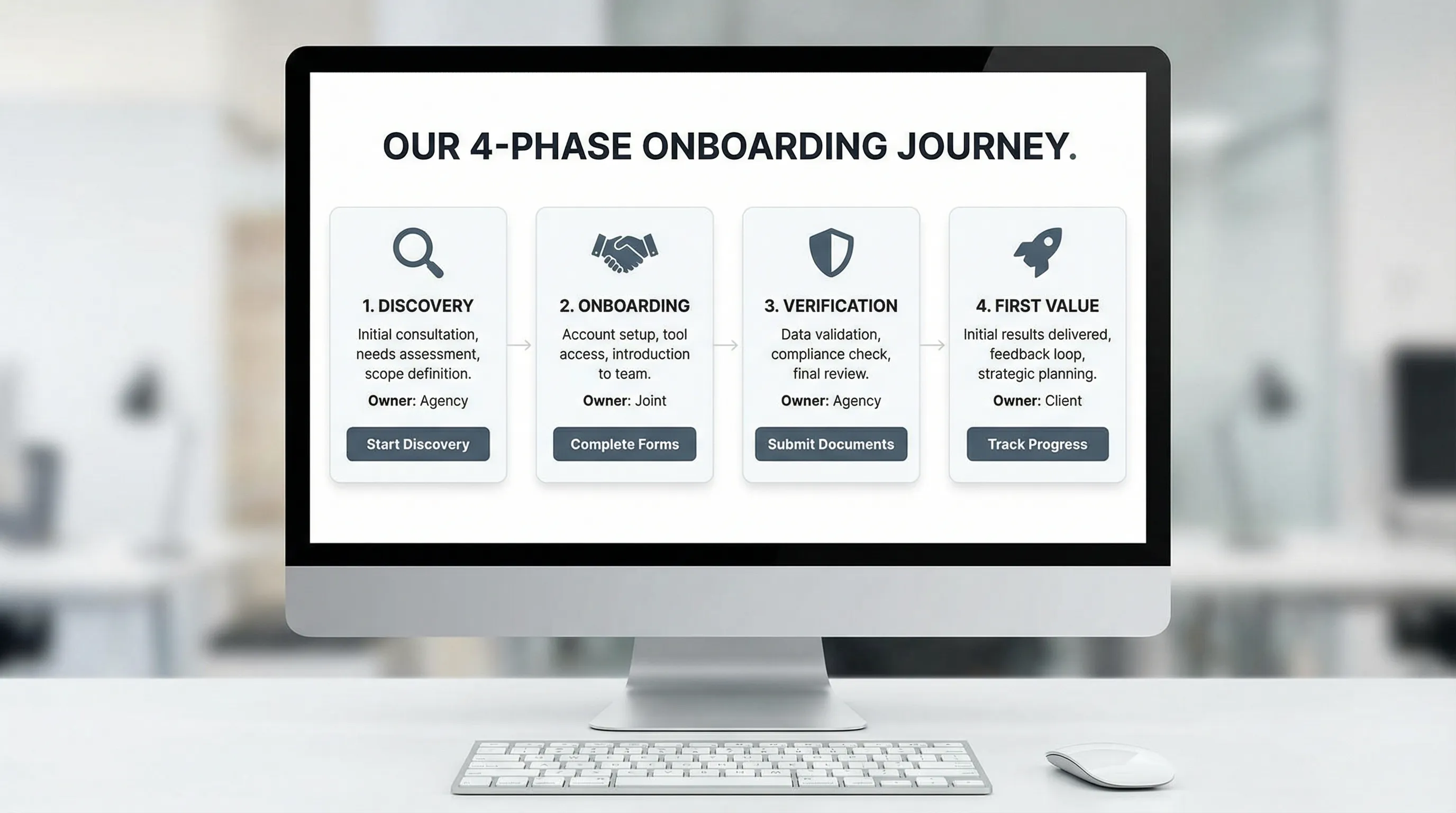
7) Process page (how you work, including onboarding)
Buyers are increasingly selecting for operational maturity. A process page makes your delivery feel lower-risk.
What to include:
- Your phases (for example: discovery, onboarding, verification, first value, optimization)
- Your SLAs (response times, reporting cadence, time-to-verified-access)
- Who does what (client vs your team)
- A lightweight timeline of the first 2 weeks
If you can make onboarding feel “one link, done,” say it. Frictionless setup is a competitive advantage.
8) About page (trust and accountability)
In 2026, “About” is less about your origin story and more about credibility signals.
Include:
- The team behind delivery (names, roles, real expertise)
- Your principles (especially around measurement and security)
- How you make decisions (what you optimize for)
- A clear CTA (case studies or book a call)
9) Contact page (low-friction conversion)
Your contact page should not be a dead-end form.
Include:
- A scheduling option (if appropriate)
- A qualification form that saves everyone time
- Expectations: when you respond, what happens next
- Alternatives: email, phone (if you offer it)
The “trust layer” pages that matter more in 2026
As privacy expectations rise and AI-generated spam increases, trust pages do more conversion work than many teams realize.
10) Privacy policy + cookie preferences (baseline compliance)
Your privacy and cookie experience is not just legal hygiene. It is a trust signal, especially for B2B buyers who have procurement reviews.
Keep it accurate, accessible, and easy to find in the footer.
11) Security page (especially for agencies touching client accounts)
If you handle ad accounts, analytics, CRMs, or customer data, add a security page. This is increasingly table stakes.
Cover:
- Access controls (least privilege, role-based permissions)
- Authentication expectations (2FA, named users)
- Data handling principles
- Incident response contact (even a dedicated email)
If you use an onboarding platform to reduce credential sharing and standardize permissions, mention that approach at a high level.
12) Terms of service (and a Data Processing Addendum if relevant)
If you sell software, a DPA may be relevant. If you sell services, clear terms still reduce disputes.
Only publish what matches your actual legal terms.
13) Accessibility statement (risk reduction and usability)
Accessibility is both a legal risk area and a user experience win. Even a basic statement and an email for accommodation requests is better than silence.
“Growth pages” that compound results over time
Once the core and trust pages exist, these pages help your digital marketing website generate demand more consistently.
14) Resource hub (blog, guides, templates)
A blog is not a checkbox in 2026. It is a proof of thinking and a way to capture intent-rich search.
What works:
- Fewer, better articles that match real buyer questions
- Templates, checklists, and SOP-style content
- Content that shows your operating rigor (measurement, onboarding, governance)
15) Landing pages for campaigns and partnerships
If you run webinars, events, lead magnets, or partner promotions, you need dedicated landing pages. They should match the message that sent the click.
A useful pattern in 2026 is “event capture” pages: a simple page that lets attendees contribute content instantly via QR.
For inspiration on how frictionless QR-based sharing can work, see this example of instant event photo sharing with QR codes where guests can contribute without a long signup flow.
16) Comparison and alternative pages (high-intent SEO)
If you compete in a clear category, comparison pages can convert extremely well because they match “decision search” intent.
Examples:
- “Agency vs in-house” for a service line
- “Tool A vs Tool B” (only if you can be fair and accurate)
- “Alternative to…” (only if you can genuinely support that user)
Do not write hit pieces. Buyers can tell.
The pages many teams forget, but operators love
These are not always needed, but when they fit, they increase close rates and reduce churn.
Client onboarding page (post-sale activation)
If you can guide new clients through next steps from a single page, you reduce drop-off after contract signature.
In practice, the best version is often a branded onboarding flow that:
- Collects required access across platforms
- Applies consistent permission templates
- Tracks completion
- Avoids password sharing
Connexify is built specifically for this: a single, branded link to set up fast, secure account access across platforms, with customizable permissions, white-label options, and API/webhook integrations. If you want to compress onboarding from days to seconds, it can be worth testing via the 14-day free trial.
Support or help page (for productized services)
If you sell retainers or packages, a help page reduces repetitive emails (“how do I send assets?” “where do I approve ads?”). Keep it short and practical.
Status page (for SaaS)
If you are a software company, a basic status page can reduce support load and build trust during incidents.
A practical “must-have pages” checklist (with goals and CTAs)
Use this table to audit your site quickly.
| Page | Primary goal | Key elements to include | Primary CTA |
|---|---|---|---|
| Homepage | Position and route | ICP, promise, proof, navigation to next steps | Book call / request demo |
| Services hub | Help visitors find the right service | Service categories, fit notes, links | View service page |
| Service pages | Convert high-intent traffic | Deliverables, process, inputs, measurement | Book consult |
| Industry/use-case pages | Establish relevance | Constraints, examples, mini proof | See relevant case study |
| Case studies | Prove outcomes | Baseline, actions, metrics, timeframe | Talk to us |
| Pricing/packages | Pre-qualify | Ranges or tiers, what changes cost | Get a quote |
| Process/onboarding | Reduce perceived risk | Phases, SLAs, timeline, responsibilities | Start onboarding / book kickoff |
| About | Build trust | Team, principles, accountability | Contact |
| Contact | Capture demand | Scheduling, form, expectations | Submit / schedule |
| Privacy + cookie | Compliance and trust | Clear policy, consent controls | Manage preferences |
| Security | Win procurement and reduce risk | Access model, 2FA, data handling | Request security info |
2026 quality standards: what makes these pages rank and convert
Having the pages is only half the job. How they are built and maintained is what separates “looks nice” from “prints revenue.”
Make pages AI-search and snippet friendly
Even if you are not chasing “AI SEO,” modern results increasingly reward clarity.
Do:
- Use descriptive headings that match real questions
- Put your definition and key promise near the top
- Add simple tables where they help decision-making
Treat measurement as part of the website, not an afterthought
A digital marketing website should be instrumented like a product:
- Track primary conversion events (form submit, booked call, demo request)
- Ensure consent and privacy controls match your tracking setup
- Prefer first-party measurement patterns where possible
Reduce friction after the click
Buyers do not want more steps in 2026.
- Keep forms short and purposeful
- Offer a “what happens next” block on conversion pages
- If onboarding requires access and permissions, standardize it instead of emailing instructions every time
How to use this list without bloating your site
If you are building or refreshing your site this quarter, focus on sequencing:
- Launch the core conversion pages (home, services, 2 to 6 service pages, case studies, contact)
- Add the process + pricing pages to improve close rate and reduce sales friction
- Publish the trust layer (privacy, security) to speed procurement
- Add growth pages (resources, landing pages, comparisons) once your foundation converts
A digital marketing website that wins in 2026 is not the one with the most pages. It is the one where every page has a job, proof, and a next step, and where onboarding is treated as part of the customer experience, not an admin chore.