Brand Ad Essentials: Brief, Assets, Approvals
01/30/2026

Most brand ads don’t fail because the media buyer picked the wrong targeting. They fail because the team started with a vague brief, scattered assets, and an approval process that turns every iteration into a week-long thread.
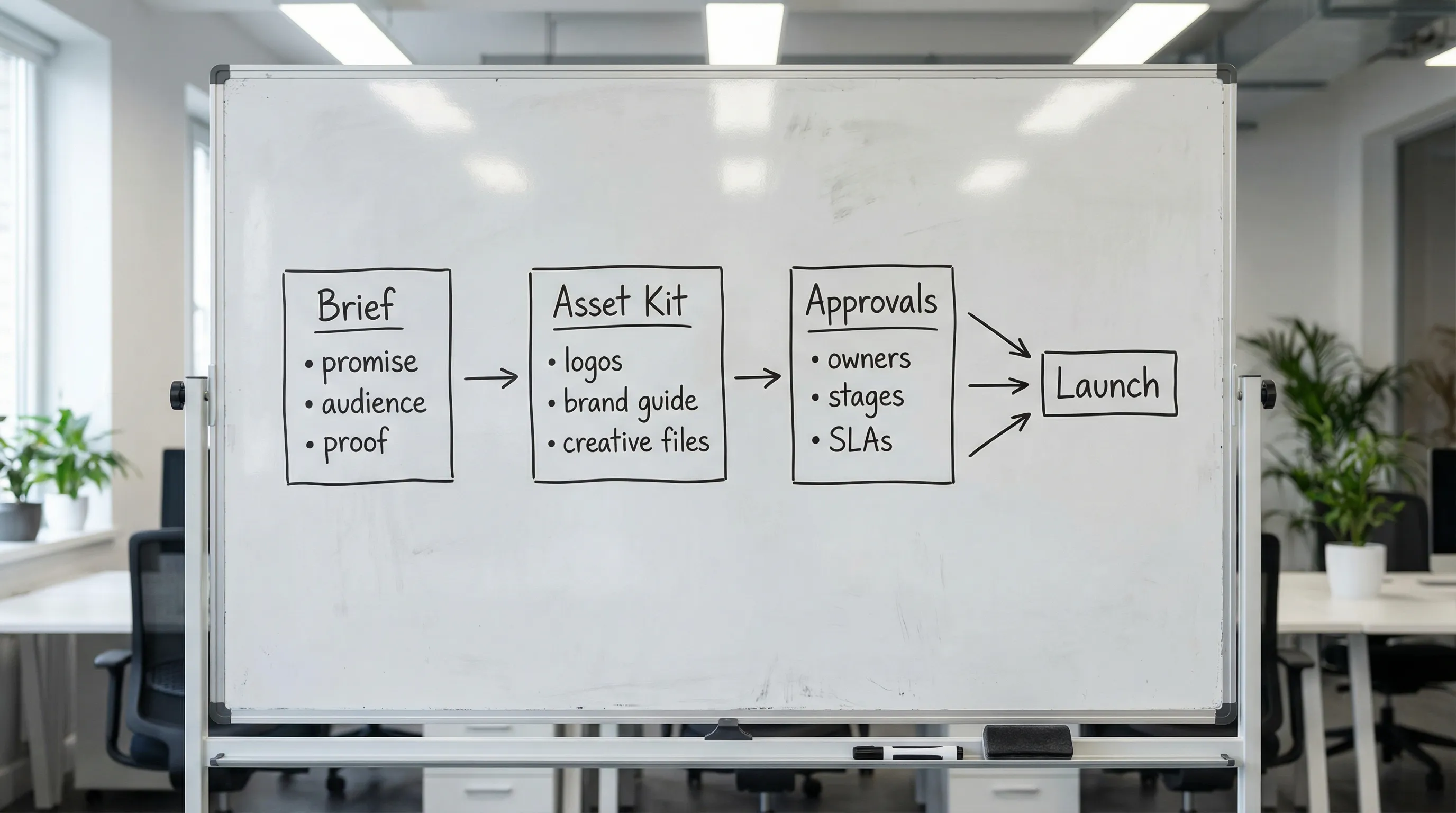
If you want brand ads that actually ship (and stay on brand), you need a simple operating system built around three things:
- A tight brief that removes ambiguity
- A complete asset kit that prevents rework
- A predictable approvals flow with clear owners and SLAs
This guide breaks down brand ad essentials: brief, assets, approvals, with templates you can reuse across clients.
What “brand ad” means (so your brief doesn’t drift)
A brand ad is any paid creative whose primary job is to build brand preference, memory, and trust, not just to capture existing demand. That can include:
- Top-of-funnel video and static ads that introduce the brand promise
- Consideration ads that reinforce differentiators and proof
- Retargeting ads that keep the brand consistent while pushing an offer
The practical implication: brand ads are evaluated on more than CPA. They must be consistent, repeatable, and recognizable across placements.
Before you write a brief, align on three decisions:
- Objective: awareness, consideration, or direct response with strong brand emphasis
- Primary message: what you want someone to remember tomorrow
- Brand boundaries: what cannot change (voice, claims, visuals, legal)
When these aren’t explicit, approvals become subjective, and the campaign turns into “I’ll know it when I see it.”
Brand ad brief essentials (the “one-page” rule)
A brand ad brief should fit on one page. Not because the project is simple, but because decisions must be readable at a glance by creative, media, and the approver.
Here’s the minimal structure that prevents most rework.
The brief fields that matter most
| Brief element | What to write | Why it prevents rework |
|---|---|---|
| Single-sentence promise | “We help X achieve Y without Z.” | Keeps concepting from drifting into random features |
| Target audience and context | Who, and in what moment are they seeing the ad? | Forces creative to match attention level and placement reality |
| 1 primary message + 2 supporting points | A message hierarchy, not a list | Prevents overcrowded creatives and unclear hooks |
| Proof | Testimonials, logos, numbers, guarantees, demos (approved claims only) | Reduces “can we say this?” back-and-forth mid-production |
| Offer (if any) | Trial, demo, lead magnet, discount, or none | Aligns landing page and CTA with intent |
| CTA and destination | CTA text + landing page URL + conversion event | Avoids last-minute destination swaps that break tracking |
| Tone and voice | 3 adjectives and 2 “do/don’t” examples | Makes feedback objective (“too playful” becomes measurable) |
| Mandatory elements | Logo lockup, disclaimer, hashtags, legal lines | Prevents compliance surprises at the end |
| Constraints | Formats, length, aspect ratios, embargo dates | Stops creating assets that cannot ship |
A fast way to write the “promise”
If the brand team struggles to summarize the message, use this fill-in:
For [audience], [brand] is the [category] that [primary benefit], unlike [alternative] because [differentiator].
You can refine copy later, but you need the positioning to be stable before design begins.
The asset kit: what you need before anyone opens Figma
The highest-leverage way to speed up brand ad production is to collect assets once, correctly, and in a standardized structure.
Core brand assets (non-negotiable)
You typically need:
- Logo files: SVG or EPS (preferred), plus PNG (light and dark versions)
- Brand colors: HEX codes and usage rules (primary vs secondary)
- Typography: font files or licensed alternatives, plus hierarchy rules
- Brand guidelines: even a short PDF is better than “use what’s on the website”
- Voice and messaging references: a few examples of “approved” language
If the client cannot provide formal guidelines, ask for 3–5 examples of pages or ads they consider “on brand,” then extract rules (spacing, headline style, iconography, photography style) and document them.
Campaign-specific assets (where most delays happen)
These vary by campaign, but the usual blockers are predictable:
- Product or service screenshots/photos (high resolution)
- Founder/spokesperson headshots (if used in ads)
- Customer logos and testimonials (with explicit permission to use)
- Offer details (what’s included, eligibility, expiration rules)
- Landing page (final URL, mobile behavior, and any geo rules)
- Legal disclaimers (industry-specific, plus claim substantiation boundaries)
Placement readiness: specs, safe zones, and “preview before you ship”
Brand ads often look great in the design file and break in real placements:
- Cropping can hide key text on mobile
- Profile images can cut off in circular masks
- Cover images can be obscured by UI
A simple habit: preview brand visuals in context before final approval. For social profiles specifically, a tool like profile picture and cover previews can help you sanity-check how key brand images will appear across major platforms and devices.
This is not about perfection, it’s about avoiding preventable “we need to re-export everything” moments.
A practical asset intake checklist (share with clients)
| Asset | Preferred format | Common mistake to avoid |
|---|---|---|
| Logo | SVG | Only having a low-res PNG pulled from a website |
| Product imagery | Original JPG/PNG | Sending screenshots inside slides or PDFs |
| Video | Original export + project file if possible | No captions or missing safe margins |
| Testimonials | Doc + usage permission | Quotes without a named source or approval |
| Brand rules | PDF or doc | “Just follow our Instagram” with no guidance |
| Landing page | Final URL + mobile check | Changing URL after ads are built |
Approvals: the system that keeps brand ads from stalling
Approvals are not a formality. They are an operating constraint.
When approvals are vague, two things happen:
- Stakeholders give taste-based feedback because no criteria exists
- The team ships late because no one knows who can say “final”
Define approval stages (and stop approving everything at once)
Split approvals into stages so the client is not reviewing fully produced assets that are still strategically uncertain.
A simple, repeatable model:
- Stage 1, Concept approval: hook, promise, angle, rough layout
- Stage 2, Copy approval: claims, tone, CTA, disclaimers
- Stage 3, Design approval: final art direction, brand compliance
- Stage 4, Final release: confirmation for launch (no new feedback)
The key is to tell the client what each stage is for, and what it is not for.
Use a RACI so “who approves” is never a debate
Here’s a lightweight example you can adapt.
| Work item | Responsible | Accountable | Consulted | Informed |
|---|---|---|---|---|
| Brief sign-off | Strategist | Client marketing owner | Sales, product | Media buyer |
| Claims and legal lines | Copy lead | Client legal (if applicable) | Compliance, PM | Creative team |
| Visual brand compliance | Designer | Client brand owner | Creative director | Media buyer |
| Final launch approval | PM | Client accountable owner | Channel lead | Everyone else |
If there is no clear “Accountable” person on the client side, approvals will drag. Fix that before production.
Set approval SLAs (and make them visible)
Brand ads ship faster when everyone knows the clock. Typical SLAs:
- 24–48 hours for feedback per stage
- One consolidated feedback pass per stage (not five separate emails)
- Silence means approved (optional, but powerful if agreed upfront)
You don’t need bureaucracy, you need predictability.
A simple workflow that connects brief, assets, and approvals
This is a practical sequence agencies use to reduce back-and-forth.
Step 1: Collect everything in one place
The biggest operational win is avoiding “Can you resend the logo?” and “Where’s the latest version?”
Standardize:
- A single intake for brief inputs
- A single location for asset uploads
- A single system of record for what is approved
Step 2: Run a 15-minute “preflight” before design
Preflight is where you catch missing inputs while it’s cheap:
- The offer is final and consistent with the landing page
- Any numeric claims have a source, or they are removed
- The CTA and destination are confirmed
- Mandatory brand and legal elements are known
Step 3: Approve concepts first, then polish
Concept approval should be fast and directional. If stakeholders can only approve “finished” assets, you end up polishing the wrong idea.
Step 4: Lock versioning and naming conventions
Version sprawl kills approvals. Pick a convention and stick to it:
- BrandAd_Product_Angle_Placement_V01
- BrandAd_Product_Angle_Placement_V02
And make sure the approver always reviews the same artifact (not screenshots pasted into chat).
Where client onboarding software fits (and why it matters for brand ads)
Most teams treat onboarding as “getting access.” In reality, onboarding is how you:
- Collect brand ad brief inputs
- Gather and organize creative assets
- Assign who approves what, and when
- Track completion so launch dates are real
Connexify is built to streamline client onboarding for agencies and service providers with one-link client onboarding, a branded onboarding experience, support for multiple platforms, and customizable permissions. It also offers white-label options, API and webhook integrations, and a user-friendly dashboard, with secure data handling and no installation required.
In practice, this means you can standardize the front end of brand ad production: the intake, the asset handoff, and the accountability around approvals, without reinventing the process for every client.
A realistic timeline: launching a brand ad without chaos
Here’s what “fast and controlled” can look like when the essentials are in place:
- Day 0: Client completes the brief intake and uploads brand assets
- Day 1: Agency runs preflight, produces 2–3 concepts
- Day 2: Client approves one concept (Stage 1)
- Day 3: Copy and design are finalized (Stages 2–3)
- Day 4: Final release and trafficking
This timeline breaks when any of the essentials are missing. Most delays are not creative complexity, they are missing inputs and unclear approval ownership.
Frequently Asked Questions
What’s the difference between a brand ad and a performance ad? A brand ad prioritizes memorability, trust, and consistent positioning, while a performance ad prioritizes direct response. In reality, good ads do both, but the measurement and creative constraints differ.
How long should a brand ad brief be? One page is ideal. If it takes longer, your decisions are not clear yet. Add detail as attachments, but keep the core decisions skimmable.
Which assets should I request first from a client? Start with logo files (preferably SVG), brand guidelines, approved messaging/positioning, product imagery, and any legal disclaimers or claim boundaries.
Who should be the final approver for brand ads? One accountable owner on the client side, typically marketing leadership. If multiple people can veto, the project will stall unless you define stages and SLAs.
How do you prevent endless subjective feedback? Use a message hierarchy, clear stage gates (concept first), and objective criteria (voice rules, mandatory elements, claim boundaries). Consolidate feedback into one pass per stage.
Make brand ad launches faster with one-link onboarding
If your brand ad projects keep slipping because briefs arrive incomplete, assets are scattered, and approvals live in comment threads, standardizing onboarding is the fastest fix.
Connexify helps agencies streamline onboarding with a single branded link so clients can provide the right inputs, upload assets securely, and move through a clear, trackable flow.
- Explore Connexify at Connexify.io
- Start with the 14-day free trial
- Or book a demo to see a streamlined onboarding flow end to end